Quick Summary
- The global mobile app market is hitting $673 billion — and cross-platform development is leading the charge
- Cross-platform frameworks now power 60%+ of all new app builds worldwide
- A single codebase cuts development costs by 30–50% and ships to both iOS and Android simultaneously
- Flutter (46%) and React Native (35%) dominate the market — together they cover most new production builds
- Cross-platform suits e-commerce, fintech, on-demand, SaaS, and logistics apps perfectly
- Native still wins for 3D games, AR/VR, and deep hardware integrations — know when to choose which
- Most real apps use a hybrid approach — 80–90% shared code, native only where the platform forces it
- Common challenges like performance gaps, UI inconsistency, and app size bloat are all fixable with the right setup
- AI is changing both sides — how apps are built (code generation, automated QA) and what apps can do (on-device ML, personalization, chat interfaces)
- Bottom line: if you need iOS + Android, have a real budget, and your app is business-driven — cross-platform is the smart move in 2026
Mobile users today expect instant performance, consistent design, and zero friction—regardless of the device they’re using. They don’t think in terms of platforms; they simply expect apps to work flawlessly every time they open them.
This shift in user behaviour has pushed businesses to rethink traditional mobile development models. Maintaining separate iOS and Android apps often leads to higher costs, slower releases, and inconsistent experiences. As a result, cross-platform mobile app development has become a strategic choice rather than a technical compromise.
With the global mobile app market growing at a CAGR of over 21%, companies are increasingly adopting cross-platform solutions to scale faster and reach wider audiences without doubling development effort. But does cross-platform development really deliver on its promises?
Let’s break it down.
What is Cross Platform App Development?
Native mobile app development involves building separate applications for iOS and Android using platform-specific languages such as Swift or Objective-C for iOS, and Kotlin or Java for Android. While this approach offers maximum control and performance, it requires maintaining two independent codebases.
Cross-platform app development takes a different route. Developers create a single shared codebase that runs on both iOS and Android. This is achieved using platform-agnostic technologies like Dart, JavaScript, C#, HTML, and CSS.
Instead of rewriting the same logic twice, teams build core functionality once and reuse it across platforms. This significantly reduces development time, cost, and long-term maintenance—without sacrificing user experience for most business use cases.
Cross-Platform Adoption
Cross-platform app development frameworks now support over 60% of global app builds, driven by efficiency and reduced time-to-market. sqmagazine.co.uk
Cost Savings
Cross-platform delivery cuts mobile build cost by 30–50% versus separate iOS and Android codebases and ships 70–90% code reuse across both platforms. index.dev
Cross-Platform Growth Rate
The cross-platform segment is expected to grow at a CAGR of 17.3% over the forecast period. 🔗 fortunebusinessinsights.com
Benefits of Cross-Platform Development
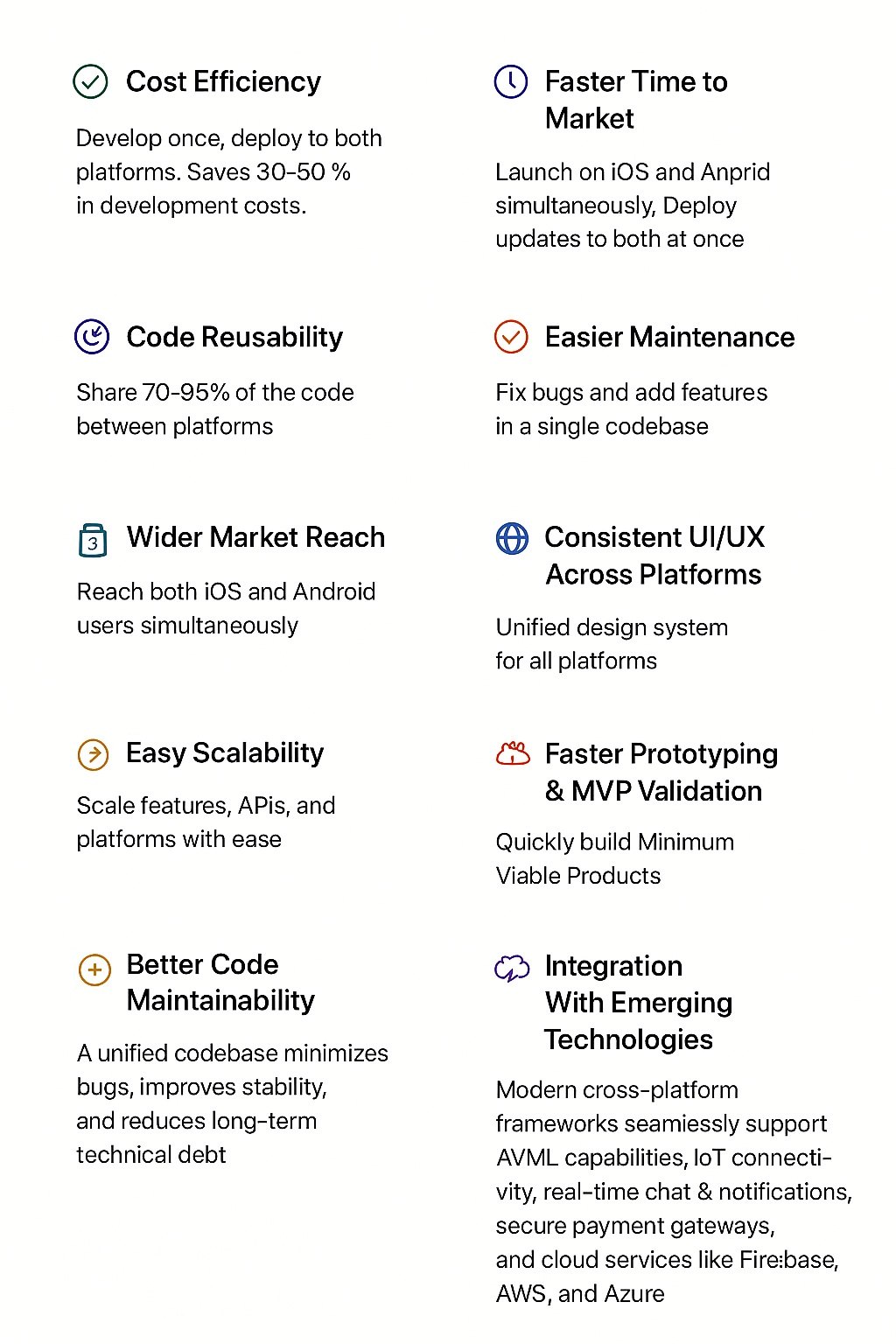
Native vs Cross-Platform Development: What’s the Difference?
Native apps are built specifically for one platform, giving developers full access to device capabilities and system-level optimizations. This makes native development ideal for performance-intensive applications such as high-end games or AR/VR products.
Cross-platform development, on the other hand, enables apps to run on multiple platforms from a shared codebase. Modern frameworks like Flutter and React Native have significantly narrowed the performance gap, making cross-platform apps suitable for most business, ecommerce, fintech, and SaaS applications.
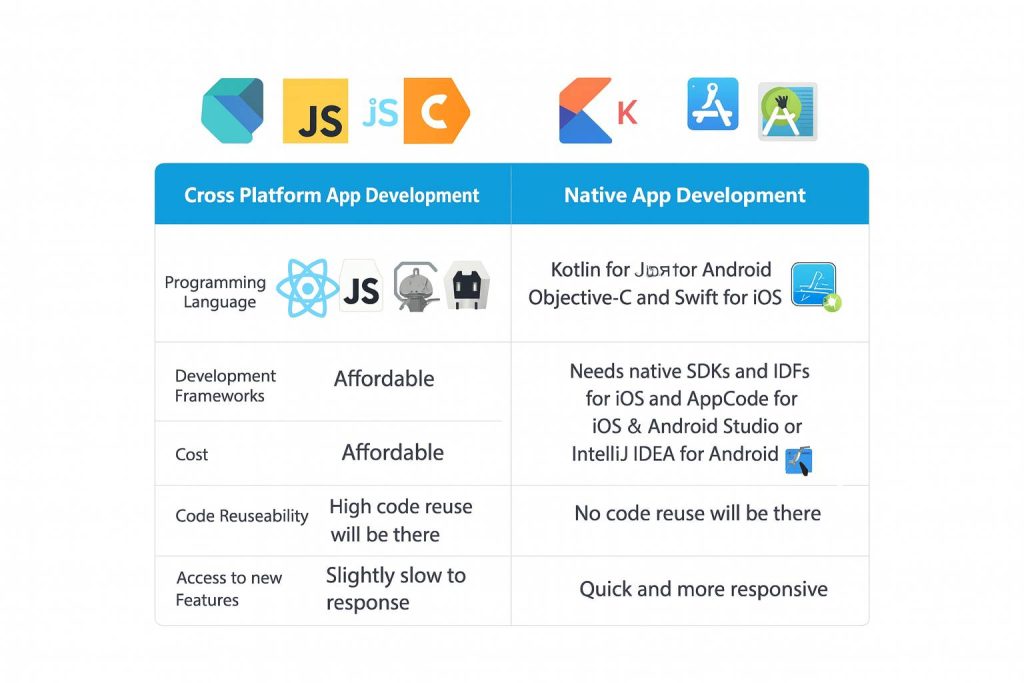
But cross platform mobile development allows you to create apps on many platforms on a shared codebase. This is possible with frameworks like Flutter and React Native, which might be a little bit less performant than native applications.
| Criteria | Cross Platform App Development | Native App Development |
| Programming Language | Dart, JavaScript, and C# | Kotlin or Java for Android. Objective-C and Swift for iOS |
| Development Frameworks | Developers can use React Native, Flutter, Cordova, Xamarin | Needs native SDKs and IDEs. It means developers use XCode and AppCode for iOS and Android Studio or IntelliJ IDEA for Android |
| Cost | Affordable | Expensive |
| Code Reusability | High code reusability | No code reuse will be there |
| Access to New Features | Introducing new features takes more time because of continuous update requirement | Receive current features quickly through native SDKs |
| Performance | Slightly slow to response | Quick and more responsive |
Top Frameworks
| Criteria | Flutter | React Native | .NET MAUI | Ionic | Cordova |
| Language | Dart | JavaScript / TypeScript | C# | HTML, CSS, JS | HTML, CSS, JS |
| Backed By | Meta | Microsoft | Ionic / Capacitor | Apache | |
| Performance | Excellent — custom rendering engine | Very good with New Architecture | Good — native controls | Adequate for content-heavy apps | Basic — WebView dependent |
| Platforms | iOS, Android, Web, Desktop | iOS, Android, Web | iOS, Android, macOS, Windows | iOS, Android, Web, Desktop | iOS, Android |
| UI Rendering | Custom (Skia / Impeller) | Native OS components | Native OS controls | WebView + Web Components | WebView |
| Code Reuse | 95–100% | 85–95% | 90–95% | 90–100% | 90–100% |
| Learning Curve | Medium — Dart is new for most devs | Low–Medium — JS / React carries over | Low–Medium — C# / .NET experience helps | Low — any web developer can start fast | Low — web skills transfer directly |
| Hot Reload | Yes | Yes | Yes (XAML Hot Reload) | Yes | Limited |
| Native API Access | Platform channels | Native modules / JSI | Full native API access | Capacitor plugins | Cordova plugins |
| Ecosystem Health | Large, growing fast | Very large, mature | Solid, enterprise-focused | Medium, web-dev community | Slowly declining |
| Best For | Startups, UI-rich products, fintech, on-demand | JS teams, e-commerce, content apps | Microsoft stack companies, enterprise tools | Progressive web apps, web-to-mobile | Converting legacy web apps |
| Known Apps Using It | Google Pay, Alibaba Xianyu, eBay Motors | Facebook Ads Manager, Walmart | UPS, Alaska Airlines | MarketWatch, Sworkit | Untappd, Nordstrom |
When developing applications that are compatible with both iOS and Android, it is important to select the appropriate framework. Both cross platform mobile app development frameworks present their advantages, support of the tools, and their abilities to perform. The following are the best ones that developers use at the moment.
1. Flutter
Flutter is a Google UI toolkit that is used to create high-quality apps using a single codebase. It is based on the Dart language and provides customizable widgets. Flutter is the best choice for fast and cross-platform app development. Its feature, hot reload, helps to experiment quickly and make changes after bug fixes. The model is best suited to startups and companies that aim to have a stable UI across platforms.
2. React Native
Developed by Meta, React Native allows programmers to create mobile apps in JavaScript and React. It assembles to native components providing smooth performance. Also, it has a massive community backing and is very modular for developers. There is code reusability in both web and mobile that promotes quicker delivery.
3. .NET MAUI (formerly Xamarin)
.NET MAUI is the cross platform app development framework that is used by C# in Microsoft. It allows developers to develop apps based on Android, iOS and macOS, and Windows, all in a single project format. The framework has good performance as well as complete access to native APIs. This is also easy in debugging and maintenance.
4. Ionic
Ionic is a famous hybrid framework that is developed using HTML, CSS, and JavaScript. It suits well with teams who are well-versed in web development. Ionic apps are still able to run within a WebView without compromising on good performance on content-driven apps. It has a rich library of UI components that can be used to create clean interfaces within a short time.
5. Cordova (Adobe PhoneGap)
Cordova enables developers to create mobile applications with standard web technology. It allows it to access device capabilities via plugins. So, this is appropriate for basic programs that do not need extensive animation and performance. It is also an efficient way of converting web apps into mobile versions for many teams.
Quick picks:
- Go with Flutter if you’re starting fresh and UI quality matters
- Go with React Native if your team already knows JavaScript
- Go with .NET MAUI if you’re deep in the Microsoft ecosystem
- Go with Ionic for content-driven apps or PWA conversions
- Avoid Cordova for new projects — the ecosystem is winding down
AI-Powered Cross-Platform App Development
AI is changing both how cross-platform apps are built and what those apps can do. Here’s what that looks like in practice in 2026.
How AI Speeds Up Development
- Code generation — Tools like Cursor and GitHub Copilot scaffold screens, state logic, and tests from prompts. What used to take a morning takes 20 minutes.
- Visual QA — AI testing tools like Applitools automatically catch rendering differences between iOS and Android builds in CI/CD, before users see them.
- Bug detection — Static analysis tools flag performance anti-patterns and memory leaks in Flutter and React Native code before the app hits a device.
AI Features Now Built Into Cross-Platform Apps
On-Device ML: Flutter integrates TensorFlow Lite; React Native taps Core ML and ML Kit via native modules. This powers real-time image recognition, voice commands, and fraud detection — all running locally, with no server round-trip needed.
Personalization: Behavioral models now adapt notification timing, content order, and even UI layout per user. A food delivery app that learns your Friday-evening habit and pre-loads your usual restaurant by Thursday is a meaningfully better product — and users stick around longer.
Conversational Interfaces: One LLM API integration works across both iOS and Android in a cross-platform app. Healthcare, finance, and education apps are embedding chat and voice interfaces that used to take months to build — now it’s weeks.
Predictive Caching: Apps analyze usage patterns in the background and pre-fetch data before users ask for it. This narrows the perceived performance gap with native apps in real-world conditions.
AI features planned from the architecture stage cost less and work better than AI bolted on after launch. If you’re scoping a cross-platform app now, that conversation should happen before the first sprint.
Ready to Build a High-Performance Cross-Platform App?
Cross Platform Mobile App Development Cost Breakdown
The following is a clear breakdown of the cost of the multi-platform mobile app development to help you know where your money is going.
1. Development Complexity & Features
Most of the cost is defined by the complexity of the application. Basic applications require a few screens and less logic, whereas sophisticated applications offer real-time features and have a custom interface. So, the greater the number of features added, the greater the number of hours it took to develop, increasing the overall cost of app development.
Estimated Cost: $15,000 – $150,000+
2. Team Location & Hourly Rates
The price of cross platform mobile app development around the world is different. The highest hourly rates are in North America, the middle ones are in Europe, and Asian countries provide cheaper developers.
Estimated Cost: $25 – $150 per hour
3. Backend Infrastructure & Integrations
Backend configuration comprises user accounts, databases, API development, payment gateways, and cloud hosting. Increased integrations need more time and testing. So, applications that require individual dashboards or real-time applications demand high investment in the backend as well.
Estimated Cost: $5,000 – $30,000+
4. Design & UI/UX
Design includes wireframes, screen layouts, branding, and user flow. Basic designs would be cheaper, whereas bespoke animations or high-quality interfaces would be more expensive. Good UI will guarantee better user interaction and easier navigation.
Estimated Cost: $3,000 – $25,000
5. Testing & Quality Assurance (QA)
Testing provides assurance that all components are functioning properly and working together seamlessly on every device. This phase of mobile app development includes tests such as functional testing, usability testing, and performance testing. Testing is conducted over a larger period of time when there are many features and screens, which increases overall expenses.
Estimated Cost: $2,000 – $15,000
6. Maintenance & Updates
After launch, apps will continue to require maintenance to fix bugs and add new features. The purpose of maintenance is to make sure that the application remains compatible with new operating system changes and continues to perform well.
Estimated Cost: 15-20% of the original app build cost per year.
Cross Platform Mobile App Development Tech Stack
The selection of the appropriate tech stack is key to creating a seamless, scalable, and cost-efficient cross-platform application. The modern mobile development technologies can assist developers in creating an application that will work both on Android and iOS using a single common codebase. For that, they need the following tech stack.
1. Programming Languages
The most popular cross-platform development languages are Dart, JavaScript, and C#. They assist in quick coding, offer robust community support, and perform easy integration with current frameworks.
2. Frameworks
Cross-platform development is based on frameworks such as Flutter, React Native, .NET MAUI, and Ionic and Cordova. They offer readymade UI, native API access, and better performance.
3. Backend Technologies
Backends commonly use Node.js, Firebase, Django, and .NET to integrate the functionality of apps with servers, databases, and APIs. These mobile development technologies assist in controlling authentication, data storage, cloud applications, and real-time updates, which guarantee data dependability and scalability.
4. Databases
Developers work with such databases as Firebase Firestore, SQLite, MongoDB, and PostgreSQL, depending on the requirements of the project. These databases facilitate secure storage of data, offline retrieval, and quick querying.
5. Tools & Libraries
Tools used in cross-platform applications are GitHub, Postman, Visual Studio Code, and Figma. The tools provide simplified version control, testing, debugging, API management, and UI design. Other libraries add to animations, form manipulation, input checks, and performance.
Step-by-Step Cross Platform Mobile App Development Process
To develop the best mobile app development software, one needs a well-defined workflow in order to be consistent between iOS and Android. The process is aimed at planning, developing, testing, and deploying to ensure a smooth multi-platform experience.
1. Requirement Analysis and Planning
The process will start with the knowledge of the objectives of the app, the target market, features, and technical requirements. Teams define the user journeys, the appropriate tech stack, budget estimates, and timelines. This will help in the project, beginning with the right vision and expectations.
2. UI/UX Design
Designers develop wireframes, screen layouts, and prototypes that are cross-platform compatible. This is to provide a seamless cross-device user experience. Before the start of the development, the visual contents and the flow of navigation are checked.
3. Development Using a Shared Codebase
The app is developed by developers based on such cross-platform frameworks as Flutter, React Native, or .NET MAUI. One codebase is developed to work with both systems, which includes frontend UI and integrations in the back end.
4. Testing & Quality Assurance
QA departments will test the application on both iOS and Android devices to ascertain that the application is compatible, responsive, and functions well. There are functional testing, API testing, UI tests, and device-specific checks that developers carry out. Then, before final deployment, bugs get fixed.
5. Deployment and Post Launch Support
The application is applied to the Apple App Store and Google Play Store in accordance with platform-specific requirements. During the launch, the developers will be able to monitor its performance, make corrections, and update it. Constant upkeep is a guarantee of stability and a better user experience.
Common Challenges in Cross-Platform Development (And How We Fix Them)
Cross-platform sounds simple until you’re three weeks into a project. Here are the real roadblocks teams hit — and what actually solves them.
Performance Gaps: The shared codebase adds an abstraction layer that can cause animation jank or slow startup. Fix it by:
- Using Flutter’s Impeller engine for smooth, pixel-perfect rendering
- Enabling React Native’s New Architecture (JSI + Fabric) to ditch the old bridge
- Always profiling on a budget Android device, not just a flagship
UI Feels “Off” on One Platform: iOS and Android have different design expectations. One codebase doesn’t mean one design. Fix it by:
- Using Platform.isIOS in Flutter or Platform.select() in React Native for conditional styling
- Building a shared design token system for colors, spacing, and typography
- Keeping navigation patterns platform-native — swipe-back on iOS, bottom nav on Android
Blocked by Native-Only Features: Face ID, NFC, ARKit — these land in native SDKs before cross-platform plugins catch up. Fix it by:
- Writing thin native wrappers via Flutter platform channels or React Native native modules
- Exposing only what you need to the shared codebase
- This approach still keeps 80–85% of your code shared
Large App Size Flutter bundles its own runtime, which adds weight. Fix it by:
- Using –split-debug-info and –obfuscate flags in Flutter release builds
- Switching to the Hermes engine in React Native (cuts startup time noticeably)
- Deferring assets and screens that aren’t needed at launch
Platform-Specific Bugs: ‘Works on iPhone, crashes on Samsung’ is a real problem when there’s one codebase to blame. Fix it by:
- Adding Sentry or Crashlytics with OS version and device model tags from day one
- Running automated tests on Firebase Test Lab across real device configurations
- Never skipping QA on Android 10–12 — that’s where most edge cases live
When to Choose Cross-Platform (And When Not To)
Cross-platform isn’t always the answer. But it’s the right answer more often than people think.
Go Cross-Platform When:
- You need to launch on both iOS and Android without doubling your budget
- You’re building an MVP, and time-to-market matters more than perfect optimization
- Your app is data-driven — e-commerce, fintech, logistics, on-demand, booking
- Your engineering team is small and can’t afford to split across two native codebases
- Your developers already know JavaScript or Dart
Stick With Native When:
- You’re building a high-end 3D game or AR/VR experience
- Your app depends on brand-new OS features the day they’re announced
- You have an existing mature native app with millions of users — migration risk is real
- Platform-specific UX is literally the product (e.g., a deep iOS-only integration)
The Middle Path (What Most Production Apps Actually Do)
Most serious apps use a hybrid approach — shared codebase for 80–90% of the product, native code for the parts that need it (camera, payments, biometrics). Companies like Airbnb and Shopify do exactly this. It’s not a compromise. It’s practical engineering.
The Most Popular Examples of Cross-Platform Apps
The use of cross-platform applications is now the norm because companies are seeking scalable solutions that can run smoothly on Android and iOS. This strategy is used by many app development companies to provide uniform performance when using the app on different devices. A few examples of such apps are-
1. Instagram
Instagram is cross-platform and cross-functional, operating on both Android and iOS with a hybrid architecture. It demonstrates the ability of large-scale applications to sustain speed, media processing, and real-time updates on various platforms.
2. Airbnb
Airbnb relies on React Native to integrate some of its mobile experience, particularly high-traffic screens. This assisted them in accelerating development on the two platforms.
3. Walmart App
React Native was used at Walmart to improve the speed and consistency of the apps without recreating the whole application. It enhanced the level of performance of UI and expedited the implementation of new features.
Why Choose GMTA Software Solutions for Cross Platform Mobile App Development
GMTA Software Solutions works with startups and enterprises to build scalable cross-platform apps using Flutter and React Native. With over seven years of experience and global delivery exposure, the team focuses on performance, maintainability, and long-term growth.
Want to Develop a Cross-Platform App That Dominates in 2026?
Conclusion
In summary, cross platform mobile app development guarantees speedy delivery, wider reach, and cost-effectiveness without affecting user experience. Using the appropriate tech stack, suitable process, and well-equipped teams, enterprises are able to develop quality apps for several platforms.
FAQs
Is cross-platform development cheaper than native?
Yes — typically 30–50% cheaper. You maintain one codebase instead of two, which cuts development hours, QA cycles, and long-term maintenance costs significantly.
Flutter or React Native — which should I pick in 2026?
Pick Flutter if UI quality and performance are your priority. Pick React Native if your team already works in JavaScript and you need a large plugin ecosystem. Both are production-ready — the decision comes down to your team’s skills, not the framework’s capability.
How long does it take to build a cross-platform app?
A simple app takes 2–3 months. A mid-complexity app with custom features, integrations, and dashboards runs 4–6 months. Enterprise-grade products with complex backends can take 8–12 months. Average time-to-market across the industry is currently 4.7 months.
Can cross-platform apps access device features like camera, GPS, and Face ID?
Yes. Flutter uses platform channels, and React Native uses native modules to access hardware features. Most common device features have ready-made plugins. For cutting-edge or niche hardware APIs, developers write thin native wrappers that plug into the shared codebase.
When should I choose native over cross-platform?
Go native if you’re building a high-end 3D game, an AR/VR experience, or an app that depends on brand-new OS features the day they launch. For most business apps — e-commerce, fintech, logistics, SaaS — cross-platform handles everything you need.
How much does cross-platform app development cost in 2026?
Costs range from $15,000 for a basic app to $150,000+ for complex, feature-rich products. Key factors are app complexity, team location, backend integrations, and design requirements. Indian development teams typically offer the best cost-to-quality ratio globally.
Can AI be integrated into cross-platform apps?
Absolutely. Flutter supports TensorFlow Lite for on-device ML. React Native taps Core ML on iOS and ML Kit on Android. LLM-powered chat features, personalization engines, and voice interfaces can all be integrated via API with a single codebase that works across both platforms.

Uday Singh Shekhawat has 9+ years of experience covering software architecture, AI/ML development, and technology strategy at GMTA Software. He writes for founders and CTOs evaluating build complexity, technology investment, and vendor decisions — including in regulated industries such as healthcare, where his background in HIPAA-compliant and FHIR-integrated systems informs his perspective on compliance-driven cost factors.