

Quick answer:
- Swift is a programming language, not a framework. A Swift framework is a reusable library that gives your iOS app ready-made features. In 2026, most new iOS apps start with SwiftUI for the interface, SwiftData for storage, and Swift concurrency for networking, then add a few vetted third-party libraries where Apple’s own tools fall short.
Choosing the wrong Swift framework early can cost an iOS project months of rework. Teams often discover this after launch, when a dependency is abandoned, a new iOS release breaks a library, or a cross-platform tool can’t reach a feature the product depends on.
The problem starts with the search itself. Many lists titled “Swift frameworks” mix Apple’s own frameworks, open-source Swift libraries, and tools like Flutter and React Native that don’t use Swift at all, so it’s hard to know what you are comparing.
This guide separates those three categories and explains what each iOS framework does, when to use it, and what it costs you later. It covers SwiftUI, SwiftData, Swift concurrency, Foundation Models, the third-party libraries worth the dependency, server-side options like Vapor and Hummingbird, and how native Swift compares with cross-platform iOS app development frameworks. You’ll also get a seven-point scorecard for evaluating any dependency, the 2026 changes that affect your choices, and framework guidance for healthcare and fintech apps.
GMTA’s CTO wrote it, and our Head of Delivery reviewed it, so the recommendations reflect how iOS apps are built and shipped, not just how the frameworks are described.
Not sure which frameworks fit your app?
Our iOS engineers will review your product idea, target iOS versions and compliance needs, then recommend a framework stack with the trade-offs explained. No generic checklist, just a stack matched to your app.
Is Swift a framework? Swift vs. iOS frameworks explained
No. Swift is a programming language created by Apple and developed in the open at Swift.org. A framework is a collection of pre-written code that your Swift code uses. Searches for Swift frameworks usually mean one of three different things:
| Layer | What it is | Examples | Written in Swift? |
| Apple SDK frameworks | Built into Apple’s platforms and Xcode | SwiftUI, UIKit, Foundation, SwiftData, Core Data, HealthKit | Yes (Objective-C also works) |
| Third-party Swift packages | Open-source libraries added with Swift Package Manager | Alamofire, Kingfisher, Lottie, GRDB | Yes |
| Cross-platform frameworks | Build iOS and Android apps from one codebase in another language | Flutter (Dart), React Native (JavaScript/TypeScript), Kotlin Multiplatform (Kotlin) | No |
The terms overlap, so here is how developers use them in practice:
- Library: code your app calls.
- Framework: a library that also shapes how you structure your app. SwiftUI, for example, calls your code.
- Package: how code is distributed, usually through Swift Package Manager.
- SDK: a bundle of frameworks, tools, and documentation, such as the iOS SDK that ships with Xcode.
Swift is Apple’s primary language for iOS, iPadOS, macOS, watchOS, tvOS and visionOS. Objective-C is still supported, which matters for older codebases. Developers often compare Swift to Kotlin, which plays a similar role on Android: both are modern, statically typed languages with built-in null safety.
Which apps are built with Swift?
Well-known companies build iOS apps with Swift, including Airbnb and LinkedIn, both showcased on Apple’s own Swift page, and Lyft, which has publicly described moving its iOS app to Swift. Many production apps are mixed codebases, where teams add Swift gradually to existing Objective-C code instead of rewriting everything.
The lesson for framework choice: apps at that scale usually lean on Apple’s frameworks and keep a small, audited set of third-party dependencies. Every dependency is a long-term maintenance and security commitment.
The best Swift frameworks for iOS app development at a glance
For most new iOS apps in 2026, start with Apple’s first-party frameworks and add third-party libraries only where they remove real work.
| Framework | Category | Best for | Notes |
| SwiftUI | UI (Apple) | New apps across iPhone, iPad, Mac, Watch | Default for new projects; supports Liquid Glass in iOS 26 |
| UIKit | UI (Apple) | Complex custom UI, legacy apps | Mature; combine with SwiftUI |
| SwiftData | Persistence (Apple) | Local data in SwiftUI apps | Requires iOS 17 or later |
| Core Data | Persistence (Apple) | Older iOS targets, proven stability | Battle-tested |
| Swift concurrency | Async (Apple) | Networking, background work | async/await, actors, Swift 6 safety checks |
| Observation | State (Apple) | Reactive UI state | The @Observable macro, iOS 17 or later |
| Foundation Models | On-device AI (Apple) | Summaries, extraction, classification | iOS 26 or later, supported devices only |
| Swift Testing | Testing (Apple) | Unit tests | Works alongside XCTest |
| Alamofire | Networking | Complex request pipelines | URLSession is enough for many apps |
| Kingfisher / Nuke | Images | Remote image loading and caching | Choose one |
| Lottie | Animation | After Effects animations | Adds designer-friendly motion |
| GRDB | Database | SQL-heavy local storage | Common Realm replacement |
| The Composable Architecture | Architecture | Large SwiftUI apps | Adds structure and a learning curve |
| Vapor / Hummingbird | Server-side | Swift backends and APIs | Not for iOS UI |
Advantages of using Swift frameworks
Swift frameworks save development time, reduce bugs, and make apps easier to maintain, as long as you choose them carefully. The main benefits:
- Faster development: ready-made components for UI, networking, storage, and animation mean you do not rebuild common features.
- Fewer bugs: Swift’s type system and optionals catch many errors at compile time, and mature frameworks have been tested by millions of users.
- Easier maintenance: frameworks give teams shared conventions, so new developers get productive faster.
- Better platform fit: Apple’s frameworks are updated with each iOS release and are the first to support new system features.
- Stronger security: Apple maintains frameworks such as Keychain Services and CryptoKit, which is safer than writing security code yourself.
- Reusable code: Swift packages let teams share code across iOS, iPadOS, macOS and watchOS apps.
The trade-off is that every third-party dependency adds update, security and App Store review work. That is why the rest of this guide ranks frameworks by fit, not popularity.
Top 10 Swift frameworks for iOS app development in 2026
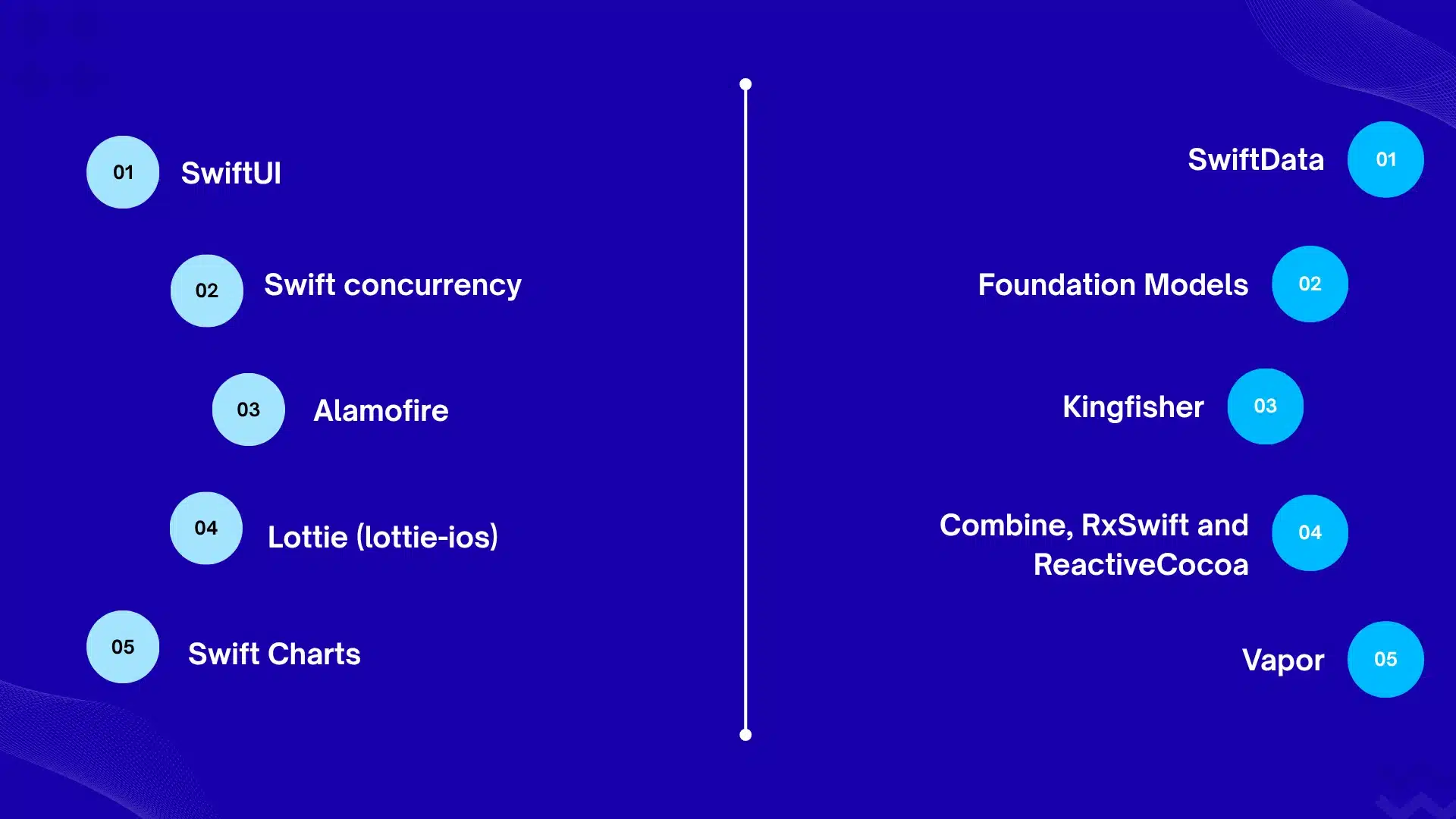
These ten frameworks shape the architecture of most iOS apps. They are ordered by how much they affect a typical app’s design, not by GitHub stars, which show popularity rather than quality or fit. Deeper explanations and code follow later in the guide.
1. SwiftUI
- Type: Apple first-party UI framework
- Best for: new apps that share UI across iPhone, iPad, Mac, Watch and Vision Pro
- Strength: less code, live previews, built-in accessibility and Dynamic Type
- Watch out for: newer features need newer iOS versions, and some deep customization still needs UIKit
2. SwiftData
- Type: Apple first-party persistence framework
- Best for: local data in SwiftUI apps that target iOS 17 or later
- Strength: Swift-native models with the @Model macro and tight SwiftUI integration
- Watch out for: needs iOS 17 or later; choose Core Data or GRDB for older iOS versions or complex SQL
3. Swift concurrency (async/await and actors)
- Type: language and Apple frameworks
- Best for: networking, background work and shared state
- Strength: Swift 6 checks for data races at compile time
- Watch out for: migrating older callback or Combine code takes planning
4. Foundation Models
- Type: Apple first-party on-device AI framework (iOS 26 or later)
- Best for: summarization, extraction and classification that work offline
- Strength: runs on the device, protects privacy and has no inference cost, according to Apple
- Watch out for: supported devices only, and a limited context window
5. Alamofire
- Type: third-party networking library
- Best for: complex request pipelines with interceptors, retries and validation
- Strength: an expressive, modular API on top of URLSession
- Watch out for: plain URLSession with async/await is enough for many apps
6. Kingfisher
- Type: third-party image downloading and caching library
- Best for: apps that show many remote images, such as feeds and catalogs
- Strength: simple API with automatic caching
- Watch out for: pick one image library, and watch memory use with large images
7. Lottie (lottie-ios)
- Type: third-party animation library
- Best for: animations that designers create in After Effects
- Strength: lightweight vector animations that look the same on iOS, Android and web
- Watch out for: complex animations can use a lot of memory
8. Combine, RxSwift and ReactiveCocoa
- Type: reactive programming (Combine is Apple’s; the other two are third-party)
- Best for: event streams and existing codebases that already use them
- Strength: powerful composition of asynchronous events
- Watch out for: for new apps, async/await and Observation often cover the same needs; avoid mixing several reactive approaches
9. Swift Charts
- Type: Apple first-party charting framework (iOS 16 or later)
- Best for: dashboards, finance and health trends
- Strength: declarative charts that fit naturally into SwiftUI
- Watch out for: the long-running Charts library (also known as DGCharts) remains an option for UIKit apps and older iOS versions
10. Vapor
- Type: server-side Swift web framework
- Best for: Swift backends and APIs that share models with the app
- Strength: built on SwiftNIO, with the Fluent ORM and authentication support
- Watch out for: a smaller ecosystem than Node.js or Python; Hummingbird is a lighter alternative
Other libraries you will see in framework lists: SwiftyJSON (largely replaced by Codable), Hero (view-controller transitions for UIKit), Swift Algorithms (Apple’s open-source package of sequence and collection algorithms), SnapKit (Auto Layout syntax), GRDB (SQLite toolkit), The Composable Architecture (app architecture) and Realm (see the migration guide below before choosing it).
Apple’s first-party frameworks
SwiftUI
SwiftUI is Apple’s declarative UI framework: you describe what the screen should look like for a given state, and the system updates it when the state changes. It is the default for new apps. Apple updated it for the Liquid Glass design in iOS 26, and it shares one codebase across iPhone, iPad, Mac, Apple Watch, and Apple Vision Pro.
- Strengths: less code, live previews, accessibility and Dynamic Type support built in.
- Trade-offs: some deep customization still needs UIKit, and newer features require newer iOS versions, so your minimum supported iOS version matters.
- Interoperability: UIHostingController puts SwiftUI inside UIKit, and UIViewRepresentable puts UIKit inside SwiftUI.
UIKit
UIKit is Apple’s older, imperative UI framework, and it is still the right tool for complex custom interfaces, large existing apps and features SwiftUI does not yet cover. Most mature apps run UIKit and SwiftUI side by side. If your team has an existing UIKit codebase, migrate screen by screen rather than rewriting.
Choose SwiftUI if you are starting a new app, you target recent iOS versions, and you want to share UI across Apple platforms. Choose UIKit if you maintain a large legacy app, need very fine-grained control, or support older iOS versions.
SwiftUI vs. UIKit at a glance
Pick by your project’s constraints, not by trend. Here is how the two compare on the factors that usually decide it:
| Factor | SwiftUI | UIKit |
| Style | Declarative: describe the UI for a given state | Imperative: build and update views step by step |
| Best for | New apps and UI shared across Apple platforms | Legacy apps and highly custom interfaces |
| Code volume | Usually less | Usually more |
| Minimum iOS | Newer features need newer iOS versions | Supports very old iOS versions |
| Learning curve | Quicker start, but a state-driven mental model | Steeper: view controllers, Auto Layout, lifecycle |
| Custom behavior | May need a UIKit fallback | Full control |
| Hiring | Growing pool of SwiftUI developers | Large pool of experienced developers |
Most production apps use both. SwiftUI covers most screens, and UIKit handles the few that need fine control.
SwiftData and Core Data
SwiftData is Apple’s Swift-native persistence framework, designed to work with SwiftUI; Core Data is the older, proven option that supports earlier iOS versions. SwiftData needs iOS 17 or later, so check your audience’s device mix first.
For SQL-heavy apps, GRDB (a toolkit over SQLite) is a strong third option.
Swift concurrency, Observation and Combine
Swift concurrency (async/await, actors and structured concurrency) is the modern way to handle networking and background work, and Swift 6 adds compile-time checks that catch data races. Swift 6.2 added “approachable concurrency”, which Apple describes as simplifying single-threaded code. The Observation framework (the @Observable macro) now covers many cases that used ObservableObject. Combine remains supported, but many new projects use async/await and Observation instead.
Foundation Models (on-device AI)
The Foundation Models framework, introduced with iOS 26, gives apps access to Apple’s on-device language model for tasks like summarization, extraction, and classification. Apple says it works offline, protects privacy, and has no inference cost. Reports on the on-device model describe a limited context window (about 4,096 tokens), so it suits short tasks rather than long documents. Always check availability, because it only runs on supported devices.
import FoundationModels
let session = LanguageModelSession()
let response = try await session.respond(to: “Summarize this note in one sentence.”)
print(response.content)
Check availability before you build on it. The model runs only on supported devices, and it can be unavailable because the device is not eligible, Apple Intelligence is turned off, or the model is still downloading. Your app needs a fallback for each case:
Swift Testing and XCTest
Swift Testing is Apple’s newer testing framework, using @Test and #expect, and it can run alongside XCTest in the same project. XCTest is still commonly used for UI automation.
import Testing
@Test func totalIsSum() {
#expect(10 + 5 == 15)
}
Other Apple frameworks you will meet often: StoreKit (purchases), WidgetKit (widgets), MapKit (maps), Core ML (on-device models), App Intents (Siri and Shortcuts) and Swift Charts (data visualization).
Third-party Swift libraries worth knowing
Add a third-party library only when it saves meaningful work and is actively maintained; every dependency adds update, security, and App Store review risk.
- Alamofire (networking). URLSession with async/await handles many apps. Alamofire earns its place with request interceptors, retry logic, and complex request pipelines. If you are looking for an Alamofire alternative, start with plain URLSession.
- Kingfisher or Nuke (image loading). Both download and cache remote images efficiently. Pick one, not both.
- Lottie (animation). Plays After Effects animations exported as JSON, so designers can ship motion without engineering rebuilds. Watch memory use on complex animations.
- GRDB (database). A SQLite toolkit with strong query control, popular for apps that outgrow SwiftData or are migrating away from Realm.
- The Composable Architecture (state management). A structured approach for large SwiftUI apps. Tripadvisor’s iOS team has publicly described adopting it. It adds a learning curve, so it suits teams with enough scale to benefit.
- SnapKit (Auto Layout). A concise Auto Layout syntax for UIKit codebases. Less relevant in SwiftUI.
Do you still need SwiftyJSON? Rarely. Codable has handled most JSON parsing since Swift 4, with type safety and no extra dependency:
struct Repo: Decodable {
let name: String
let stargazersCount: Int
}
func loadRepo() async throws -> Repo {
let url = URL(string: “https://api.github.com/repos/apple/swift”)!
let (data, _) = try await URLSession.shared.data(from: url)
let decoder = JSONDecoder()
decoder.keyDecodingStrategy = .convertFromSnakeCase
return try decoder.decode(Repo.self, from: data)
}
Is Realm still a safe choice? Be careful. MongoDB deprecated the Atlas Device SDKs and Atlas Device Sync, with end-of-life on September 30, 2025. The on-device database continues as an open-source project, but apps that relied on Realm Sync need another sync solution. For new projects, evaluate SwiftData, Core Data or GRDB first.
Migrating away from Realm
Plan the migration around Sync first, because that is the part that no longer exists. A typical path:
- Check whether you use Sync. If you do, the sync layer must be replaced whichever database you choose. If you only used the local database, you can keep it while you plan.
- Choose the target. SwiftData suits simple models on iOS 17 or later, Core Data suits older iOS versions or teams with Core Data experience, and GRDB suits teams that want SQL control.
- Replace sync. Options include CloudKit (SwiftData and Core Data can sync through it, with restrictions on the model, and it ties users to Apple accounts) or your own backend API. Plan offline conflict handling early, since it is the hardest part.
- Write a one-time migration. On first launch of the new version, read from Realm, write to the new store and mark the migration complete. Test it with large, realistic data sets.
- Release in two steps for critical data. Keep Realm read-only for one release as a safety net, then remove it.
- Remove the SDK and delete unused models.
Architecture patterns for Swift apps
Frameworks work better inside a clear architecture. Three patterns cover most iOS apps:
| Pattern | How it works | Best for | Trade-off |
| MVVM with Observation | @Observable view models hold state and logic; views display it | Most SwiftUI apps | Can get messy without discipline |
| The Composable Architecture (TCA) | One-way data flow with state, actions and reducers | Large teams that want predictability and easy testing | Learning curve, extra boilerplate and a third-party dependency |
| Modular local Swift packages | Features split into packages with clear boundaries | Large or multi-team apps | Upfront setup cost |
A sensible path is to start with MVVM, move features into local packages as the app grows, and adopt TCA only if your team wants its strict structure.
Tooling that supports your frameworks
The right tooling reduces framework risk as much as the frameworks themselves.
- Swift Package Manager: Apple’s dependency manager. Prefer it, and favor libraries that support it.
- SwiftLint and SwiftFormat: enforce a consistent code style across the team.
- Fastlane: automates builds, screenshots and App Store releases.
- Xcode Cloud: Apple’s continuous integration and delivery service.
- Instruments: profiles memory, CPU and scrolling performance, which is where heavy image or animation libraries show their cost.
Server-side Swift: the best Swift web frameworks
Swift web frameworks run Swift on the server instead of in an iOS app. The two main options are Vapor and Hummingbird.
- Vapor is the most established server-side Swift framework, with routing, a database ORM (Fluent), and authentication support.
- Hummingbird is a lighter, modular framework built on SwiftNIO, designed with minimal dependencies, with optional modules for authentication, WebSockets and AWS Lambda.
Use server-side Swift when your team already writes Swift and wants to share models and validation between the app and the backend. Expect a smaller ecosystem and hiring pool than Node.js or Python, so weigh that before committing. For a Swift backend framework, start with Vapor if you want batteries included and Hummingbird if you want control over what you ship.
iOS app development frameworks beyond Swift
If you search for an iOS app development framework, you will often see cross-platform tools. They are alternatives to native Swift, not Swift frameworks.
| Approach | Language | UI approach | Best for | Main trade-off |
| Native Swift (SwiftUI/UIKit) | Swift | Native Apple UI | Best platform fit, Apple-first features | Separate Android codebase |
| Flutter | Dart | Its own rendering engine and widgets | Consistent UI on iOS and Android | New language for most teams; larger app size |
| React Native | JavaScript / TypeScript | Native components via React | Teams with React/web skills | Native modules for deeper platform features |
| Kotlin Multiplatform | Kotlin | Share logic; native or shared UI | Sharing business logic with Android | Newer iOS tooling story |
NativeScript is another JavaScript-based option. No-code builders such as Swiftic are marketed for building apps without programming, and they are a different category from developer frameworks.
When native Swift wins: apps that rely on the newest Apple features (Foundation Models, widgets, Live Activities, HealthKit), need top-tier performance, or must follow Apple’s design language closely. When cross-platform wins: you need iOS and Android quickly with one team, and your features do not depend heavily on platform-specific APIs.
How to choose a Swift framework: a 7-point scorecard
Choose frameworks by scoring them against your product, not by popularity. Use this checklist before adding any dependency:
- Apple first. Does an Apple framework already do this? Prefer it, since it ships with the OS and is maintained with it.
- Minimum iOS version. Does the framework support the oldest iOS version you must serve?
- Maintenance health. Check recent commits, release cadence, open issues and who maintains it.
- Swift 6 readiness. Does it work with strict concurrency checking, or will it fight your compiler?
- Security and privacy. Review what data it touches and its permissions. Apple asks commonly used third-party SDKs to provide privacy manifests, so confirm the current App Store requirements.
- License and cost. Confirm the license suits commercial distribution.
- Exit cost. How hard is it to remove later? Wrap third-party code behind your own protocol.
Quick picker by need:
| If you need… | Use |
| A modern UI for a new app | SwiftUI |
| Maximum control or legacy support | UIKit |
| Local data on iOS 17+ | SwiftData |
| Local data on older iOS | Core Data or GRDB |
| Networking | URLSession; Alamofire for advanced needs |
| Image loading | Kingfisher or Nuke |
| On-device AI features | Foundation Models |
| A Swift backend | Vapor or Hummingbird |
| One codebase for iOS and Android | Flutter, React Native or Kotlin Multiplatform |
What changed in 2026, and what to plan for
Apple’s tooling keeps moving yearly, so audit your dependencies at least once a year. Key shifts:
- Swift 6 and 6.2: stricter compile-time concurrency safety, with Swift 6.2 aiming to make concurrent code easier to write.
- iOS 26 and Liquid Glass: Apple’s new design material, supported in SwiftUI. Test your UI before updating.
- Foundation Models: free on-device AI inference for supported devices, now part of mainstream app planning.
- AI in Xcode: Xcode 26.3 added support for coding agents, and Apple announced Xcode 27 and iOS 27 at WWDC 2026.
- WWDC 2026 reports: early coverage describes SwiftData additions such as sectioned queries and a LanguageModel protocol that lets other model providers plug into Foundation Models.
Building a healthcare or fintech iOS app?
Keychain and CryptoKit are only the starting point. HIPAA and PCI DSS also depend on your backend, vendors, and audit trails. GMTA’s team can review your architecture and flag gaps before they become App Store or compliance problems.
Talk to our healthcare & fintech app team →
Choosing frameworks for healthcare and fintech apps
Regulated apps need frameworks chosen for security first. Apple’s own frameworks cover many needs:
- Keychain Services for credentials and tokens.
- CryptoKit for encryption and hashing.
- LocalAuthentication for Face ID and Touch ID.
- HealthKit for health and fitness data, with user permission.
- App Transport Security for encrypted network connections.
Using these frameworks does not make an app compliant with HIPAA, PCI DSS or other regulations. Compliance depends on your architecture, data handling, vendor agreements and processes. Keep third-party dependencies to a minimum in these apps, and review each one.
Frequently asked questions
Is Swift a framework?
No. Swift is a programming language. Frameworks such as SwiftUI, UIKit and Alamofire are libraries written in Swift (or Objective-C) that your Swift code uses.
What is the best framework for iOS app development?
For native apps, SwiftUI with SwiftData and Swift concurrency is the best default in 2026. For one codebase on iOS and Android, Flutter and React Native are the most common choices.
Is SwiftUI better than UIKit?
SwiftUI is better for new apps and cross-Apple-platform UI. UIKit is better for legacy apps and very custom interfaces. Many apps use both.
Should I use Alamofire or URLSession?
Use URLSession with async/await for most apps. Choose Alamofire when you need interceptors, retries or complex request pipelines.
Is Realm still safe to use?
The on-device database remains open source, but Atlas Device Sync reached end-of-life on September 30, 2025. For new apps, evaluate SwiftData, Core Data or GRDB.
Is Swiftic a Swift framework?
No. Swiftic is marketed as a no-code app builder, which is a different category from developer frameworks.
Can I build iOS apps without Swift?
Yes. Flutter (Dart), React Native (JavaScript/TypeScript) and Kotlin Multiplatform (Kotlin) all produce iOS apps, with trade-offs in platform fit and access to the newest Apple features.
What is the best Swift web framework?
Vapor is the most established and full-featured. Hummingbird is a lighter, modular alternative built on SwiftNIO.
What is Swift similar to?
Swift is most often compared to Kotlin, which plays the same role on Android. Both are modern, statically typed languages with null safety.

Rishi Ram is CTO at GMTA Software, with 6+ years of experience in software architecture and technical leadership. He’s led GMTA’s work across fintech—including eWallet apps, mobile banking platforms, and Sharia-compliant fintech builds—as well as on-demand and taxi app development and AI-integrated products like fraud detection agents and workflow automation tools.