


Key Takeaways
- What it is: Iterative app building in sprints, with working software and client feedback at the end of every one.
- Best fit: Products where requirements will change, such as MVPs, consumer apps and anything built for users you haven’t met yet.
- Process: Discovery, design, development, testing, release, and review, repeated every sprint.
- Frameworks: Scrum is the usual starting point, Kanban suits live-app maintenance, XP adds engineering discipline, and Mobile-D is a method designed for mobile.
- The mobile twist: Store review, device testing, and phased rollouts must be part of your definition of done, not an afterthought.
- Watch-outs: Scope creep, thin documentation, and a product owner who isn’t available.
- Hiring a partner: The contract model decides how much Agile flexibility you actually get.
Agile app development is a way of building mobile apps in short cycles called sprints, usually one to four weeks long. Each sprint delivers a tested, working piece of the app; the client reviews it, and that feedback shapes the next sprint. The result is less guesswork, earlier releases, and room to change direction.
That matters more for mobile than for most software. User expectations shift quickly, Apple and Google change their platforms every year, and an app can’t be patched the way a website can: every fix has to go through a build, a store review, and an update that users may take days or weeks to install. A plan that looks perfect on paper in month one can be wrong by month six.
Agile mobile development is built for exactly this. Instead of locking down every requirement up front and delivering everything at the end, the team plans a little, builds a little, ships it to real testers, and learns. In this guide, we cover how the process works, which framework to pick, what changes specifically for mobile, how contracts and budgets behave, and where Agile is the wrong tool.
What Is Agile App Development?
Agile app development is an iterative approach in which a team designs, builds, tests, and releases an app in small increments, and uses feedback from each increment to decide what to build next. It is the application of Agile software development to apps, with extra attention to the constraints of phones, tablets, and app stores.
The word “Agile” comes from the Agile Manifesto, written in February 2001 by 17 software practitioners who met in Snowbird, Utah. The Manifesto states four values:
- Individuals and interactions over processes and tools
- Working software over comprehensive documentation
- Customer collaboration over contract negotiation
- Responding to change over following a plan
The Manifesto adds that the items on the right still have value. Agile does not mean “no plan” or “no documentation”. It means the items on the left win when the two conflict.
Two terms are often confused. Agile is the mindset and set of principles. Scrum, Kanban and Extreme Programming (XP) are frameworks that put those principles into practice with specific roles, meetings and rules. When people say “we build apps the Agile way”, they usually mean they run Scrum, Kanban or a blend of both.
For mobile, the most important principles are delivering working software frequently, welcoming changing requirements, and having the business and developers work together daily. Those three map directly onto the realities of building for app stores and a fast-moving user base.
Agile vs Waterfall for Mobile Apps
Waterfall plans everything up front and releases once. Agile plans a little, builds a little and learns after every release. For mobile apps, where the market and the operating systems keep moving, that difference decides how much risk you carry until launch day.
| Dimension | Waterfall | Agile | Why it matters for mobile |
| Planning | Full scope and schedule defined first | Roadmap up front, detailed plans one or two sprints ahead | Requirements often change after real users touch the app |
| Releases | One release at the end | A working build every sprint, store releases when ready | Beta testers can use the app months before launch |
| Handling change | Change requests, often costly | Reprioritise the backlog at each sprint boundary | New OS versions and competitor moves can be absorbed |
| Testing | Mostly after development | Continuous, inside every sprint | Device and OS bugs surface early, not at submission |
| Client involvement | At the start and the end | Every sprint review | Wrong turns are caught in weeks, not quarters |
| Documentation | Heavy and upfront | Lightweight and living | Specs stay current instead of going stale |
| Risk discovery | Late, often at integration | Early, because risky work is pulled forward | Payments, maps, hardware or API risks appear in sprint one or two |
| Best fit | Fixed, well-understood scope | Evolving or uncertain scope | Most new consumer and business apps |
Waterfall is not obsolete. If a regulator or contract requires a signed specification before work begins, or the app depends on hardware with long lead times, a staged plan can still be the right choice. Many teams settle on a hybrid: a short, disciplined upfront discovery phase, followed by Agile delivery.
The Agile App Development Process: Six Phases That Repeat Every Sprint
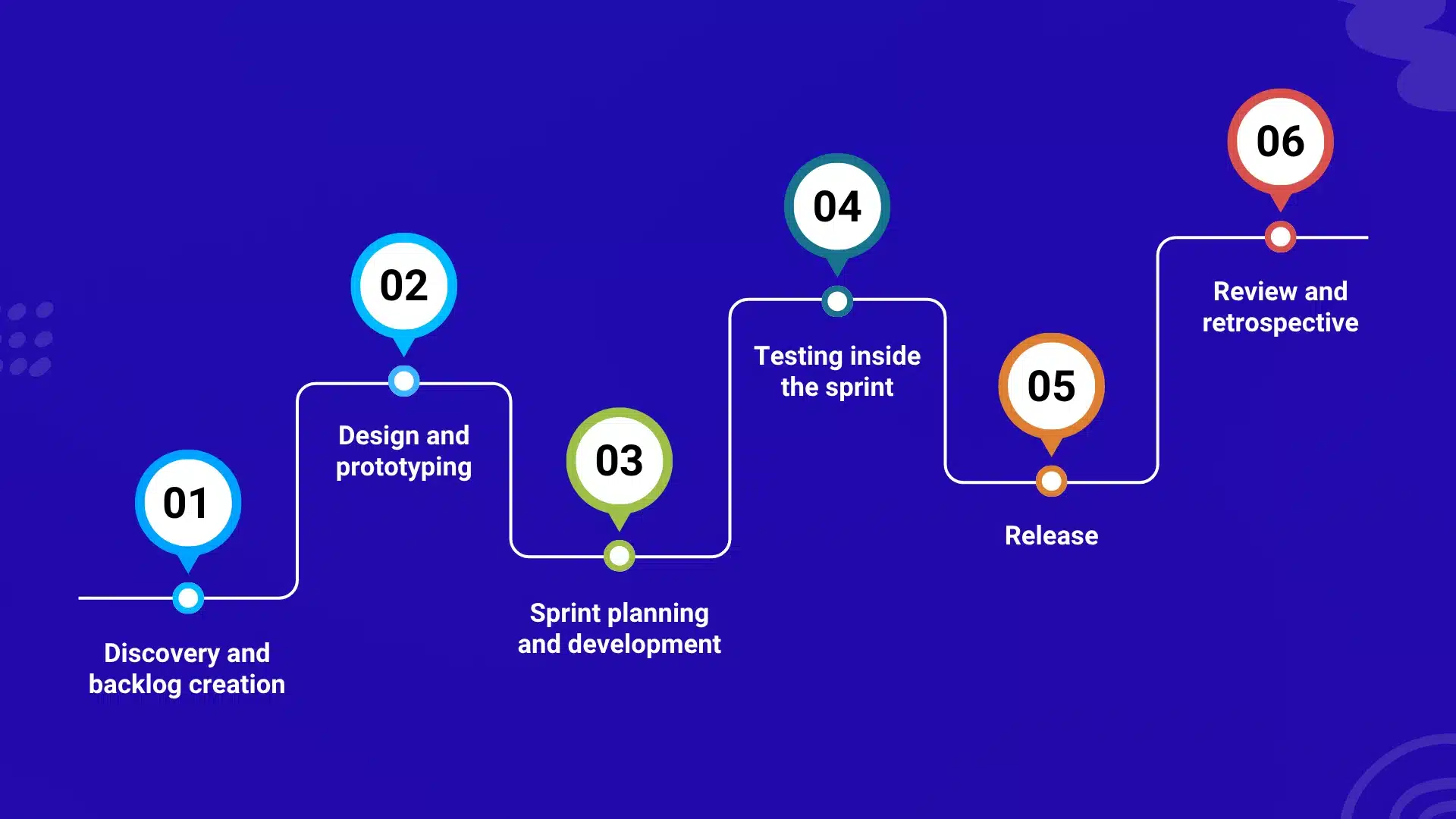
The agile app development process is a loop, not a line. Discovery happens once at the start and again whenever the roadmap changes, but design, build, test, release, and review repeat in every sprint. In practice, the phases overlap: designers usually work one sprint ahead of developers, and testing runs alongside coding.
1. Discovery and backlog creation
The team and the client agree on the product vision, the target users and the riskiest assumptions. Requirements are written as user stories and collected in a prioritised product backlog. A good story names the user, the goal and the reason:
As a returning customer, I want to reorder my last purchase in two taps, so that checkout takes seconds.
Each story gets acceptance criteria, a rough estimate, and a priority. Techniques such as MoSCoW (must, should, could, won’t) or a simple value-versus-effort grid help decide what goes into the first release. The output is a ranked backlog, a definition of the minimum viable product (MVP), and a short list of technical risks to tackle early.
2. Design and prototyping
UX and UI designers turn the top of the backlog into wireframes and a clickable prototype. Testing the prototype with even a handful of real users exposes most of the major usability problems before a line of production code exists. Design is lightweight and continuous: the team designs what it will build in the next sprint or two, not the entire app.
3. Sprint planning and development
At sprint planning the team picks stories from the top of the backlog and agrees a sprint goal. Developers then build in short loops: a daily 15-minute stand-up, code reviews on every change and an automated build on every merge. Unfinished features can ship switched off behind feature flags, so the main branch stays releasable.
4. Testing inside the sprint
Testing is not a phase at the end. Each story is tested as it is built:
- Automated tests: unit and integration tests run on every build; UI tests cover the critical flows.
- Real-device testing: a device matrix of phones and OS versions, using physical devices and cloud device labs.
- Non-functional checks: cold-start time, memory, battery drain, behaviour on slow or dropped networks, and accessibility with VoiceOver and TalkBack.
- Security: checks against a recognised baseline such as the OWASP Mobile Application Security Verification Standard (MASVS).
5. Release
Most sprints end with an internal build in testers’ hands. Apple’s TestFlight and the internal, closed, and open testing tracks in Google Play let teams distribute beta builds without a public launch. When the product is ready for users, both stores support gradual rollouts, so a new version reaches a small share of users first and expands only if crash and rating data look healthy.
6. Review and retrospective
At the sprint review, the team demonstrates working software and stakeholders react to the real thing. At the retrospective, the team looks at its own process and picks one or two improvements for the next sprint. Crash reports, analytics, and store reviews feed straight back into the backlog, and the loop starts again.
What Changes When You Use Agile for Mobile App Development
Generic Agile advice assumes you can deploy whenever you like. Agile for mobile app development has to work around gatekeepers, hardware variety, and annual platform changes. These are the constraints that most often break a plain sprint plan.
| Mobile constraint | What it breaks | What to do about it |
| App store review is outside your control | “We ship at the end of every sprint” | Treat the store release as separate from the sprint end. Submit a release candidate a few days early and keep a tested hotfix path. Apple offers an expedited review request for critical fixes, but don’t plan around it. |
| Device and OS fragmentation | “Done” on one phone means done everywhere | Define a device and OS support matrix from your target market and analytics data, and put it in the definition of done. Android spans many manufacturers and screen sizes; iOS has fewer devices but several supported OS versions. |
| Annual OS releases | A stable app can break after a platform update | Apple and Google ship a major OS version every year, with developer betas months earlier. Reserve backlog capacity each summer to test against the betas. |
| Slow update adoption | Old versions stay in the wild for weeks or months | Keep backend APIs backward compatible, add a minimum-supported-version check and use remote configuration or feature flags to change behaviour without a new binary. |
| Store policies and privacy rules | Scope changes mid-project | Plan for privacy disclosures (Apple’s privacy labels, Google Play’s data safety section), permission prompts and policy updates as backlog items, not surprises. |
| Real-world conditions | Features that only work on office Wi-Fi | Write acceptance criteria for poor connectivity, offline states, interruptions, low battery and background behaviour. |
| Build and signing complexity | Release day becomes a manual scramble | Automate builds, code signing, testing and beta distribution in a CI/CD pipeline from sprint one. Common options include Fastlane, Xcode Cloud, GitHub Actions, Bitrise and Codemagic. |
Three practical rules follow from this table.
Decouple sprint end from store release. The sprint produces a release-ready build. Whether it goes to the store that week is a product decision.
Put the riskiest integrations in the first sprints. Payments, maps, push notifications, biometrics and hardware connections are where mobile projects hide their surprises. Finding out in week three is cheap; finding out in week twelve is not.
Measure what real users experience. Track crash-free sessions, app start time and store ratings from the first beta, and treat regressions as backlog items with the same weight as new features.
Agile Methodology for Mobile Application Development: Scrum, Kanban, Lean, XP and Mobile-D
No single framework is “the” agile methodology for mobile application development. Most real teams pick one as a base and borrow from the others. Here is how each one works and where it fits.
Scrum
Scrum organises work into time-boxed sprints of one month or less. The Scrum Guide defines three accountabilities (Product Owner, Scrum Master and Developers), five events (the Sprint, Sprint Planning, Daily Scrum, Sprint Review and Sprint Retrospective) and three artifacts (Product Backlog, Sprint Backlog and Increment). Every sprint ends with a usable increment of the product.
Best for: building a new app or MVP with a dedicated team. It is the most widely used Agile framework, which also makes it the easiest to hire for and to explain to stakeholders.
Kanban
Kanban visualises work on a board, with columns such as To Do, In Progress, Review, and Done, and caps how many items can be in progress at once (work-in-progress limits). There are no fixed sprints; work flows continuously.
Best for: maintaining a live app, handling bug fixes, support requests, and small improvements that arrive unpredictably. Teams that mix feature work and maintenance often run Scrumban, which keeps sprints for planning and adds Kanban’s flow limits.
Lean
Lean software development, adapted from lean manufacturing by Mary and Tom Poppendieck, is a set of principles rather than a process: eliminate waste, amplify learning, decide as late as responsibly possible, deliver as fast as possible, empower the team, build integrity in, and see the whole. It pairs well with the MVP mindset of testing an idea with the smallest useful build.
Best for: early-stage products with a tight budget and a lot of unknowns.
Extreme Programming (XP)
Created by Kent Beck, XP focuses on engineering practices: test-driven development, pair programming, continuous integration, refactoring, small releases, and collective code ownership. Many Scrum teams adopt XP practices to keep code quality high as the app grows.
Best for: apps where regressions are expensive, such as payments, health data, or anything with complex business logic.
Mobile-D
Mobile-D was developed at the VTT Technical Research Centre of Finland and published in 2004. It draws on XP, Crystal and the Rational Unified Process and is aimed at small teams building mobile applications in short cycles. Its five phases are Explore, Initialize, Productionize, Stabilize, and System Test and Fix, with test-driven development and continuous integration throughout.
Few teams adopt it by the book today, but its core ideas — an early architecture baseline, test-first development, and frequent integration — are still sound for mobile work.
Which framework should you choose?
| Your situation | Best fit | Why |
| New app or MVP, dedicated team | Scrum | Clear cadence, roles and regular demos |
| Live app with a steady stream of fixes and small changes | Kanban | Continuous flow, no sprint boundary to wait for |
| Feature work plus support in one team | Scrumban | Sprint planning with flow limits |
| Payments, health or other high-regression-risk logic | Scrum plus XP practices | Test-driven development and pairing protect quality |
| Tight budget and an unvalidated idea | Lean thinking plus Scrum | Smallest useful build first, learn, then invest |
| Several teams building one large product | A scaling approach such as SAFe or LeSS | Coordination across teams becomes the main problem |
If you are unsure, start with Scrum, then adjust after a few sprints based on what your retrospectives tell you.
Agile Project Management for Mobile Application Development: Roles, Events and Metrics
Agile project management for mobile application development replaces the traditional project manager’s plan-and-control role with shared accountability. Here is who does what, and how progress is measured.
Roles
| Role | Responsibility |
| Product Owner | Owns the product backlog and the priorities. Makes the call when scope, budget and time conflict. On outsourced projects this is usually the client’s representative. |
| Scrum Master (or delivery lead) | Coaches the team on the process, removes blockers and protects the sprint from outside interruptions. |
| Developers | The cross-functional team that builds the product: iOS and Android engineers or cross-platform engineers, backend developers, QA engineers and UX/UI designers. |
| Stakeholders | Business owners, support and marketing teams who attend sprint reviews and give feedback. |
Events
- Backlog refinement(ongoing): the team clarifies, splits, and estimates upcoming stories.
- Sprint planning: agree on the sprint goal and select the work to meet it.
- Daily Scrum: a 15-minute check-in on progress toward the goal and blockers.
- Sprint review: demonstrate the working increment and collect feedback.
- Sprint retrospective: decide how the team will work better next sprint.
A mobile definition of done
A story is not finished when the code is written. A strong mobile definition of done typically includes:
- Code reviewed and merged, with unit and integration tests passing
- Verified on the agreed device and OS matrix, including at least one low-end device
- Acceptance criteria met, including offline and poor-network behaviour
- Accessibility checked with VoiceOver and TalkBack
- Analytics events and crash reporting in place for the new feature
- No new high-severity security findings against the team’s baseline
- Included in a beta build that stakeholders can install
Metrics worth tracking
- Velocity: a planning aid for the team, not a performance score. Comparing velocity across teams is misleading.
- Cycle time and lead time: how long a story takes from start to done, and from request to release.
- Escaped defects: bugs found by users rather than by the team.
- Crash-free sessions and users: the clearest signal of stability in production.
- Release frequency and change failure rate: two of the four DORA delivery metrics, useful for CI/CD health.
- Store rating and review themes: a direct line to user sentiment.
For boards and backlogs, teams commonly use Jira, Linear, Azure DevOps, or Trello, with Figma for design hand-off. The tool matters far less than the habit of keeping the backlog ordered and visible.
Agile Mobile Application Development in Practice: An Illustrative MVP Plan
To make this concrete, here is how a first release of a mobile MVP might be sequenced: a discovery sprint followed by six two-week sprints, roughly three months. This is an illustrative example, not a quote or a promise. Real timelines depend on scope, platforms, integrations, team size, and how quickly decisions are made.
| Sprint | Goal | Typical outcome |
| Sprint 0 (discovery) | Agree vision, MVP scope and risks | Ranked backlog, clickable prototype, architecture decisions, CI/CD pipeline running |
| Sprint 1 | Prove the foundation and the riskiest integration | Sign-up and login, navigation skeleton, the hardest third-party integration working in thin form, first internal build |
| Sprint 2 | Core user journey end to end | The main flow usable from start to finish, with basic analytics and crash reporting |
| Sprint 3 | Complete secondary flows | Profile, settings, notifications and back-office or admin needs, tested on the device matrix |
| Sprint 4 | Round out the MVP and open the beta | Remaining must-have stories, first external beta through TestFlight and Google Play testing |
| Sprint 5 | Learn from beta users | Fixes and changes driven by real feedback, performance, accessibility and security passes |
| Sprint 6 | Release readiness | Release candidate, store listing and privacy disclosures, staged rollout and monitoring plan |
Two things make this work. First, the date and budget stay fixed while scope flexes: if a story takes longer than expected, a lower-priority story moves out of the MVP rather than the launch date slipping. Second, every sprint ends with something a real person can install and react to, so the client sees progress as working software rather than status reports.
For context on timing, GMTA’s published estimates put basic apps at one to three months and moderately complex apps at four to six months, with highly complex apps running longer. A scoped proposal after requirement analysis replaces any generic range.
Benefits of Agile Mobile App Development
The benefits of agile mobile app development come from one mechanism: shorter feedback loops. Each benefit below follows from that.
- Earlier feedback from real users. Beta testers use working software months before launch, so wrong assumptions are corrected while changes are still cheap.
- Lower cost of change. Because only the next sprint or two is planned in detail, reprioritising does not mean tearing up a signed specification.
- Risk surfaces early. Teams pull the riskiest work forward: integrations, performance-critical screens, hardware connections. Bad news arrives in sprint two, not at submission.
- Higher quality.Continuous testing and a definition of done stop defects piling up for a late test phase.
- A faster, smaller first release. Prioritising by value makes it natural to ship a focused MVP and expand once users prove which features matter.
- Transparent progress and spend. Sprint reviews show working software, and budgets can be tracked sprint by sprint, with the option to pause or redirect.
- Better alignment. Developers, designers, and business owners talk every week, so fewer decisions get lost between departments.
- Resilience to platform change. New OS versions, store policy updates, and competitor moves can be absorbed in the backlog instead of derailing a fixed plan.
Challenges of Agile App Development, and When It Is Not the Right Fit
Agile solves real problems, but it creates its own. These are the ones that cause the most damage, and how to manage them.
| Challenge | Why it happens | How to manage it |
| Scope creep | Easy to add “one more thing” when change is welcome | Keep one ordered backlog. Anything new must displace something of equal size, or wait. |
| Unclear total budget | Scope is not fully known at the start | Fix a budget and timeline for the MVP, flex scope inside it, and review the forecast every sprint. |
| Thin documentation | “Working software over documentation” is misread as “no documentation” | Keep short, living documents: architecture decisions, API contracts, release notes, runbooks. |
| Absent product owner | Decisions stall when nobody can answer questions | Name a product owner with authority and a fixed weekly time commitment before the first sprint. |
| Team independence without guidance | Self-organising teams still need technical leadership | Ensure a senior engineer owns architecture and code standards. Mixed-seniority teams work well when someone does. |
| Distributed teams and time zones | Less overlap for daily conversations | Agree core overlap hours, record demos and write decisions down. |
| Estimation uncertainty | Early estimates are rough by nature | Use relative sizing and forecast from observed throughput rather than promising dates for every story. |
When Agile is not the right fit
Agile works poorly when:
- A contract or regulator requires a fully signed specification before any work starts.
- The app depends on hardware, certification, or third-party approvals with long, fixed lead times.
- Nobody on the client side can make product decisions in a timely way.
- The scope is genuinely small, fixed, and understood, such as a straightforward port of an existing app.
In those cases, a hybrid works: invest in a disciplined discovery and specification phase, then deliver in sprints.
What about regulated apps?
Healthcare and fintech apps can be built with Agile, but compliance evidence has to be built into every sprint instead of added at the end. That means traceable requirements, recorded test results, security reviews and audit-ready change history as part of the definition of done. Agile does not remove regulatory obligations; it spreads the effort across the whole project.
Hiring an Agile App Development Company: Contracts, Budget and Your Role
The contract model decides how much of Agile’s flexibility you actually get. A team can run perfect sprints and still be unable to change direction if the contract treats every change as a dispute.
| Model | How it works | Agile fit | Watch out for |
| Fixed price, fixed scope | One price for a specified list of features | Moderate. Works for a well-scoped MVP or release phase, with an agreed rule for swapping items of equal size. | Anything beyond the agreed scope needs renegotiation, so define the scope and the change rule carefully before work starts |
| Time and materials | You pay for the effort spent each sprint | Strong. Priorities can change freely. | Needs good reporting and a firm budget ceiling to keep spend predictable |
| Dedicated team or capacity-based | A stable team for a monthly fee; the backlog decides the work | Strong. Best for long-running products. | Needs an engaged product owner to direct the team’s capacity |
| Fixed budget and timeline, variable scope | Price and date are fixed; scope is negotiated sprint by sprint | Strong. Gives cost certainty and flexibility. | Requires agreement up front on how must-have and nice-to-have items are defined |
Your role as the client
Agile projects succeed or fail on client involvement. You will need to:
- Appoint a product owner with real decision-making authority, available every week.
- Attend sprint reviews and give feedback within the sprint, not weeks later.
- Keep priorities ordered, and accept that something must leave when something enters.
- Test the beta builds the team sends you.
- Hold the accounts that matter: your own source-code repository, app store developer accounts, and cloud environments, so that you own your product from the first commit.
Questions to ask any agile app development company
- How long are your sprints, and what does a sprint review look like?
- Who acts as product owner, and how much of their time do you need from us?
- How are scope changes handled, and what do they do to the budget?
- What is in your definition of done for a mobile feature?
- Do we receive an installable build through TestFlight and Google Play testing every sprint?
- Who owns the repository, store accounts, and cloud infrastructure?
- How do you report progress, velocity, and quality, and what do we see between reviews?
- How do you handle store review delays, OS beta testing, and hotfixes?
The quality of the answers tells you more than any portfolio page. Vague replies about “flexibility” without specifics usually mean the process is Agile in name only.
Agile in Action: The Tokyo-MK Limousine Transfer App
One example from our own work shows why Agile suits multi-audience mobile products. Tokyo-MK is a luxury limousine transfer platform in Tokyo. We built it with an Agile approach as a web application plus Android and iOS apps serving three groups at once: customers who book rides, drivers who fulfil them, and staff who manage operations.
Three user groups mean three sets of feedback, and each group’s needs surfaced as the product took shape. Working in iterations let the platform grow in response, with the following capabilities delivered over successive releases:
- Advanced booking improvements, based on user feedback
- Multilingual and multicurrency support
- Real-time flight status updates, with flight tracking and invoicing
- Job assignment, vehicle availability and monitoring tools for staff
- A Bluetooth Low Energy (BLE) taximeter integration and driver-focused Android tablet apps
Hardware integrations such as a BLE taximeter are exactly the kind of work Agile teams tackle early, because they carry the most technical risk and are far cheaper to discover in an early sprint than in a final test phase. The multi-audience structure shows the other strength of iterative delivery: each user group can react to working software and shape the next release.
How an engagement with GMTA works
Every engagement follows four stages: a discovery call, requirement analysis, proposal and planning, and development. The proposal gives you a roadmap with scope, timeline, and cost estimates before any build work starts, and development then runs with full visibility on progress.
A few commitments sit around that process:
- You own the product. The client owns the code and intellectual property for the software we build.
- Pricing is clear before work starts. Once a project is scoped, the price is locked. If a requirement changes, we tell you how it affects scope and cost before any work on it begins.
- Flexible engagement models.Project-based delivery, dedicated development teams, and agile team extension, depending on whether you need a fixed-scope build or ongoing capacity.
- Support after launch. Every project includes six months of free maintenance and support.
You can read the full Tokyo-MK case study, or see how our mobile app development, MVP development, and custom software development teams would apply these sprints to your scope.
Where AI Fits into Agile App Development
AI tools now touch most stages of an Agile mobile project, but they work best as accelerators with a human accountable for the result.
- Backlog work: drafting user stories and acceptance criteria from a rough brief, which the product owner then edits and approves.
- Coding and review:code suggestions, boilerplate generation, and first-pass review comments.
- Testing: generating test cases and test data, and summarising failures from crash logs.
- Release and feedback: drafting release notes and clustering store reviews into themes.
The rule that keeps this safe is simple: AI output passes through the same definition of done as human work. Generated code still needs review, tests, and security checks, because it can reference APIs that don’t exist or introduce vulnerabilities. Sensitive data and proprietary code should only go into tools your contract and security policy allow.
AI also changes the product itself. If the app includes an AI feature, such as a chat assistant or an on-device model, the backlog needs stories for evaluation sets, guardrails, fallback behaviour, and monitoring, because model output is not deterministic and can’t be verified with a simple pass or fail test. If you are planning an AI-powered app, our AI development and AI agent development teams can help you scope it in sprints.
Conclusion
Agile app development works because it replaces one big bet with many small ones. Each sprint puts a working build in front of real people, each review corrects the course, and each release carries less risk than the last. For agile mobile development, where store review, device variety, and annual OS changes punish rigid plans, that loop is close to a necessity.
Start with Scrum, build the mobile realities into your definition of done, pick a contract model that doesn’t punish change, and keep a product owner close to the team. If you are weighing an app idea and want to see how the first sprints would look for your scope, book a free consultation with GMTA. We will scope it with you and come back with a roadmap covering discovery, the MVP, and the first releases.
Frequently Asked Questions About Agile App Development
What is agile app development?
Agile app development is an iterative way of building apps in short sprints. Each sprint produces a tested, working increment, stakeholders review it, and their feedback decides what is built next. It replaces up-front planning of the whole project with continuous planning and learning.
What is the difference between Agile and Waterfall for mobile apps?
Waterfall completes each phase (requirements, design, build, test, release) once, in order, and delivers at the end. Agile repeats a small version of all those phases every sprint and delivers working software throughout. For mobile apps, Agile suits changing requirements and lets teams absorb OS updates and user feedback mid-project.
What are the phases of agile app development?
The six phases are discovery and backlog creation, design and prototyping, sprint planning and development, testing, release, and review and retrospective. After the initial discovery, the last five repeat in every sprint.
How long is a sprint in mobile app development?
Sprints are time-boxed to a month or less under the Scrum Guide. Most mobile teams choose one or two weeks, because shorter sprints give faster feedback while still leaving time to build and test a meaningful increment.
Which Agile framework is best for mobile app development?
Scrum is the usual choice for building a new app because of its clear roles, cadence and demos. Kanban suits maintaining a live app, and many teams combine them as Scrumban. XP practices such as test-driven development are a strong addition when quality risk is high.
Is Agile suitable for small apps and MVPs?
Yes. Agile is particularly well suited to MVPs because the goal of an MVP is to learn, and short sprints with early beta releases generate that learning quickly. A very small, fully specified project may not need the full set of Scrum events, but the incremental, feedback-driven approach still applies.
Can Agile work with a fixed-price contract?
Yes, with conditions. A fixed price works best for a well-scoped MVP or release phase, with an agreed rule that new requests either replace items of equal size or are priced separately. Fully open-ended scope fits time-and-materials, dedicated-team or fixed-budget models better.
How much does agile app development cost?
Cost depends on complexity, platforms, integrations, compliance requirements and project length. Agile makes spend visible sprint by sprint instead of hiding it until launch. As a guide, GMTA’s published ranges are roughly $5,000 to $20,000 for simple apps, $20,000 to $50,000 for medium-complexity apps and $50,000 or more for enterprise apps involving IoT, advanced security, AI or AR/VR. A scoped proposal after requirement analysis replaces any generic estimate.
What are the roles in agile app development?
The core roles are the product owner, who sets priorities; the Scrum Master or delivery lead, who supports the process; and the developers, a cross-functional group of mobile engineers, backend developers, QA engineers and designers. Stakeholders join sprint reviews to give feedback.
Does Agile mean no documentation?
No. The Agile Manifesto values working software over comprehensive documentation, not instead of all documentation. Good Agile teams keep lightweight, up-to-date documents such as architecture decisions, API contracts and release notes, and regulated projects keep the records their standards require.
What is Mobile-D?
Mobile-D is an agile development method designed for mobile applications, created at the VTT Technical Research Centre of Finland and published in 2004. It combines practices from Extreme Programming, Crystal and the Rational Unified Process, and organises work into five phases: Explore, Initialize, Productionize, Stabilize and System Test and Fix.

Rishi Ram is CTO at GMTA Software, with 6+ years of experience in software architecture and technical leadership. He’s led GMTA’s work across fintech—including eWallet apps, mobile banking platforms, and Sharia-compliant fintech builds—as well as on-demand and taxi app development and AI-integrated products like fraud detection agents and workflow automation tools.