

Key Takeaways:
- AI image generator apps run on diffusion models, not the older GAN architecture most tutorials still reference—this affects everything from cost to output quality.
- You don’t have to train your own model. Most founders should start with a commercial image-generation API and only consider self-hosting once usage or margin pressure justifies it.
- Build an AI Image Generator App: Cost ranges from roughly $15,000 for an API-based MVP to $300,000+ for a custom-model, enterprise-scale platform—see the full breakdown below.
- Midjourney no longer requires Discord. As of 2026, it’s accessible through its own web app, though Discord access is still available for users who prefer it.
- Content moderation isn’t optional—image-generation apps carry real copyright and safety exposure that most “how to build” guides skip entirely.
The interest behind this topic isn’t hype. Fortune Business Insights puts the global AI image generator market at approximately $484.29 million in 2026, growing to $1.75 billion by 2034 at a 17.4% CAGR, with North America holding the largest regional share. Widen the definition to include the broader ecosystem of tools built on top of image-generation models — design platforms, marketing suites, creative tooling — and other research firms model a market worth several times that; the spread between reports mostly reflects how narrowly or broadly each one scopes “AI image generation,” not disagreement about the trend. For context on where this fits inside AI investment more broadly, see our breakdown of AI app development cost trends in 2026.
The more useful number for a founder scoping a build isn’t the total market size — it’s what a small, focused team has already proven is possible inside it. Midjourney is widely reported to have crossed $500 million in revenue in 2025, up from $300 million in 2024, built entirely without outside funding and with a team industry trackers put at roughly 100 people. Those figures come from third-party business-intelligence trackers rather than an official Midjourney disclosure, but they’re consistent across multiple independent sources. The real insight behind “build something like Midjourney” isn’t matching that team’s model quality — it’s that a narrow, well-executed use case can compete in this market without hyperscaler-level resources, which is exactly the kind of build-vs-API and MVP-scoping decision this guide walks through below.
Founders researching how to build an AI image generator app like Midjourney are usually trying to answer three questions at once: what technology actually powers these apps, what it costs to build one, and whether it’s realistic to build something like Midjourney without Midjourney’s budget or timeline.
This guide answers all three — from a build perspective, not a marketing one. It’s written for startup founders, product owners, and CTOs scoping a real project, not for developers looking for a code tutorial.
What Is an AI Image Generator App?
An AI image generator app is a product that converts a text prompt (and sometimes a reference image) into a new, AI-created image in seconds, using a machine learning model trained on large volumes of image and text data. Midjourney, along with tools like Adobe Firefly and OpenAI’s image tools, is a consumer-facing example of this category. Most businesses building in this space aren’t trying to recreate Midjourney itself—they’re adding image generation as a feature inside an existing product (marketing tools, e-commerce platforms, design tools, social apps) or building a narrower, niche-focused generator.
How AI Image Generators Like Midjourney Actually Work
Modern AI image generators — including Midjourney, Stable Diffusion, and FLUX — are built on diffusion models, not the generative adversarial networks (GANs) that powered earlier AI art tools. Understanding this matters because it explains both the quality and the cost structure of these apps.
Here’s the simplified flow:
- Prompt encoding — Your text prompt is converted into a numerical representation (an embedding) using a language-vision model, so the system understands both objects and style.
- Latent space generation — The model starts from random noise and, guided by your prompt embedding, gradually “denoises” it across dozens of steps into a coherent image. This iterative denoising is the “diffusion” in a diffusion model.
- Upscaling and refinement — The raw output is typically generated at lower resolution first, then upscaled and sharpened — which is why most apps show a quick preview before a higher-quality final render.
- GPU inference — Every one of those denoising steps runs on a GPU. This is the actual cost driver behind AI image apps — not app development itself, but the compute needed to generate each image.
This is also why “which AI technology should I use” is a more important question for founders than most generic guides treat it — it’s a cost and quality decision, not just a technical one.
Build vs. API: Choosing Your AI Image Generation Technology
This is the single most consequential decision in the entire project, and it’s the one most “steps to build” guides skip or oversimplify into naming a coding framework. Here’s an honest comparison of the three realistic paths.
| Approach | How It Works | Speed to Launch | Cost Structure | Control | Best For |
| Commercial image-generation API (e.g., Stability AI, Black Forest Labs’ FLUX API, OpenAI’s image models, Google’s Imagen) | You send prompts to a hosted model via API and get images back | Fastest — days to a few weeks of integration work | Usage-based, per-image ($0.01–$0.10+ per image depending on resolution/model) | Lower — you depend on the provider’s uptime, pricing, and model updates | Most startups and MVPs; teams validating demand before heavier investment |
| Self-hosted open-weight model (e.g., Stable Diffusion or FLUX running on your own GPU infrastructure) | You deploy an open-source model on cloud GPUs (AWS, Lambda Labs, RunPod, etc.) you manage | Slower — infrastructure and MLOps setup required | Fixed/predictable GPU cost, but you carry idle-capacity risk | High — full control over model version, fine-tuning, and data | Products at meaningful scale where per-image API costs would exceed self-hosting costs |
| Fine-tuned custom model | You start from an open-weight base model and fine-tune it on your own style/brand/domain-specific images | Slowest — requires curated training data and ML expertise | Highest upfront cost, lower marginal cost at scale | Highest — a genuinely differentiated, on-brand output style | Products where a distinctive visual style is the product (niche art styles, brand-specific generation, verticals like product mockups) |
Practical guidance: Start with an API. It’s the fastest way to validate whether users actually want AI image generation inside your product, and it avoids the GPU-ops burden before you know your usage volume. Move to self-hosting or fine-tuning only once usage economics or brand differentiation genuinely require it — this is consistent with how most AI MVPs get scoped; Recommended AI app development cost for how this build-vs-API decision plays out across AI products generally, not just image generation.
Core Features an AI Art Generator App Needs
| Feature | Purpose | MVP or Advanced? |
| Prompt input with style presets | Lowers the barrier for non-expert users to get good results | MVP |
| Generation queue / progress state | Manages user expectations during the 5–20 second generation window | MVP |
| Image gallery / history | Lets users revisit and reuse past generations | MVP |
| Upscaling | Produces print- or production-ready resolution | MVP |
| Variations / remix | Generates alternate takes on a result the user likes | Advanced |
| Reference image / image-to-image input | Guides output using an uploaded image, not just text | Advanced |
| Content moderation filter | Blocks unsafe or infringing prompts before generation (see below) | MVP — non-negotiable |
| Authentication & credits/subscription system | Manages access and monetization | MVP |
| Team/collaboration spaces | Shared libraries, brand asset control | Advanced |
| Admin dashboard | Usage monitoring, moderation review, cost tracking | Advanced |
Technical Architecture Overview
A typical AI image generator app has four layers:
- Frontend — Usually React (web) or Flutter/React Native (cross-platform mobile), handling the prompt interface, gallery, and generation states.
- Backend/API layer — Node.js, Python (FastAPI), or similar, orchestrating requests between your app, the image-generation API or self-hosted model, storage, and payments.
- Inference layer — Either a third-party API call or your own GPU-backed inference service if self-hosting.
- Storage & data layer — Object storage (e.g., S3-compatible) for generated images, a database for user accounts, prompt history, and usage/credit tracking.
If you’re integrating this into an existing product rather than building standalone, the API integration work follows the same patterns covered in the API integration guide — the image-generation API is simply one more third-party service in your stack.
How to Build an AI Image Generator App: Step-by-Step
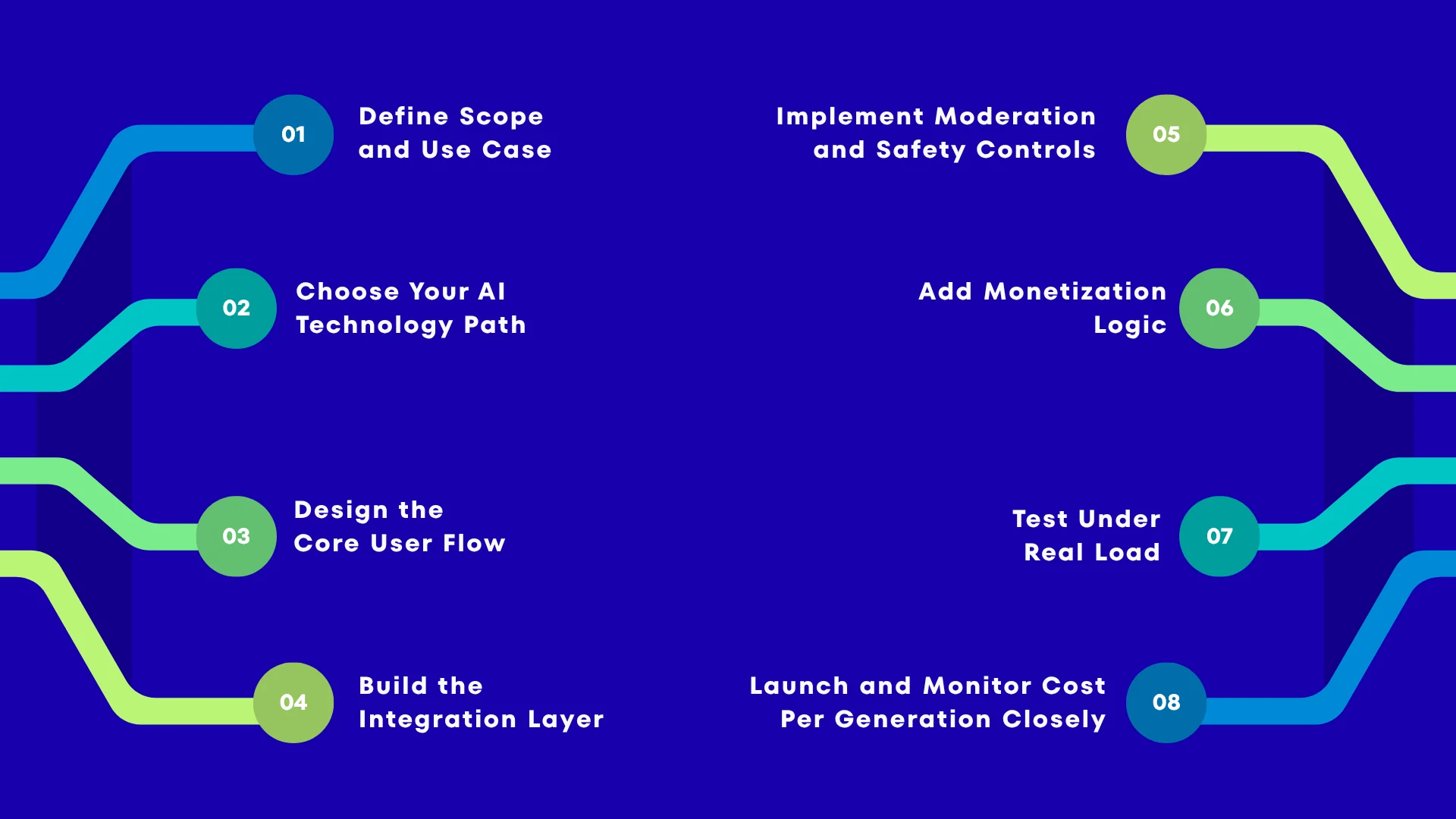
1. Define Scope and Use Case
Start by deciding whether you’re building a standalone consumer app or adding image generation as a feature inside an existing product — these are genuinely different builds, not variations of the same one. A standalone app needs its own onboarding, retention loop, and monetization surface; a feature needs to fit seamlessly into a workflow your users already have.
Next, decide on output style: photorealistic, artistic/stylized, or a specific niche (product mockups, anime, architectural concepts, brand-specific visuals). This isn’t a cosmetic choice — it directly affects which model or API is the right fit, since different models are trained toward different visual strengths. Also define who’s generating: end consumers, internal teams, or your customers’ customers (if you’re building a white-label or embedded feature) — each audience has different tolerance for generation time, cost per image, and interface complexity. Every decision after this step inherits from what you define here, so resist the urge to skip it in favor of “we’ll figure it out while building.”
2. Choose Your AI Technology Path
Use the build-vs-API comparison above to make this decision deliberately, not by default. For a first version, a commercial image-generation API is almost always the right call — it lets you validate demand and get real usage data before committing to GPU infrastructure you’d otherwise be guessing about. Self-hosting or fine-tuning a model is a decision to revisit later, once you know your volume and whether a distinctive visual style is actually part of your value proposition, not something to default into at day one because it sounds more “proprietary.” At this stage, also shortlist two API providers rather than one — model quality, pricing, and rate limits shift often enough in this category that having a fallback avoids a rebuild later if your primary provider changes terms.
3. Design the Core User Flow
Map the flow end to end: prompt input → generation state → result → save/download/share, and keep every step as frictionless as possible. The prompt input is where most non-technical users get stuck, so style presets, example prompts, or guided fields (subject, style, mood) meaningfully improve completion rates over a blank text box. The generation state — the 5 to 20 seconds between submitting a prompt and seeing a result — is an easy step to underdesign, but it’s where users decide whether the product feels responsive or broken; show progress, not just a spinner, and give users something to do (browse presets, view past generations) while they wait. Decide early whether users see one result per prompt or a grid of variations, since that choice affects both your API cost per generation and your UI design.
4. Build the Integration Layer
This is where your backend connects to the chosen image-generation API (or your self-hosted inference service). Beyond the basic request/response wiring, build explicit handling for the failure modes specific to this category: prompts rejected by content filters, generation timeouts, and provider rate limits or outages. Each of these needs its own user-facing message and fallback behavior — a generic “something went wrong” error is a common and avoidable source of user drop-off in AI image products specifically, since generation failures are more frequent here than in typical API integrations. If you’re using image-to-image or reference-image features, this layer also needs to handle file upload, validation, and storage before the generation request is ever sent.
5. Implement Moderation and Safety Controls
Build this in before launch, not as a post-launch patch — see the Content Moderation and Copyright Considerations section below for the specifics. At minimum, this means prompt-level filtering before a generation request is sent, and a plan for reviewing flagged or reported outputs after the fact. Treat this as core product infrastructure with the same priority as authentication, not as a compliance checkbox to revisit later — retrofitting moderation after users are already generating content is significantly harder than building it in from the start.
6. Add Monetization Logic
Implement credits, subscription tiers, or usage-based billing depending on the model you chose in Part 6 of this guide (see Monetization Models below). Whichever model you pick, tie it directly to your actual generation cost from day one — a flat “unlimited” tier without a fair-use cap is one of the most common early monetization mistakes in this category, since a small number of heavy users can generate a disproportionate share of your API costs. Build usage tracking at the same time as the billing logic itself, not as an afterthought; you’ll need accurate per-user generation counts for both billing and cost monitoring in step 8.
7. Test Under Real Load
Generation latency and queueing behavior under concurrent users matters more here than in most app categories — this is where many AI image apps fail in production. Test what happens when 50 or 500 users submit prompts at the same moment: does your queue degrade gracefully, or do requests silently fail? If you’re using a third-party API, understand its rate limits and concurrency behavior under your expected load before launch, not after a traffic spike exposes it. If you’re self-hosting, this is also where you validate your autoscaling and GPU cold-start behavior, since a cold GPU instance can add significant latency to a user’s first generation after a traffic lull.
8. Launch and Monitor Cost Per Generation Closely
Inference cost is your primary variable cost in this category, and it needs active monitoring from day one, not just once you’re at scale. Set up dashboards that track cost per generation, cost per active user, and cost per paying user separately — the gap between the first and third numbers is usually where margin problems show up first. Watch for prompt patterns that are unusually expensive to generate (very high resolution requests, excessive variations, retry loops from confused users) and address them in product before they become a cost problem at volume.
If you’re earlier in the process and still deciding whether to build a full product or validate first, MVP software development covers how to scope a lean first version generally, which applies directly to image-generation features.
Content Moderation and Copyright Considerations
- Prompt filtering: Most teams run user prompts through a moderation check (either the image-generation provider’s built-in filter or a separate moderation API) before generation, to block clearly unsafe or policy-violating requests.
- Output review: Some products add a secondary check on generated images themselves, not just the prompt, since prompts alone don’t always predict output.
- Copyright exposure: AI image generation sits in an evolving legal area — training data provenance and output ownership are both live issues. This isn’t a space to guess in; if your product touches commercial use of generated images, get counsel involved on your terms of service and usage rights, particularly around what your commercial API provider’s licensing terms actually allow for your use case.
- User-generated content policies: If users can share generated images inside your app, you need standard UGC moderation and reporting tools on top of generation-time filtering.
How Much Does It Cost to Build an AI Image Generator App?
| Tier | Approx. Cost | What’s Included |
| MVP (API-based) | $15,000 – $30,000 | Prompt-to-image flow, basic gallery, auth, credits system, one commercial API integration, basic moderation |
| Mid-tier product | $30,000 – $70,000 | Multiple style presets, image-to-image, team features, subscription billing, admin dashboard, stronger moderation pipeline |
| Enterprise / self-hosted or fine-tuned | $70,000 – $100,000+ | Self-hosted or fine-tuned model, custom infrastructure, advanced moderation, SSO, analytics, high-availability scaling |
What actually drives cost within these ranges:
- API usage-based generation cost scales with your user volume, not just your build — budget for it as an ongoing operating cost, not a one-time build cost.
- Self-hosting shifts cost from per-image API fees to fixed GPU infrastructure — the crossover point depends on your volume.
- Moderation, compliance, and content-safety tooling add real cost that’s easy to underestimate.
How much time does it take to build an AI image generator?
| Tier | Typical Timeline |
| API-based MVP | 6–10 weeks |
| Mid-tier product | 3–5 months |
| Enterprise / self-hosted, fine-tuned | 5–9 months+ |
Timelines assume a defined scope going in — the biggest timeline risk in this category is usually infrastructure and moderation work being underestimated, not the core prompt-to-image flow itself.
MVP vs. Full-Scale Product: What to Build First
Most successful AI image products start narrower than founders initially plan. A realistic MVP proves one thing: that users will generate and keep/use the images your app produces — not every feature you can imagine.
Start with: one API-based model, one clear use case, basic style presets, and a working credit or subscription system. Defer: fine-tuning, self-hosting, team features, and advanced editing tools until usage data tells you they’re worth the investment.
This mirrors the general MVP-first approach covered in our MVP development guide — AI image generation doesn’t change the underlying logic of validating before you scale; it just adds inference cost as a new variable to watch.
Monetization Models for AI Image Generation Apps
- Credit-based — users buy or earn credits per generation; simplest to implement, aligns revenue directly with your variable API cost.
- Subscription tiers — monthly plans with generation caps and feature access (higher resolution, faster queue priority, commercial usage rights).
- API/white-label licensing — if your model or pipeline is genuinely differentiated, offering it as an API or white-label product to other businesses.
- Freemium with usage caps — free tier to drive adoption, paid tiers for volume, speed, and commercial rights.
Common Challenges
- GPU cost management at scale, especially if self-hosting
- Generation latency under concurrent load
- Content moderation accuracy and false-positive rates
- Model version dependency — commercial APIs update or deprecate model versions, which can shift your output quality or cost without warning
- Differentiation — with strong general-purpose models widely available via API, standing out often comes down to use case, workflow, and UX rather than raw model quality.
Conclusion
Building an AI image generator app in 2026 is far more accessible than it was even two years ago — commercial APIs mean you no longer need to train a model from scratch to launch a credible product. The decisions that actually determine whether your project succeeds are the ones this guide focused on: API vs. self-hosted, MVP scope, moderation from day one, and realistic cost planning for both build and ongoing inference.
Weighing an API-based build against a self-hosted or fine-tuned model for your specific use case? Talk to GMTA’s AI development team about scoping the right approach and getting a realistic cost and timeline for your product — not a generic estimate.
FAQ
What is an AI image generator app?
An app that converts text prompts (and sometimes reference images) into AI-generated images using a diffusion model, in seconds.
Can I build an app like Midjourney?
You can build a product in the same category, but recreating Midjourney’s specific model quality and scale isn’t realistic for most teams. A more realistic goal is building a focused product using a commercial image-generation API, differentiated by use case rather than by out-competing Midjourney’s underlying model.
How much does it cost to build an AI image generator app?
Typically $15,000–$30,000 for an API-based MVP, $30,000–$70,000 for a mid-tier product, and $70,000–$100,000+ for a self-hosted or fine-tuned enterprise build.
How long does it take to build an AI image generator?
An API-based MVP typically takes 6–10 weeks; a full-featured product with self-hosted or fine-tuned models can take 5–9 months or more.
Which AI models are used for image generation?
Most 2026-era apps use diffusion models — commercial options include Stability AI’s and Black Forest Labs’ FLUX APIs, OpenAI’s and Google’s image models; open-weight options like Stable Diffusion and FLUX can also be self-hosted.
Should I use an API or train my own model?
Start with a commercial API unless you have a specific reason (cost at scale, or a genuinely distinctive style) to self-host or fine-tune — see the comparison table above.
Is Midjourney available without Discord?
Yes — as of 2026, Midjourney is accessible through its own web app; Discord access remains available but is no longer required.
How is content moderated in AI image apps?
Most products filter prompts before generation using a moderation API or the image-generation provider’s built-in filters, and many add a secondary check on outputs — this should be built in from the start, not added after launch.
How do AI image generator apps make money?
Common models are credit-based pay-per-generation, subscription tiers, freemium with usage caps, and API/white-label licensing.
What’s the difference between an MVP and a full AI image app?
An MVP typically uses one API-based model, one use case, and basic features to validate demand; a full-scale product adds fine-tuning, self-hosting, team features, and advanced editing once usage justifies the investment.

Uday Singh Shekhawat has 9+ years of experience covering software architecture, AI/ML development, and technology strategy at GMTA Software. He writes for founders and CTOs evaluating build complexity, technology investment, and vendor decisions — including in regulated industries such as healthcare, where his background in HIPAA-compliant and FHIR-integrated systems informs his perspective on compliance-driven cost factors.