
Key Takeaways
- An education CRM centralizes prospect, applicant, parent, and student interactions across the enrollment lifecycle
- Admissions teams use CRM automation to track inquiries, assign counselors, manage application follow-ups, and reduce missed enrollment opportunities
- Lead scoring and segmented communication help institutions prioritize high-intent applicants instead of treating every inquiry equally
- Student engagement workflows give support teams a consolidated view of unresolved requests, communication history, and intervention needs
- K–12 schools need strong parent and guardian communication, while higher education institutions require more extensive recruitment and admissions workflows
- SIS and LMS integrations keep CRM records aligned with official enrollment data and meaningful learning activity
- FERPA compliance depends on access controls, auditability, secure data handling, vendor agreements, and institutional policies, not CRM software alone
With 19.4 million higher ed registrations in Fall 2025, relying on traditional SIS means missing a potential admission follow-up. Almost 8 out of every 10 prospective students inquire through multiple channels. This forces your team to monitor which applicants are moving towards enrolment manually. The risks surface when the information remains fragmented across mail inboxes, spreadsheets, and disconnected systems, causing leads to go cold. The moment you focus on a generic sales pipeline, your CRM for education risks forcing institutions to change their established processes instead of fixing enrolment gaps.
There’s a far more pressing product challenge that goes beyond mere contact management. Whether it’s the US colleges, K-12 schools, or training providers, education organizations hardly share the same engagement model. In fact, you will be surprised to know that during the 2021-22 school year, 14+ million students were absent due to poor learning engagement strategies across the US. What’s worse is that the impact is seen for teaching staff too. 84% of teachers even said they hardly have enough time to plan lessons, grade students, or answer emails. A CRM that fails to connect with student record systems or learning delivery tools becomes another database that staff needs to update manually.
Having said that, we have prepared a detailed guide on how you can build a beneficial CRM for an education system with features that actually can help address these challenges. What’s more, we will also talk about the necessary integrations that can prevent your product from becoming a part of today’s fragmented edtech pipeline.
How does CRM work for education systems?
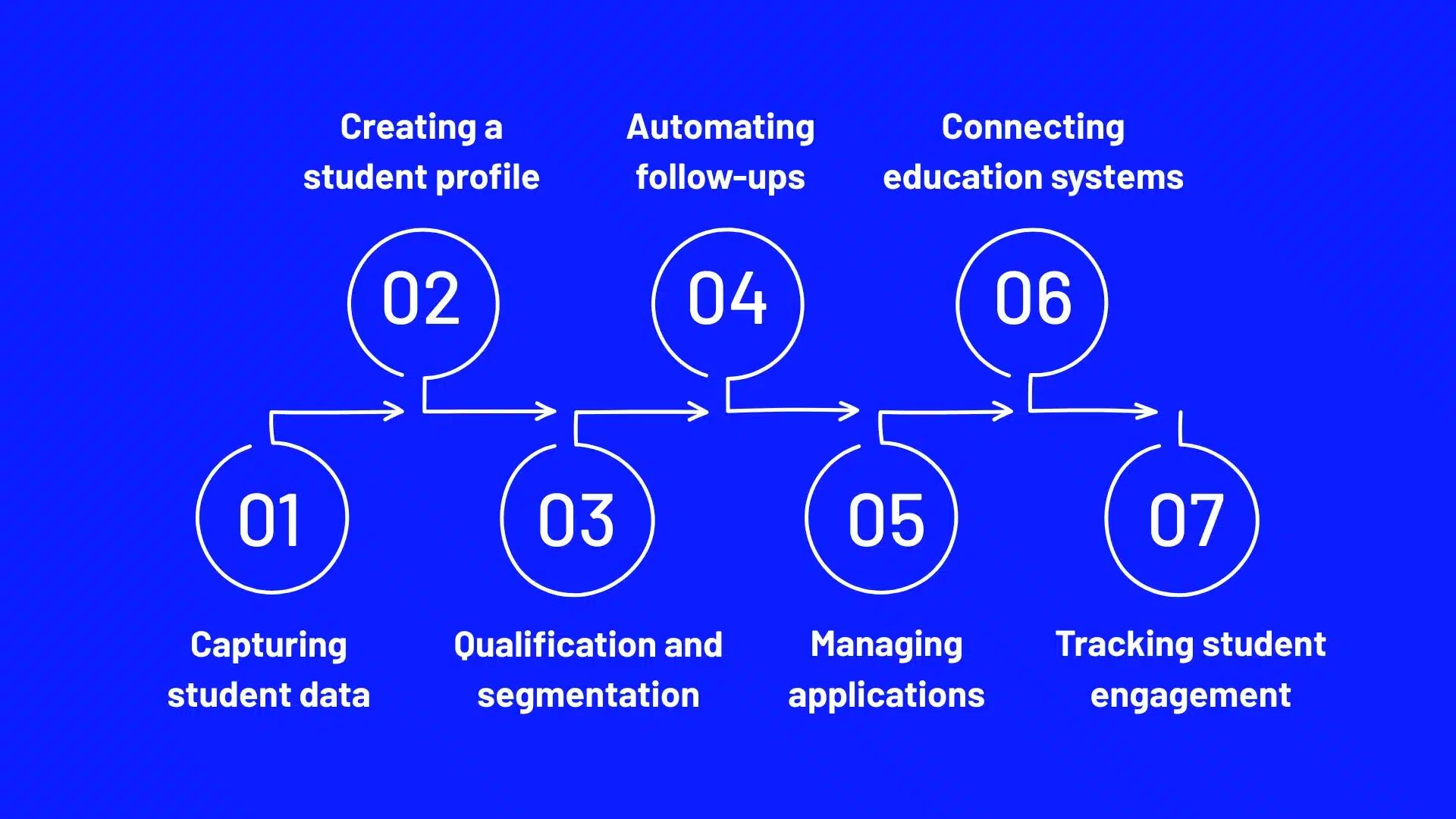
Capturing student data
This software can capture prospective student information from multiple channels that education providers still use to acquire new applicants. Whether it’s a website enquiry, a Google Ads lead form, or an education marketplace submission, your CRM will receive these information pieces through native forms, API connections, or third-party integrations as configured. It can then retain the original source and campaign attribution associated with each record. This holds immense significance when a university spends heavily on recruitment but struggles to distinguish enquiries generating applications from those that never progress beyond an initial expression of interest.
Creating a student profile
The education CRM system can turn incoming inquiries into persistent student records through identity matching and data consolidation. This particular functionality is way more complex than simply matching email addresses. That’s because an applicant can use a personal email for an initial inquiry and a different address for the formal application. The CRM tool then:
- Compares available identifiers
- Flags potential duplicates
- Associates verified records with the same student identity
Qualification and segmentation
It works through rules that classify prospects according to the institution’s recruitment criteria, and not some generic benchmarks. Suppose a university assigns different priority levels to applicants based on attributes like:
- Program interest
- Intended intake
- Application completion
- Engagement history
Your CRM’s scoring engine will then update classifications once it receives new information. However, there’s a catch you should consider: recruitment readiness and academic eligibility are separate assessments. By doing so, you can acknowledge that a highly engaged applicant is not always eligible for admission.
Automating follow-ups
An education CRM tool helps automate notifications through event-triggered workflows. You can strategically design them to respond immediately once a student record changes. Assume a scenario where a prospect leaves an application incomplete midway. Your product can then trigger a reminder sequence based on the admission deadline. Now imagine the same applicant subsequently submits the missing document through a connected portal; the CRM receives the updated status and stops the relevant reminders.
Managing applications
When we talk about an education CRM, this capability revolves around maintaining visibility into the applicant’s progression along the entire admission pipeline. Your tool can record stage changes as applications move from initiation to submission, review, offer, and finally enrolment. In case academic evaluation occurs in a separate admission platform, the corresponding status automatically gets synced with your CRM,
Connecting education systems
With proper integrations in place, your CRM can exchange information with external systems your customers already depend on, whether it’s a K-12 school or an online learning provider. Consider having a university using Ellucian Banner as its SIS and Canvas as its LMS. Your product can receive enrolment updates from Banner and relevant learner engagement events from Canvas through supported integrations. Behind this data exchange, there are multiple components determining how records are meant to move, including:
- APIs
- Authentication protocols
- Field mapping
- Synchronization rules
Tracking student engagement
An education CRM combines interaction histories with relevant information from connected student platforms so that teaching staff and administrators can easily track engagement rates. For an online learning provider, a learner who stops accessing course materials while leaving support requests unanswered presents a completely different retention concern from someone who hasn’t opened a marketing email in the first place. Your product can then associate these signals with the learner’s profile and create an intervention task immediately.
Key integrations for education systems
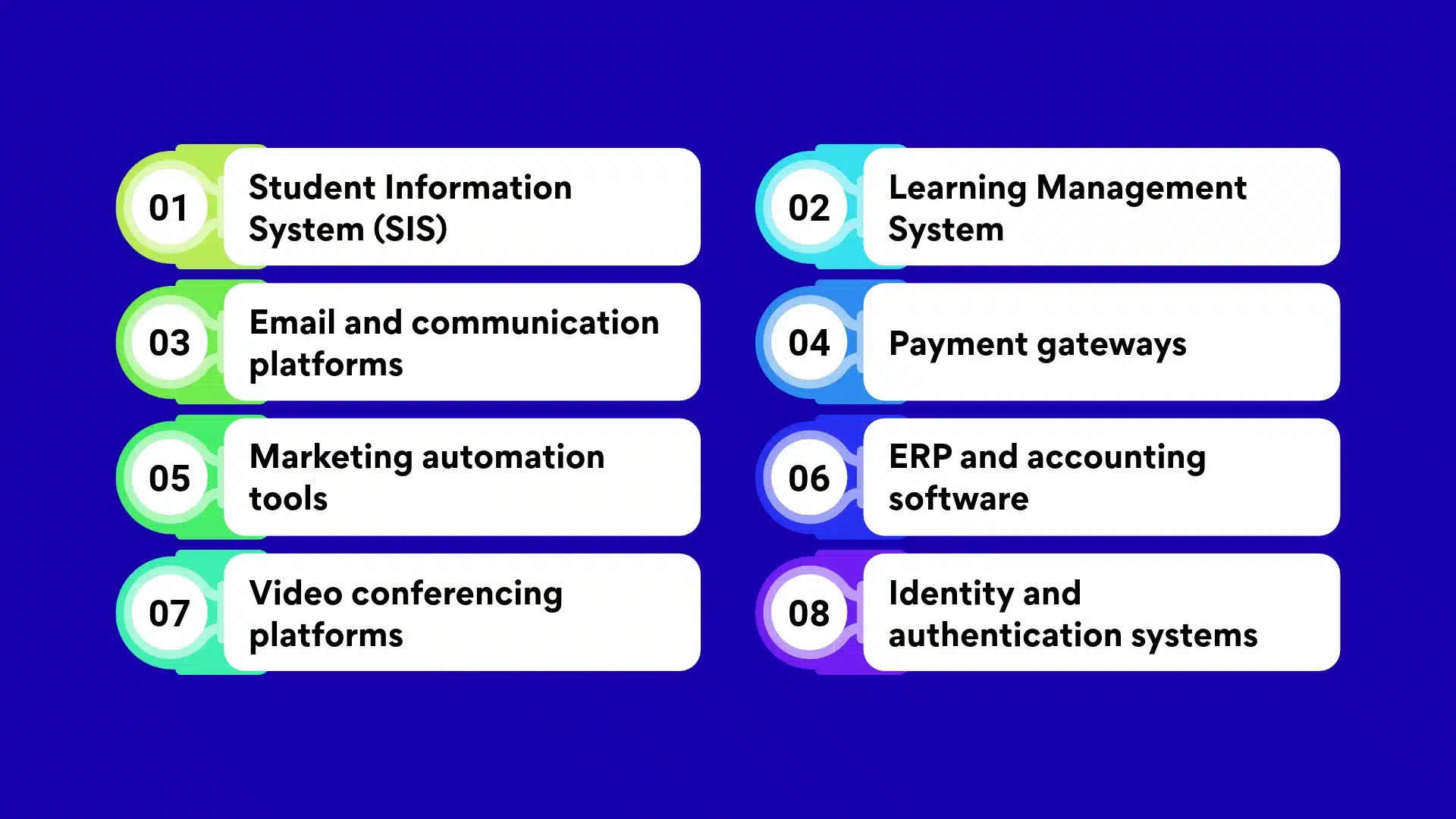
Student Information System (SIS)
This integration will help you connect admission and recruitment activities with the institution’s official student records. Suppose an applicant accepts an admission offer. Your product will transfer their personal details, chosen program, and application status directly to the SIS. The latter then:
- Creates an official student record
- Assigns an ID number
- Returns enrolment details to your CRM
This integration yields maximum value during peak admission periods when hundreds of applicants move from offer acceptance to registration. Admission teams can then:
- Identify who has completed enrolment successfully
- Follow up with students whose registration is still in progress
- Report actual conversions instead of relying on accepted offers
However, there’s a trade-off. Platforms like Ellucian Banner and Workday Student use different data structures. This will make careful configuration necessary for field mapping, duplicate-record detection, and synchronization rules. Also, you need to ensure the SIS remains the authoritative source for official enrolment data. By doing so, you get the opportunity to prevent any conflict in student records and maintain absolute data integrity across all edtech platforms.
Learning Management System
When someone enrolls in a course through Canvas, Moodle, or Blackboard, this platform will share enrollment details and relevant engagement events with your CRM. The benefit? Your customers, whether it’s a university or a K-12 school, then receive a complete, unobscured view of student participation that goes beyond admission and registration. To understand this behavior, let’s assume a learner has stopped accessing a course out of the blue before completing a required module.
Your CRM can then trigger a follow-up automatically, minimizing the need for manual intervention and allowing an academic consultant to take appropriate actions in case the issue escalates. In addition, universities and K-12 schools using your CRM can identify learners eligible for advanced programs or additional courses by analyzing course completion records. The downside appears when you want to transfer login, click, or page view events, as this can create messy records with compromised data integrity.
The key here is to prioritize specific events capable of signaling either meaningful progress or disengagement. In addition, you should also account for the major differences that often remain hidden in:
- LMS APIs
- Course structures
- Student consent requirements
Email and communication platforms
Whether it’s Microsoft Outlook or Google Workspace, once you integrate your education CRM with these platforms, you allow your customers to manage applicant communication from within their already-established workflows. Let’s imagine a scenario where an admissions officer sends an email or receives a reply. Your product can automatically associate the conversation with the relevant prospect or application record. No manual updating is required here.
Your customers then get access to a complete communication history, using which different teams can continue the conversation as required without asking the applicant to repeat the same information over and over again. What’s more, you can even support SMS communication through services like Twilio for quick admission updates and deadline reminders.
As email synchronization depends on reliable contact matching and permission controls, you need to work on these attributes prior to moving the integration to production. Otherwise, your CRM will end up:
- Creating duplicate conversations
- Exposing confidential messages
- Sending automated follow-ups after the enrolment is already completed
Payment gateways
Your customers can track every monetary transaction involving applicants without relying on the age-old manual updates or reports from their in-house finance teams. Suppose a student pays through Stripe or Authorize.net, whether it’s the initial registration fee for an UG course or the nominal deposit for a Fall distance learning program. The payment gateway can easily notify your education CRM through a webhook. The latter will then update the applicant’s payment status and trigger the appropriate next step as per the rules you configure.
It can be confirming the deposit or flagging an unpaid application. The benefit? Your customers can identify payment-specific enrolment delays and minimize manual reconciliation work. However, payment processing isn’t limited to just receiving a successful transaction notification. So, you need to ensure the integration can handle events like:
- Failed payments
- Chargebacks
- Duplicate webhooks
Marketing automation tools
From K-12 schools to multi-specialty universities, almost every US educational body already uses HubSpot or Marketo to attract prospective students through channels like:
- Webinars
- Downloadable course guides
- Paid campaigns
- Email newsletters
Here, your software will add value by connecting this marketing activity to the actual admissions journey. Let’s imagine a prospect repeatedly engages with a course campaign. But unfortunately, they haven’t started an application yet. In such a case, your CRM integrated with the marketing automation tool can route the lead to the admissions team in charge for personal follow-up.
Once the applicant applies in the system, your product will pass back the status to the marketing platform and trigger a stop sequence for acquisition emails. This integration also brings another advantage: your customers will be able to see which campaigns have generated maximum applications, and not just the clicks.
ERP and accounting software
When we talk about the financial picture of an applicant, it never remains consistent throughout the admission process. That’s because the concerned educational entity can receive the application fee first, followed by the enrolment deposit and then the tuition fees. Your CRM will then help customers follow these payment milestones from a single dashboard, and not rely on their fragmented ERP or accounting records to handle the actual financial transactions.
Besides, the integration will enable every transaction detail to reach the connected finance tool accurately from your platform, be it QuickBooks or NetSuite. The benefit? Whether they want to match payments against student accounts or investigate discrepancies between collected fees and recorded revenue, it will provide the flexibility of configuring custom account mapping and transaction rules.
Video conferencing platforms
Integrating your education CRM software with tools like Microsoft Teams or Zoom will allow your customers to conduct activities like:
- Virtual admission interviews
- Parent meetings
- Student counselling
- Course demonstrations
Take an admissions officer scheduling an interview directly from an applicant’s CRM record, for example. Once the meeting ends, your product will record attendance and let the staff add interview notes or update the application’s status. By doing so, it prevents meeting details from getting buried in individual calendars and ensures the concerned teams can follow up on missed appointments.
Identity and authentication systems
Your education CRM tool will often have to work with login systems your customers have been using for several years. So, once you integrate it with Microsoft Entra ID or Okta, users can use the existing credentials to access your system instead of being forced to manage separate passwords. What’s more, you can eliminate friction from new onboarding journeys by building a Single Sign-On feature. Similarly, RBACs will help your customers decide which person gets read access and who can modify stored student records and to what extent.
The only trade-off here is considering the difference between authentication and authorization. You cannot treat either one as a substitute for the other. Otherwise, you will end up compromising data integrity and exposing confidential details to external parties.
CRM for education and real-world examples for consideration
Student recruitment and admissions
Your CRM system for education will help institutions manage prospect relationships straight from initial inquiry through application and enrolment without having to switch between multiple tools. It gives the recruitment staff a shared record of each student’s interactions, whether it’s a conversation with an education counselor or the participation details in a recruitment event. For example, a counsellor can easily check if a prospect has attended a college fair or responded positively to a course campaign from within the CRM. Similarly, admission managers can examine where applicants originate and which recruitment efforts generate actual applications.
Iowa State University illustrates this use case further at scale. It began expanding Salesforce in 2017 to give college-based recruiters a common working environment. The university subsequently extended the platform to graduate recruitment and also developed custom event functionality for school visits and college fairs. Iowa State even reported a 25% increase in business-process productivity.
For your CRM, therefore, the significant design consideration will be the relationship between prospect history and recruiter activity. So, make sure to build a system where event attendance, counselor assignments, application progress, and campaign responses contribute to one continuous record, and not multiple isolated information pieces. If your institution already runs on Salesforce, our Salesforce development services can extend it with custom workflows and SIS or payment integrations instead of replacing it.
Student engagement and retention
An education CRM helps institutions manage the services and administrative interactions that influence a student’s ability to continue studying. This practical use case becomes clearer when a request involves more than one department. Suppose a student has contacted the registrar to know more about registration eligibility only to discover that a financial hold must be cleared first. Without coordinated case management, the student then becomes responsible for navigating between multiple departments. A CRM can instead:
- Preserve the original request
- Route it to the responsible team
- Record internal updates
- Make the resolution visible to the staff involved
Arizona State University has already developed this approach through its Service Excellence initiatives in 2013. Using Salesforce Service Cloud, it brought general departmental email addresses into a centralized case-management process. This allowed the teams to convert incoming requests into appropriate cases and implement workflow rules for automatic assignment. ASU also developed a searchable knowledge base accessible through its My ASU portal, ensuring students can find answers without having to submit a service request.
Your opportunity is to make case management sensitive to students’ institutional context. Whether it’s a financial hold or an unresolved technology request, no ticket should exist as an isolated event. Your CRM must let authorized staff see the relevant student record, understand the issue’s history, and identify which team is responsible for the next action.
Lead tracking & nurturing.
When a prospective student requests information about multiple course programs without being ready to apply, the education CRM software records that interest and helps recruitment teams understand how to approach the person persuasively. Therefore, someone exploring an online MBA program receives information relevant to the course, and not repetitive undergraduate admission messages. Once the prospect responds to emails, attends webinars, or requests a further conversation, the CRM adjusts the communication journey and alerts a recruiter when personal follow-up is needed.
The University of Massachusetts Lowell’s Division of Graduate, Online & Professional Studies struggled a lot in handling 20K+ inquiries annually across 200+ academic programs. It was only after implementing Salesforce Marketing Cloud that the institute was able to create personalized content and tailor communications to program interests. The team also filtered bot submissions using form honeypot fields and IP quality scoring. This initiative generated more than 1.5K prospective-student responses in a month and was associated with a 4% increase in graduate enrolment yield.
For your product, therefore, lead nurturing should be driven by program-level intent, and not a generic sequence of scheduled emails. Hence, you will have to give customers control over their business goals associated with:
- Audience segmentation
- Behavioral triggers
- Communication frequency
- Application-based campaigns
Continuing education and course renewals
Continuing education CRM supports relationships with learners who return for additional courses, professional certificates, microcredentials, or career development programs. Unlike a conventional degree pathway, these prospects are likely to complete courses intermittently while balancing employment and family responsibilities. Educational institutions can use the CRM to know which requirements a learner has completed and what remains before awarding a certificate. Apart from this, the tool can be configured to:
- Send relevant course reminders
- Identify learners approaching completion
- Encourage registration for the next suitable offering
Take the example of the University of Utah’s Professional Education team offering multi-course certificate and microcredential programs so that learners can complete 3 to 6 classes in any order, sometimes over several years. They developed a Salesforce enrolment tracker that imports student data from PeopleSoft, matches registration against program requirements, and automatically records course completion.
While developing an educational CRM, make sure to model learning progress at both course and program level. That’s because a learner might complete one course only without completing the certificate, which is why a simple enrolment-status field won’t be enough to capture their actual position.
Parent and guardian relationship management
With education CRM implementation, institutions can maintain an organized relationship with the adults responsible for a student’s education. The tool generates maximum value in K–12 environments, where one student usually has multiple authorized contacts, each with different communication preferences and responsibilities. It can be designed to maintain separate parent and guardian profiles linked to the same student, record who attended a parent-teacher meeting, and track unresolved concerns raised by a family.
MSD Wayne Township in Indiana demonstrates the operational value of centralized family communication. The district, serving 16,865 students across 20 public schools, replaced fragmented tools such as SchoolMessenger, Remind, and ClassDojo with ParentSquare. Its platform integrates with the student information system to keep family contact records current and supports multilingual messaging. The district achieved 98% parent contactability, while participation among English learner families at orientation increased by 100–200% after communications were provided in preferred languages.
What you need to consider here is a model that can map family relationships separately from student records. For this, your CRM must support multiple guardians per student, authorized access at the individual level, preferred communication languages, and contact verification through SIS synchronization.
Key benefits of CRM for education organizations
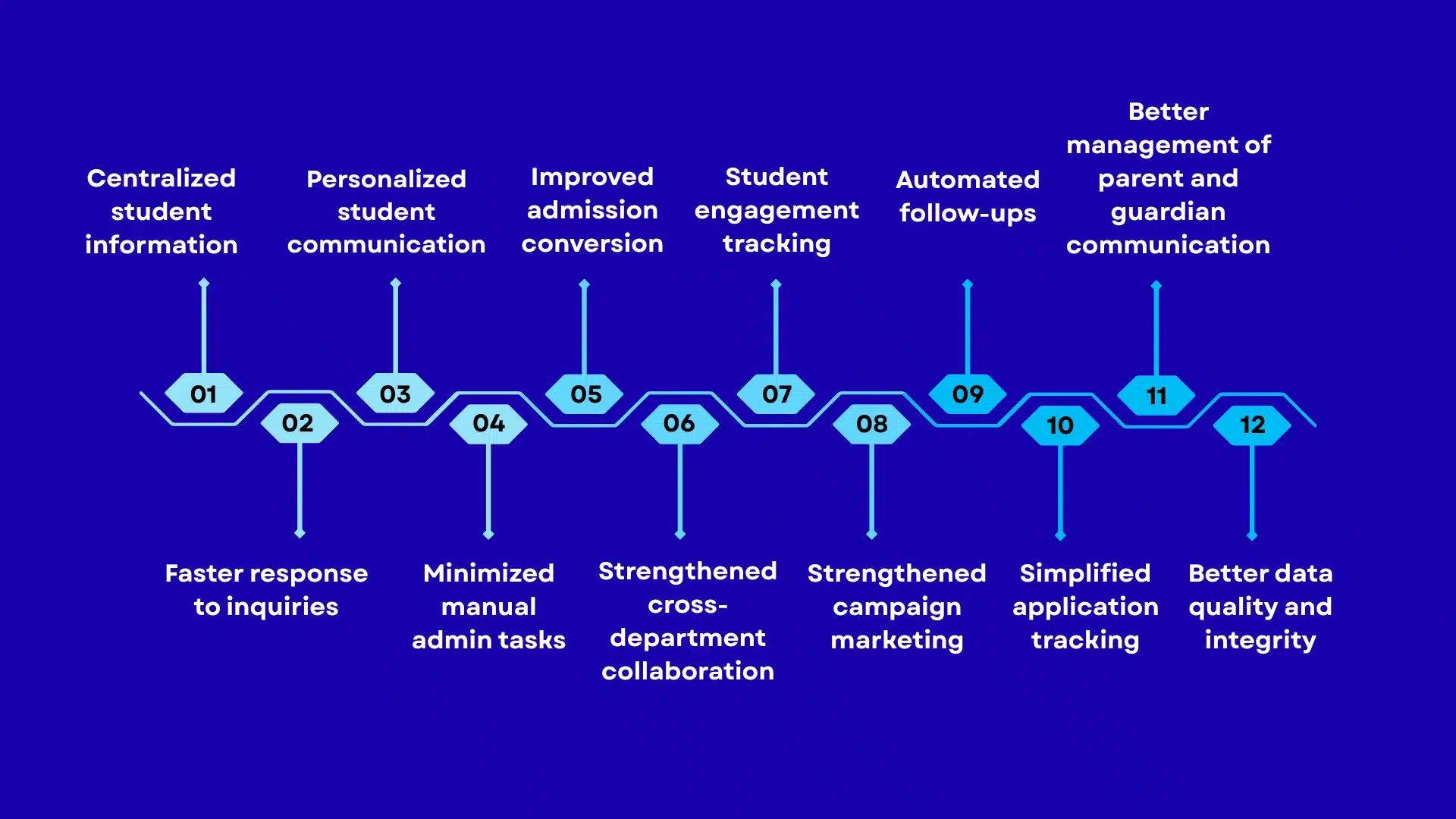
Centralized student information
Your CRM software can give leadership a reliable view of the recruitment portfolio across campuses, programs, and intake periods through a centralized dashboard. It can also expose duplicate demand and conflicting ownership, like two recruiters pursuing the same applicant or separate records inflating inquiry volume. This automatically changes staffing decisions, campaign attribution, and the credibility of enrolment reports.
Faster response to inquiries
Response speed affects whether an institution enters a student’s consideration set before competing colleges. Inquiry timestamps, assignment delays, and first-contact times can reveal where demand is being lost. Comparing these measures by program and channel will show whether counselor capacity is adequate during peak periods, rather than simply relying on average response times.
Personalized student communication
Your CRM can help personalize communication and create measurable value by reflecting the applicant’s actual decision barrier. A transfer applicant might need a credit evaluation, or an admitted international applicant might be waiting for visa documentation. Relevant journeys configured within the CRM can help your customers address these blockers at the right stage, while suppression rules will prevent enrolled students from receiving acquisition campaigns consistently.
Minimized manual admin tasks
Your CRM’s automation feature can help reduce the hidden operating cost of recruitment, like repeated record entry, manual list preparation, deadline chasing, and departmental reconciliation. The financial benefit here isn’t simply fewer clicks. Rather, it’s the additional counselor capacity institutions will have during application peaks, less overtime before enrolment deadlines, and fewer qualified applicants lost because of unfinished routine tasks.
Improved admission conversion
Admission conversion analysis separates weak demand generation from poor execution after inquiry. If inquiry-to-application rates are healthy but completed-file rates fall, the bottleneck may be documentation or application friction. If offers do not become deposits, the issue shifts to affordability, competing offers, or follow-up. Each failure requires a different intervention, which is where your CRM software will come into play to amplify admission conversion.
Strengthened cross-department collaboration
By enabling cross-department coordination, your CRM tool will help reduce enrolment leakage often caused by unresolved handoffs. A student who is ready to register might get blocked by financial-aid verification, residency classification, or immunization clearance. Once your tool makes ownership and status visible, teams can easily resolve the dependency instead of sending students between offices or counting the person prematurely as enrolled.
Student engagement tracking
This particular CRM feature allows educational organizations to distinguish activity from intent easily. From advising appointments to event attendance, service requests, and responses to outreach, every action can carry different meanings from email opens. Your product can help compare these signals with persistence and course registration. Thus, institutions can easily identify interactions that predict continued enrolment, instead of treating digital touch as the only evidence of engagement.
Strengthened campaign marketing
You can configure your education CRM tool so that it can connect campaign responses with applicant records. This will further help marketing teams to follow a lead from its original source through application and enrolment. Instead of judging a campaign solely by clicks or inquiries, institutions can identify which channels attract enrolled students, compare recruitment costs, and allocate budgets using actual enrolment outcomes.
Automated follow-ups
Your customers can configure the education CRM to send follow-ups automatically and keep applicants moving through time-sensitive admission requirements. They won’t have to rely entirely on counselor reminders. If an application lacks a transcript or an admitted student hasn’t paid the deposit, your product can trigger state-specific messages and staff tasks. This will further minimize missed deadlines and prevent qualified applicants from abandoning unfinished enrolment steps.
Simplified application tracking
The educational CRM will help bring application progress, document status, reviewer updates, and outstanding actions into a shared view. Admission staff can then identify files awaiting transcripts, recommendation letters, or departmental decisions without having to search isolated systems. The result? Reduced application processing delays, improved workload distribution, and more consistency in updates sent to applicants throughout the admission cycle.
Better management of parent and guardian communication
This edtech software maintains connected student and guardian profiles, allowing schools to manage separate contact details, communication preferences, and authorized relationships. Staff can then send attendance notifications, fee reminders, or school updates to the appropriate contacts without having to maintain duplicate family records. Communication errors can, therefore, be minimized across households with varying custody arrangements.
Better data quality and integrity
An education CRM improves record accuracy by matching duplicate inquiries, validating contact information, and maintaining consistent applicant histories across all recruitment channels. When someone registers at an open house and later submits the application, both interactions can be associated with one profile.
How to integrate a CRM in an education business?
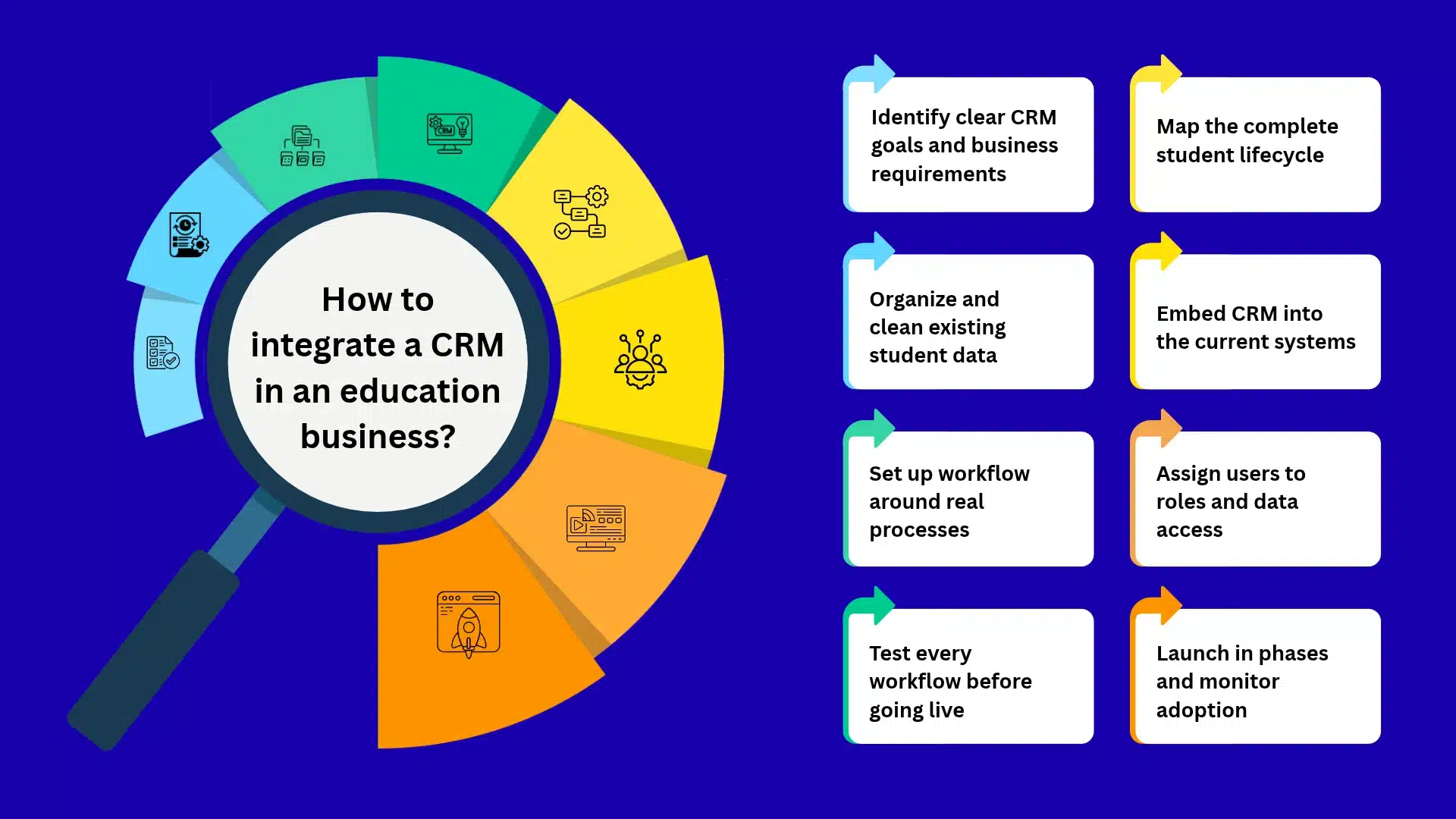
Identify clear CRM goals and business requirements
To integrate a CRM into an education business, start by identifying the enrolment or operational problem your investment is meant to solve. If your customers are losing applicants through delayed follow-ups, you will have to prioritize recruitment workflow improvements over secondary features. Define measurable targets for conversion, response time, and staff workload. Only then approve the implementation scope or expenditure.
Map the complete student lifecycle
Map the entire lifecycle of a student’s journey before configuring your CRM. That’s because your customers might be managing undergraduate recruitment, graduate admissions, transfer applications, and continuing education through different procedures. Documenting where each journey begins, which department takes ownership, and what qualifies as successful enrolment will help prevent unsuitable pipeline structures and incomplete lifecycle reporting.
Organize and clean existing student data
Before migrating records to your education CRM tool, establish ho existing applicant data needs to be reconciled. Your customers can have duplicate contacts across admission spreadsheets, event platforms, and legacy databases. That’s why you need to define matching rules using email addresses and institutional identifiers and then focus on resolving conflicting datasets. If not, inaccurate historical data will compromise segmentation and enrolment reporting.
Embed CRM into the current systems
Integrate your education CRM with the systems your customers already depend on. The SIS should remain authoritative for official student records, while the application platform manages submitted applications and the payment gateway confirms transactions. Define field ownership and synchronization direction before connecting APIs.
Set up workflow around real processes
Configure CRM workflows around the actual admissions procedures that your customers follow. An undergraduate application awaiting transcript verification should not follow the same approval route as a graduate application requiring faculty review. Reproducing these differences in task assignments and escalation rules ensures automation reflects institutional decision-making rather than imposing artificial processes.
Assign users to roles and data access
Establish role-based access before your education CRM goes live. Admissions counselors need recruitment histories, whereas financial-aid personnel handle more restricted verification information. Your customers should not grant broad departmental access simply for convenience. Define permissions around job responsibilities, sensitive fields, and authorized student relationships to reduce unnecessary exposure of education records.
Test every workflow before going live
Test your product against complete admissions scenarios before production deployment. Check whether duplicate applications merge correctly, payment failures update applicant status, and SIS synchronization preserves authoritative records. In addition, include withdrawn applicants and deferred admissions in testing. These exceptions will help you expose failures that a successful demonstration using uncomplicated sample records will not reveal.
Launch in phases and monitor adoption
Launch with one admissions department or academic program before expanding across your customers’ operations. Monitor whether counselors record interactions consistently, managers use pipeline reports, and integrations remain stable under actual workloads. Compare response times, application completion, and enrollment conversion against baseline performance before expanding the rollout.
Challenges of adopting an education CRM and how to overcome them
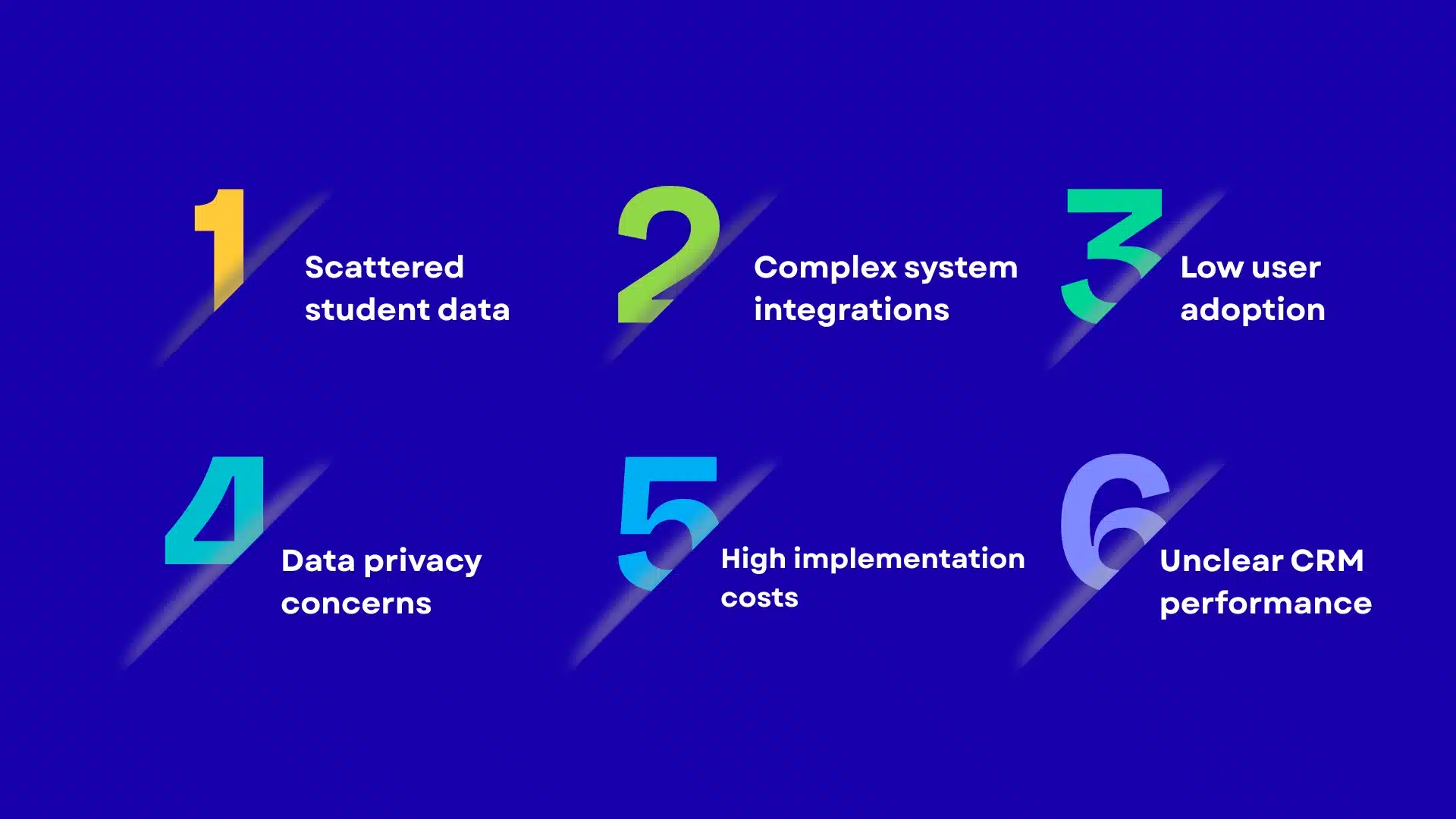
Scattered student data
When student data sits in isolated systems, CRM adoption becomes more complicated than you initially anticipated. That’s because your customers may maintain separate records across admissions spreadsheets, legacy databases, event platforms, and departmental applications. Migrating everything without reconciliation will create duplicate profiles and unreliable reporting. So, address this by auditing source systems first, establishing a master record strategy, and defining which platform owns each data field before migration.
Complex system integrations
Integrating an education CRM with SIS, LMS, payment, and application platforms involves different APIs, data structures, and synchronization rules. Your customers may also operate older systems with limited integration capabilities. Assess API availability, authentication requirements, and data ownership before implementation. Also, make sure to prioritize critical integrations, validate error handling, and avoid expensive custom connections without a clear operational need.
Low user adoption
Low CRM adoption surfaces when employees perceive the platform as additional administrative work rather than part of their existing process. Counselors may continue using spreadsheets if logging calls takes longer than recording them elsewhere. That’s why you need to involve departmental users during configuration and remove unnecessary data-entry steps. Apart from this, you also have to measure adoption through actual workflow completion rather than login frequency.
Data privacy concerns
Education CRM adoption involves sensitive records, especially when student information has to move between recruitment, advising, and external platforms. FERPA obligations further demand that institutions control access and protect education records. The key here is to review vendor agreements, access permissions, retention policies, and integration security before migration. Only by doing so can you prevent poorly governed data sharing from creating regulatory exposure and reputational damage.
High implementation costs
The implementation costs of an education CRM tool usually extend beyond software licensing. Data migration, integration development, process redesign, staff training, and ongoing administration can increase the total cost of ownership. Before committing, separate mandatory implementation expenses from optional customization. Phase deployment around high-value workflows, and assess recurring costs against measurable improvements in enrollment operations and staff capacity.
Unclear CRM performance
When institutions measure activity rather than business outcomes, it will be difficult to measure your CRM’s performance in real time. High login counts or thousands of recorded inquiries do not establish improved enrollment. What you need to do here is define baseline metrics before launch, including inquiry response time, application completion, admission yield, and enrollment conversion. Do not forget to review these by program and recruitment channel to identify measurable operational improvements.
Why choose GMTA Software for education CRM development?
At GMTA Software, we understand that an education CRM is not just a place to store student contacts. It has to support the work happening behind every inquiry, application, admission decision, and enrollment. That is where our approach to custom software development comes in. We look at how information moves between departments and systems before deciding how the CRM should work.
For example, an admissions team should not have to chase the finance department to confirm whether an enrollment deposit has been received. Nor should a counselor work from an applicant record that has not been updated after a change in the application system. We address these situations through custom workflows, API integrations, centralized data handling, and role-based access. Our experience building web applications and connecting business systems also allows us to work with existing institutional technology rather than assume everything needs replacing. The same approach applies to the learning platforms around the CRM, which we cover in our education app development services.
We bring more than seven years of software development experience, with over 200 projects delivered for 80+ customers. Our engineering capabilities span custom web and mobile applications, backend development, and integrations. Where an education CRM requires intelligent document handling or automated support, our experience with technologies such as LangChain, LangGraph, and retrieval-augmented generation (RAG) provides additional scope for building those capabilities.
Our flexible engagement models allow development to progress around your roadmap, with six months of post-launch maintenance included in our offering. If you are planning an education CRM, a discussion with our team can help clarify the architecture, integrations, and delivery scope before development begins.
FAQs
What is the difference between an education CRM and a student information system (SIS)?
An education CRM manages relationships throughout recruitment, admissions, communication, and student engagement. A Student Information System (SIS) maintains official academic and administrative records, including enrolment, grades, attendance, and course registration. On the one hand, the CRM focuses on relationship management and recruitment workflows. On the other hand, the SIS remains the authoritative record system.
How much does it cost to develop a custom education CRM?
Custom education CRM development costs between $30K and $150K for a focused platform, while complex enterprise systems can exceed $200K. Pricing depends on workflow complexity, user roles, integrations, reporting requirements, migration, and security controls. Connecting multiple SIS and LMS platforms or supporting multi-campus operations will increase engineering effort, and hence the overall development investment. As for ongoing hosting, maintenance, and enhancements, you will have to budget for recurring expenses. For broader CRM pricing, see our custom CRM development cost guide, and for the learning-platform side, the cost of building an education app.
Is an education CRM suitable for both K–12 schools and higher education institutions?
Yes, education CRM software supports both K-12 schools and higher education institutions even though their workflows differ. K-12 deployments focus on family communication, admission inquiries, and enrolment management. Colleges and universities require more extensive recruitment pipelines, application tracking, financial aid coordination, and alumni engagement. That’s why you need to ensure that your product’s configuration reflects each institution’s operating model and regulatory obligations.
How does an education CRM support FERPA compliance and student data security?
An education CRM supports FERPA compliance through role-based access, restricted record visibility, audit logs, secure data transmission, and controlled information sharing. However, using it doesn’t automatically make an institution FERPA compliant. Your users will have to establish legitimate access permissions, review vendor agreements, govern third-party disclosures, and maintain appropriate safeguards for protected education records.
Should an education business choose a custom CRM or an off-the-shelf platform?
Choose an off-the-shelf education CRM when existing workflows fit an institution’s requirements, and standard integrations cover its systems. Custom CRM development makes more sense when recruitment processes, multi-campus operations, legacy integrations, or reporting requirements demand substantial customization. Compare total ownership costs, licensing restrictions, integration expenses, and future scalability before committing to either approach.

Rishi Ram is CTO at GMTA Software, with 6+ years of experience in software architecture and technical leadership. He’s led GMTA’s work across fintech—including eWallet apps, mobile banking platforms, and Sharia-compliant fintech builds—as well as on-demand and taxi app development and AI-integrated products like fraud detection agents and workflow automation tools.