


Key Takeaways:
- PyTorch is an excellent option in deep learning, research, generative AI, computer vision, and NLP.
- TensorFlow can still be used for large production systems, serving, mobile, and enterprise workloads.
- One of the most suitable machine learning frameworks for classical ML and structured cases is scikit-learn.
- Keras may be recommended when fast prototyping is necessary, with a simple deep-learning application.
- JAX is optimised for high-performance numerical modelling, research, and accelerator-intensive workloads.
- XGBoost, LightGBM, and CatBoost are still very viable for tabular business data.
- Hugging Face Transformers are especially helpful when dealing with pretrained language, vision, and multimodal models.
- Like MLflow, Kubeflow, and Ray, model-serving platforms are complementary and not substitutes for core ML frameworks.
- No one-size-fits-all framework exists. The best decision will be based on the information, the type of model, programming focus, the platform where they are deployed, and the experience of a team.
When you are planning to launch an Android app in the US, your biggest concern shouldn’t be whether your team can build the product. Instead, it should be whether you are funding the right product for the $988.5 million market you are entering in 2026. A missed trend at the planning stage is likely to become a costly product decision later in a couple of years. That’s because it will affect the way your customers interact with your app, the device they use, the data you collect, or the amount of manual work your product requires.
Android is changing on all of these fronts. AI is moving into everyday app interactions, beyond conventional recommendation engines and chatbots. The demand for innovative Android apps isn’t going anywhere, especially now that in 2026, about 143 billion mobile apps will be downloaded from the Google Play Store. At the same time, privacy and security are also becoming consequential. Especially as apps now handle sensitive customer data.
Overlooking these shifts can leave you with numerous challenges you could never comprehend. From higher redevelopment expenses to a narrower product experience and weaker retention, missing these opportunities can never help you differentiate your business. The problem will turn grave when the missed capability sits deep inside your product architecture.
So, we have illustrated which Android app development trends in 2026 are likely to materially affect your product and which are unlikely to justify the investment. Understanding these now will give you the information to decide which should be built into the foundation of your product, and not retrofitted later.
How big is the Android app market in 2026?
The Android opportunity in 2026 is colossal enough to make the market a serious business platform, rather than continuing to act as a simple mobile distribution channel. It accounted for 67.61% of global mobile OS usage as of August 2026. For your business, this matters because the numbers represent the scale of the ecosystem your app will operate within once you move it to production. However, there’s a catch: you cannot assume the global share to be similar to the US addressable market. The real business opportunity lies in the Android adoption rate among your specific customer segment.
Google revealed that its Play Store has 2.5+ billion active users across 190+ markets, which means the product will give you direct access to one of the world’s largest established digital distribution networks. What’s surprising is that this platform was never positioned just to act as an anchor for publishing mobile apps. Rather, it has helped and will help businesses acquire, engage, retain, and monetize users.
The broader mobile economy reinforces this business opportunity further. That’s because the global Android mobile app market is expected to grow from $116.87 billion in 2025 to $988.5 billion in 2035. With the US being recognized as one of the largest markets amongst all other countries, you won’t be just entering a market where mobile apps are peripheral for businesses. Instead, you will be tapping into an ecosystem where these digitized products have already become a substantial commercial channel across industries.
The bottom line is that the Android market offers enormous reach. But reach alone can never guarantee revenue. Your app will still need the right category, customer proposition, acquisition strategy, retention model, and monetization mechanism. The size of the ecosystem simply implies that there is a substantial demand to compete for.
Not sure which 2026 trends are worth building into your Android app?
Get a free 20-minute consultation with our Android team before you lock in your roadmap.
Android app trends in 2026: What is shaping the future of development
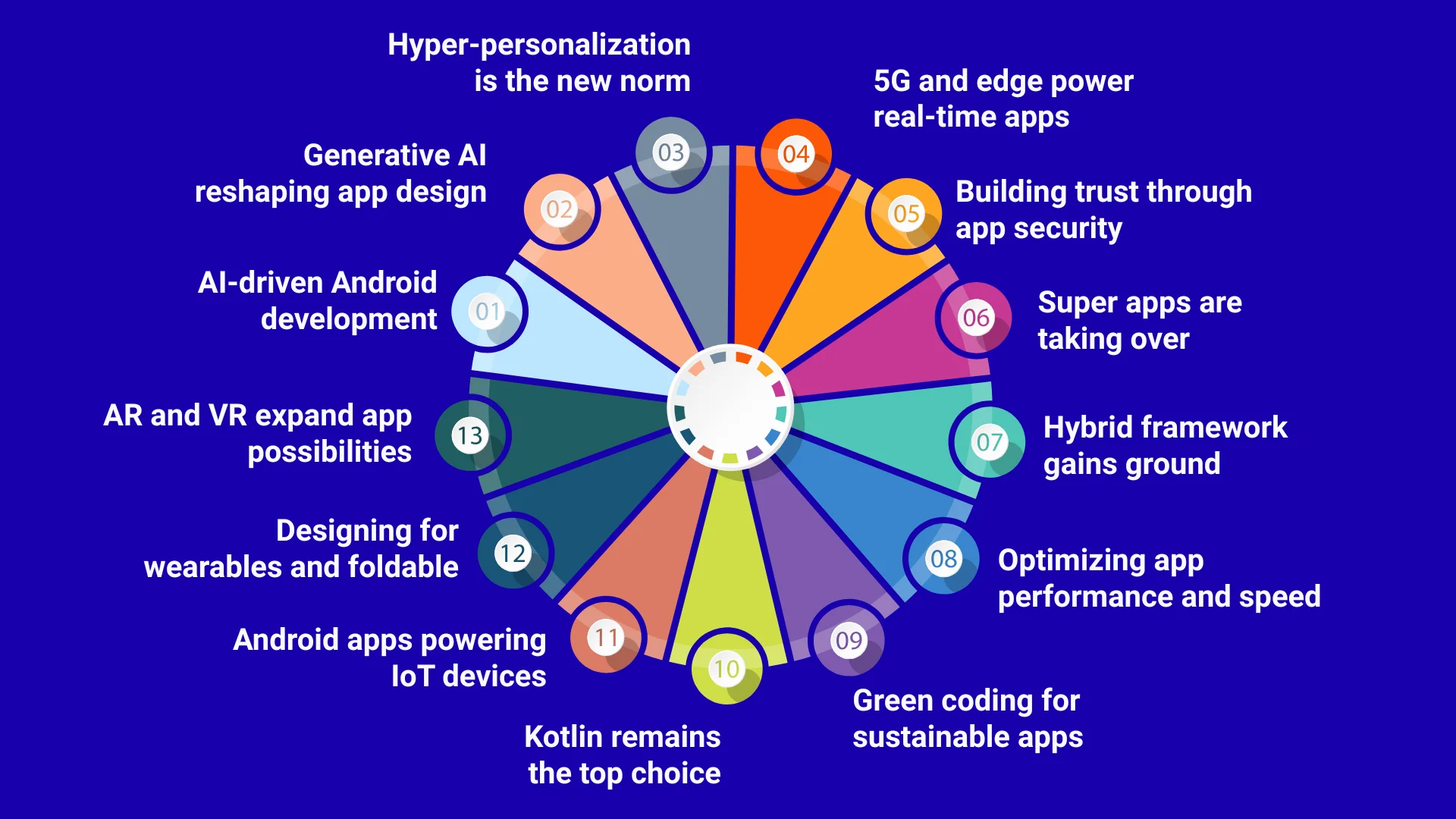
AI-driven Android development
You can now use artificial intelligence to accelerate the build cycle and add intelligent capabilities directly into the Android app you are developing. As of 2026, this includes:
- AI-assisted coding
- Automated debugging and testing
- AI-powered UI development
- On-device AI
- Agent-driven app interactions
In fact, Google’s latest Android Studio now comes integrated with Gemini. This allows developers to generate code, troubleshoot errors, analyze crashes, build UI components, and work across complex development tasks. For your business, it means faster product development and less repetitive engineering work. In addition, AI also changes the scope of functionality you can build. Take the example of On-device AI Android apps. With the help of Gemini Nano and ML Kit GenAI APIs, these products support multiple tasks without requiring every request to be sent to the cloud server.
Another key trend is AI agent integration. Android App Functions allow apps to expose specific functions that authorized agents can discover and execute. Thus, your users can complete multiple tasks through NLP-driven interactions rather than manually moving through multiple screens.
Generative AI reshaping app design
Using GenAI to design an Android app will allow you to build a product that can effortlessly generate, summarize, rewrite, personalize, and interpret content within UX. That’s because this OS platform supports GenAI through Gemini models, Firebase AI Logic, and on-device ML Kit GenAI APIS. This completely changes the role of the app’s interface.
Instead of asking users to follow the same fixed sequence of screens, you can use GenAI models to make interactions more context-aware and task-focused. A customer support app, for example, can summarize a long conversation in seconds. Similarly, a retail app can generate accurate product information based on user input.
This technology trend will directly affect both user effort and your product differentiation strategy. Suppose a customer previously needed five steps to find information, complete a form, or understand a result. With GenAI, however, the entire interaction gets reduced to a much smaller workflow. This creates a more efficient product experience while giving your US business additional opportunities to automate repetitive customer-facing tasks.
Hyper-personalization is the new norm
To deliver more relevant content, recommendations, and app experiences to your users, you can use a Generative AI personalization or hyper-personalization strategy. This will directly affect how effectively the app moves users towards valuable action, be it confirming the payment and successfully checking out or submitting an enquiry form. Instead of showing every customer the same home page, product list, or offers, you can use mechanisms like Engage SDK for surfacing personalized recommendations and continuation content across Google.
The objective here isn’t just to make the interface look tailored to different users and their search intent. Rather, it’s to reduce the time between opening the app and finding something relevant and purposeful. Personalization will also help create a retention opportunity for your US business. For example, if you use Android’s Engage SDK, you will gain valuable insights for re-engagement.
However, there’s a catch. Personalization will require an intensive data architecture. Your development team will, therefore, need to determine:
- Which behavioral data categories should be collected
- How user content and privacy requirements are handled
- How recommendations will be generated across all touchpoints
- Which personalization rules should influence the product experience
5G and edge power real-time apps
Android apps can use 5G and edge computing to deliver faster, more responsive experiences to the end users, regardless of the screen size and the OS version. That’s because both these technologies help reduce network latency and process data closer to where it gets generated, i.e., the users’ devices. Android is already offering multiple APIs that can detect 5G connectivity automatically, estimate available bandwidth, and adapt the app’s behavior to the changing network conditions. For specific enterprise and premium connectivity use cases, it also uses 5G network slicing techniques.
For your US business, this trend will matter if your product depends on real-time data or continuous connectivity. From delivery tracking to video communication, remote monitoring, multiplayer gaming, and live commerce, 5G and edge computing will generate maximum value by enabling responsive data exchange. A logistics app, for example, can update vehicle or order information continuously, and not rely solely on delayed refreshes. A healthcare monitoring app can process incoming information more efficiently, allowing clinicians to intervene at the right moment.
Edge computing adds another layer by moving selected processing closer to the user or device. Here, not all operational data will be sent to the cloud server. This architecture becomes relevant when milliseconds affect the user experience or when colossal volumes of device-generated data need to be processed with the highest efficacy.
Building trust through app security
In 2026, this particular aspect has shifted towards protecting the entire app ecosystem, starting from the user identity to API access to sensitive data, transactions, device logs, and application integrity. For your business, this will directly influence the architectural decisions, like how the product:
- Authenticates users
- Stores information
- Communicates with backend systems
- Responds to suspicious activities
A weak authentication flow, exposed API, insecure local storage, or compromised sessions doesn’t just create a technical defect. Rather, any of these events can interrupt transactions, expose customer information, trigger incident response costs, and damage user confidence in seconds. That’s why Android’s security model relies on the device and the OS to help protect users.
You can use different techniques to build a strong app security layer in 2026, like:
- App sandboxing
- Permission controls
- Credential protection
- Play Protect
- Platform-level safeguards
Your product’s architecture will have to move beyond a basic login screen. Define how tokens are issued and refreshed. Check how the APIs verify login or access requests and how sensitive actions are protected. If your app involves money or high-value actions, you will have to invest in device integrity and transaction-level controls from day one.
Super apps are taking over
Standing in 2026, the need for super apps/ on-demand apps has skyrocketed because these digital products connect multiple services, transactions, or functions within one platform. Thus, users don’t have to switch between different apps on their device. Consider a marketplace application. A user can perform multiple tasks without leaving the app, like:
- Discover a service
- Communicate directly with the provider
- Schedule an appointment
- Make a payment
- Track fulfilment status
- Receive support when needed
- Manage future bookings
Here, each connected function creates another opportunity for engagement and monetization, while reducing dependencies on separate third-party apps. Instead of building an app around one isolated transaction, you can therefore connect several services that naturally extend the customer’s journey. In addition, this Android app model can also help you strengthen customer retention and first-party data. When related activities happen inside a product, your business will gain a clearer view of the customer journey. Thus, you can further use the information to improve recommendations, offers, loyalty programs, and cross-selling.
Hybrid framework gains ground
These frameworks have gained immense popularity since 2024 as they help businesses to build both Android and iOS versions of the same product from a largely shared codebase. Thus, there’s no need to invest in duplicated implementation across platforms. Now, in 2026, frameworks like Flutter and React Native are highly significant for product teams that need to support both platforms while managing engineering resources. React Native’s new architecture, for example, replaces the older asynchronous bridge with JSI-based JavaScript-to-native communication. This has improved the framework’s ability to support more demanding native interactions.
The business advantage, here, is not just having one codebase. Rather, it’s the minimized duplicated product work. Suppose your Android and iOS app versions share multiple workflows, like:
- Authentication
- Onboarding
- Catalogs
- Booking
- Checkout
- Account management
- API-driven tasks
If you make any change to these workflows, you won’t have to implement them independently from scratch on both platforms. This becomes more useful when your Android launch is followed by an iOS launch. A shared architecture then allows the same product logic and much of the interface to move across platforms. At the same time, your product teams can concentrate on native development only where platform-specific capabilities are needed.
This decision will, therefore, affect your 5-year engineering cost, not just the initial build estimate. So, before you select a framework, map which features are genuinely cross-platform, which will require native APIs, how frequently both apps need to be updated, and if your development team has the native expertise.
Optimizing app performance and speed
Android app performance optimization in 2026 goes beyond reducing the app size or improving the startup time. It now involves measuring and optimizing the exact code paths users follow to complete important actions within your product. This has a direct business consequence because performance affects revenue-generating interactions across all platforms. Suppose a shopping app takes too long to display products or a marketplace delays search results. At these moments, users will experience friction before they can csuz complete a transaction.
That’s why Android’s Baseline Profile allows developers to identify critical journeys, like app launch, scrolling, payment, or login. It then helps them to precompile those code paths so that they can be executed more efficiently right from the first launch. Android also recommends measuring both Time to Initial Display (TTID) and Time to Full Display (TTFD). TTID is measured when the app’s frame first appears on the device screen, while TTFD signals the time when the app becomes fully usable. If your product’s screen loads initially fast but remains unusable due to data loading, optimization is not appropriate.
Green coding for sustainable apps
This means reducing unnecessary CPU processing, network transfers, background execution, storage operations, and battery consumption without reducing the application’s required functionality. In 2026, this has become more relevant as Android apps incorporate continuous synchronization, location services, richer media, AI processing, and connected-device features. The business impact here appears in two places: device efficiency and infrastructure consumption.
Suppose you have an app that repeatedly wakes the device, refreshes data unnecessarily, uploads large payloads, or performs processing that could have been avoided. By doing these, the product just increases resource consumption on the user’s device. At scale, unnecessary network and server processing also increases infrastructure work required to support the same customer workflow.
In addition, you also need to consider background activity. A delivery app, for example, might need location updates only while an order is active. A finance app, on the other hand, will need to refresh account information only after a transaction is processed. Therefore, designing these workflows around actual business events will help you reduce unnecessary data processing.
Performance profiling also offers a practical way to identify resource-intensive code. Android’s profiling tools can help you examine CPU activity, memory usage, power consumption, latency, and related runtime behavior. Thus, you no longer have to depend on assumptions about features that might be inefficient.
Kotlin remains the top choice
In 2026, Kotlin Multiplatform (KMP) gives businesses a way to reuse Kotlin-specific code across both Android and iOS. For your US startup, using Kotlin matters because it affects developer availability, maintenance, and the costs of expanding the product after the first launch. A Kotlin-based Android app aligns with the current Android ecosystem, making it easier for your team to adopt new platform capabilities and maintain the app efficiently over time.
KMP adds another commercial advantage when you plan to launch your app on both Android and iOS. Instead of building every piece separately, your team can share common functionalities, like:
- Business rules
- Data handling
- Networking
- Validation
- Authentication
You can also choose how much to share, instead of committing the entire app to one cross-platform approach. This means your Android investment can easily support a future iOS product without requiring two completely separate implementations. However, make sure to ask your development partner if they can structure the product in a way that the reusable functionalities are shared without compromising native Android or iOS experience.
Android apps powering IoT devices
Android apps are nowadays used to control, monitor, and manage connected devices, thereby turning the mobile app into part of the customer’s physical-product experience. This has become possible as the Android ecosystem natively supports seamless connectivity with Bluetooth, Bluetooth Low Energy, Wi-Fi, and companion devices. For your US business, the opportunity is recurring engagement beyond the initial product purchase.
A connected fitness device can use your app to deliver ongoing analytics and coaching. Similarly, industry equipment units with IoT sensors can send automated maintenance alerts to the floor operators. Smart home products can provide remote control and automation benefits.
These real-time use cases completely change the revenue model. Instead of relying only on hardware or one-time transactions, you can invest in IoT apps for Android users. This will help you support subscriptions, premium analytics, remote monitoring, maintenance services, usage-based offerings, and upgrades.
The app can also become part of the product’s support system. Device diagnostics, status alerts, setup, troubleshooting, firmware updates, and service notifications can be handled through the mobile experience. This will help reduce dependencies on a manual support matrix for routine support.
Designing for wearables and foldables
With foldable and wearable app development, you can easily expand the Android product beyond a standard smartphone experience, creating additional customer touchpoints and larger screen workflows. Android’s current ecosystem supports phones, tablets, foldables, Wear OS, and other form factors. This means that you will have to decide which device experience can help improve a customer action enough to justify the additional development scope.
Wearables will generate value only when customers need quick, time-sensitive information, like delivery updates, appointment reminders, payment notifications, or health metrics. Hence, the opportunity lies in minimizing the need to open the full mobile app for simple actions. On the other hand, foldables and tablets will create value when customers need more information on screen simultaneously. A real estate app can show listings beside property details, or a B2B dashboard can display KPIs besides underlying records.
AR and VR expand app possibilities
AR and VR are expanding Android apps from screen-based interactions into product visualization, immersive training, virtual experiences, and real-world assistance. At the same time, Google is also extending Android into XR devices, including headsets and glasses, while AR capabilities remain available for supported devices. For your business, the value of these technologies is strongest when your customers need to see, compare, place, or understand something before making a decision.
A furniture retailer can allow customers to visualize a product inside their home. A property company can provide virtual tours to clients. A fashion or beauty app can support virtual make-up try-ons. These experiences will reduce uncertainty during the buying process and give customers a more interactive way to evaluate options.
The wider AR VR spatial computing ecosystem also creates opportunities beyond customer-facing experiences. For example, training companies can use immersive simulations, manufacturers can provide remote assistance, and businesses can create interactive product demonstrations. Spatial experiences become more valuable when showing something on a conventional phone screen doesn’t provide enough context.
| Trend | Business Trigger | What You Gain | Priority Level | Business-Focused Prioritization |
| AI-Driven Android Development | High manual workload or complex customer workflows | Lower operating effort and smarter product capabilities | High | Include where AI produces a measurable business outcome. |
| Generative AI | Customers spend too much time searching, writing, summarizing, or processing information. | Faster task completion and more flexible interactions | High | Prioritize specific use cases rather than a generic chatbot. |
| Hyper-Personalization | Customers have significantly different preferences or purchasing behavior | Higher relevance, engagement, and repeat usage | High | Prioritize when personalization directly supports conversion or retention. |
| 5G and Edge | Product value depends on real-time updates or rapid responses | Faster interactions and better real-time experiences | Medium–High | Add selectively where latency affects a core workflow. |
| App Security | App handles sensitive data, payments, identity, or high-value transactions. | Lower security exposure and stronger customer confidence | Critical | Build in from day one. |
| Super Apps | Customers use multiple related services around your core product | More transactions, cross-selling, and ecosystem engagement | Medium–High | Plan expansion after establishing demand for the core product. |
| Hybrid Frameworks | You need Android and iOS without duplicating the entire development effort. | Greater development reuse and potentially lower cross-platform costs | High | Evaluate before development if both platforms are planned. |
| Performance and Speed | Customers frequently use search, booking, checkout, payments, or other critical workflows. | Better task completion, conversion, and user experience | Critical | Make performance a product requirement for key journeys. |
| Green Coding | App uses significant battery, data, processing, or cloud resources | Better resource efficiency and potentially lower operating consumption | Medium | Prioritize resource-heavy features where efficiency has measurable impact. |
| Kotlin + KMP | Android launches first, but iOS is planned | Modern Android development and potential cross-platform code reuse | High | Use Kotlin as the baseline and evaluate KMP for planned expansion. |
| IoT Integration | Business includes connected hardware, sensors, or physical devices | Continuous engagement and potential recurring digital services | Medium–High | Prioritize when connected products are central to the business model. |
| Wearables and Foldables | Customers benefit from quick access, alerts, monitoring, or larger screens. | Additional touchpoints and more convenient interactions | Medium | Add when a specific device improves an important customer journey. |
| AR, VR and Spatial Computing | Customers need visualization, simulation, or physical-environment interaction. | Better visualization, training, engagement, or service delivery | Medium | Keep outside the MVP unless immersive interaction is fundamental to the product. |
How should businesses update their Android apps for 2026 trends?
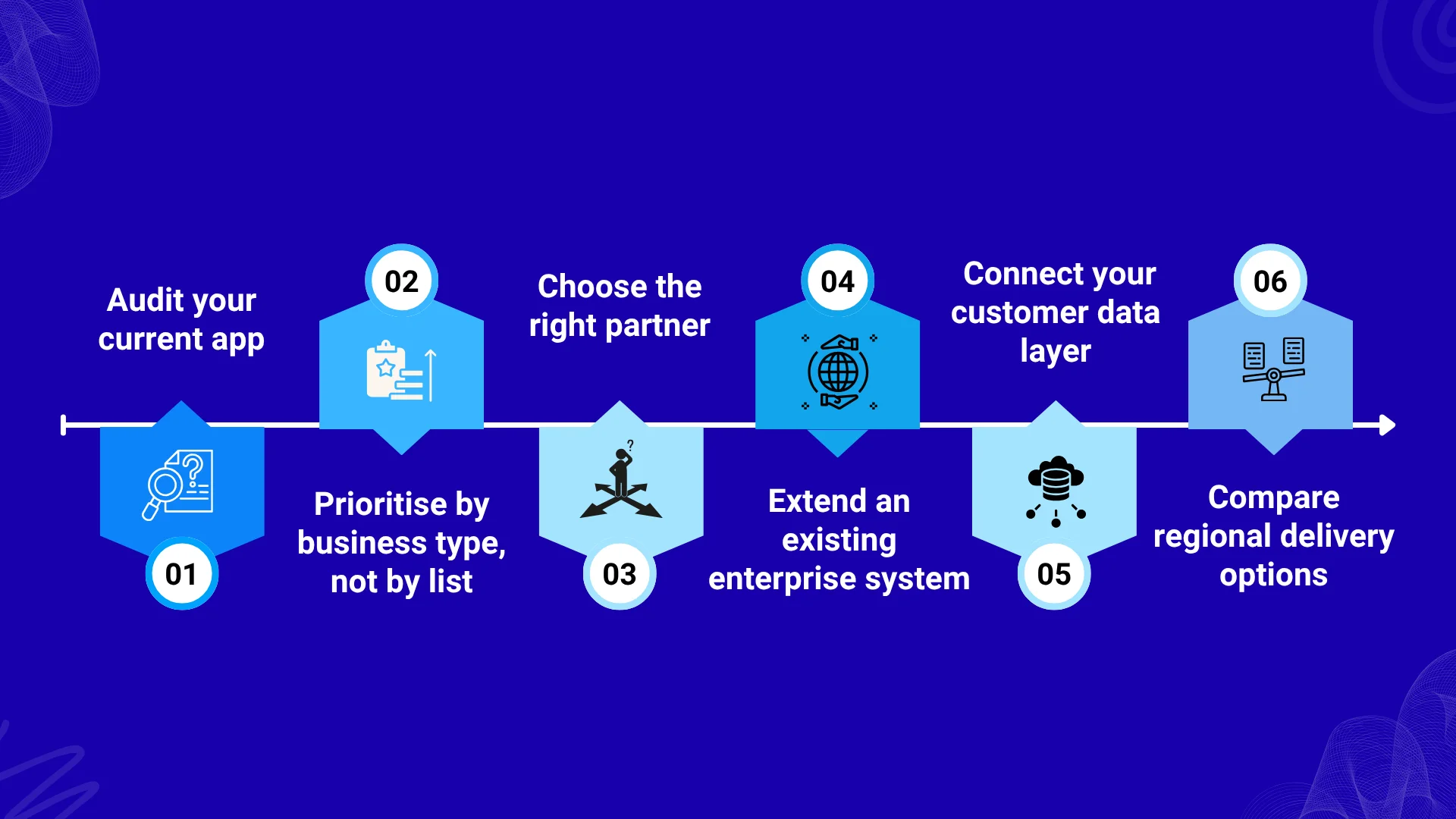
Step 1: Audit your current app
Before you add new 2026-based capabilities, audit your existing Android app against the customer journeys and business outcomes it was designed to support in the first place. Look at where users are dropping off consistently and which workflows are generating maximum support request volumes.
Examine the processes where customers still rely on manual effort and have yet to adopt automation. Review the current usage of AI, personalization, security, analytics, device compatibility, and integrations. However, make sure to evaluate each of these areas through their business impact, and not just check whether a technology is present.
For example, you can discover that improving search and personalization for your eCommerce app will have more immediate value than adding AR. Similarly, if you have a field service company in the US, you may learn that real-time tracking and IoT connectivity will be a better choice than incorporating a Generative AI model with your Android app.
Apart from these, the audit should also identify technical debt that, if not addressed, will make future updates expensive. Outdated dependencies, fragmented code, poor performance, or weak integration points will increase the cost of implementing new capabilities later.
Step 2: Prioritize by business type, not by list
The right priority logic for Android app development trends depends on your business model, customers, operational requirements, and revenue strategy. Instead of working through the list from top to bottom, identify which developments will directly improve the way your business acquires, serves, retains, or monetizes customers.
This approach will prevent unnecessary scope expansion. Adding every emerging capability will increase development and maintenance expenses, and that too without guaranteeing additional revenue or customer value. So, create a priority framework based on:
- Customer impact
- Operational efficiency
- Revenue potential
- Implementation effort
- Strategic relevance
Classify each trend as essential now, valuable for the next release cycle, or better left for future exploration. For example, when it comes to an eCommerce app, Generative AI search, hyper-personalization, and secure payments will have a direct commercial connection. A healthcare app, on the other hand, should put greater emphasis on privacy, security, accessibility, connected devices, and reliable performance.
Step 3: Choose the right partner
When you plan to hire Android app developers for your initiative, never go in blindly. Instead of evaluating vendors only on hourly rates or their ability to build Android screens, assess if they understand product strategy, integrations, security, testing, analytics, and long-term maintenance. Ask potential partners to explain how they would approach your specific priorities. If AI is important for your app, they should be able to identify practical use cases rather than simply proposing a chatbot.
Similarly, if you are planning cross-platform expansion, ask how they would evaluate Kotlin Multiplatform, native development, or another approach. Apart from these, you should also check previous work. A partner experienced in consumer marketplaces won’t be able to automatically add value to a regulated enterprise app or a connected device product.
Step 4: Extend an existing enterprise system
If your Android app already supports an established business, treat it as another access point to your existing systems, rather than building a disconnected product. Your CRM, ERP, inventory platform, payment infrastructure, customer support tools, analytics systems, and internal databases already contain information that the mobile experience needs.
Take the example of a retail employee using an Android application. The user should be able to access relevant inventory details rather than having to maintain a separate mobile database. Similarly, a fintech banking app should connect authentication, transaction processing, compliance, and customer service workflows.
This level of connectivity becomes valuable when you want to introduce AI, personalization, automation, or real-time functionality. That’s because these capabilities are only as useful as the business information they can access and the actions they are authorized to perform.
Step 5: Connect your customer data layer
2026 app experiences primarily depend on understanding what customers have done, what they need, and how they interact with the product. This is what makes your customer data layer an important part of the Android roadmap. Before you introduce personalization, AI recommendations, automated support, or behavioral insights, make sure to establish how your app will collect, organize, govern, and use customer information.
Start by identifying the information your app already captures, like:
- Account activity
- Purchase histories
- Searches
- Preferences
- Location interactions
- Support requests
- Subscriptions
Once you have the data, determine what details you need to improve a specific customer journey. Here, the objective isn’t to collect as much data as possible. Instead, it’s to create reliable customer context that can support particular business outcomes. In addition, you will also have to plan for privacy and consent, especially if your app handles sensitive or regulated information.
Step 6: Compare regional delivery options
Where your development is located can affect more than the initial development cost. For your US business planning an Android app, it’s better to compare regional delivery options based on engineering capability, communication, time-zone coverage, domain expertise, and long-term support. A local US-based development partner will provide closer time-zone alignment and easier in-person collaboration.
On the other hand, an offshore or nearshore team will provide access to a much larger engineering resource pool and different cost structures. You can also go with a hybrid model where you will have to combine product leadership or key stakeholder collaboration in the US with distributed engineering and QA resources.
Get an exact cost estimate for your Android app
These ranges are a starting point. Share your feature list and we’ll return a detailed cost and timeline breakdown within 48 hours — no obligation.
What does it cost to build an Android app with 2026-standard features?
For a US business, the Android app development cost in 2026 ranges between $50K and $500K+, depending on the product’s complexity, integration and AI requirements, security needs, and whether it’s an MVP or a production-grade application. The gap between a $50K app and a $500K+ product becomes easier to understand when you connect the budget with the trends we have discussed above.
Take the example of AI-driven functionality and Generative AI. Depending on whether you need a focused AI feature, a conversational experience, A search, content generation, or a more advanced AI workflow connected to proprietary business data, you will have to invest around $15K-$100K+. Thus, building a simple AI assistant will require a completely different investment compared to an application where AI performs customer-facing tasks across multiple workflows.
Similarly, hyper-personalization can add $10K-$50K+. That’s because your product requires behavioral data, personalized recommendations, dynamic content, and customer segmentation. The costs automatically increase when personalization needs to operate across multiple customer journeys rather than a single recommendation feature.
For businesses requiring 5G, edge, or real-time functionality, an additional $15K-$60K+ becomes a reasonable planning range for capabilities like:
- Live tracking
- Real-time status updates
- Rapid data synchronization
- Low-latency interactions
Logistics, field service, delivery, and connected product applications usually have stronger reasons to make the investment justifiable. Now, when we consider IoT integrations, you will have to budget around $30K-$150K+, depending on the number of connected devices, communication requirements, monitoring workflows, alerts, and device management capabilities. An Android app controlling one type of connected device is completely different from a platform managing multiple devices and continuous telemetry.
Meanwhile, supporting wearables, foldables, and other Android form factors can add approximately $10K-$60K+ for adaptive interfaces, device-specific experiences, and expanded testing. AR/VR and spatial computing can add another $30K-$150K+, especially if the product requires 3D assets, visualization, immersive interactions, and specialized experiences.
| Trend | Estimated Additional Cost | Typical Timeline | Business Value | Main Cost Driver |
| AI-Driven Android Development | $10K–$50K+ | 4–10 weeks | Reduces manual effort and enables smarter product workflows | AI functionality, data integration, automation scope |
| Generative AI | $15K–$100K+ | 6–16 weeks | Improves search, support, content creation, and task completion | AI model integration, proprietary data, conversational workflows |
| Hyper-Personalization | $10K–$50K+ | 4–12 weeks | Improves relevance, engagement, conversion, and retention | Customer data, recommendation logic, behavioral analysis |
| 5G & Edge Computing | $15K–$60K+ | 6–14 weeks | Enables faster real-time experiences and responsive workflows | Real-time infrastructure, data synchronization, latency requirements |
| App Security | $10K–$50K+ | 4–12 weeks | Protects customer data, transactions, identity, and business operations | Authentication, encryption, compliance, security testing |
| Super Apps | $50K–$200K+ | 12–30+ weeks | Expands customer journeys, transactions, cross-selling, and retention | Number of connected services and workflows |
| Hybrid Frameworks | $40K–$150K+ | 10–24 weeks | Reduces duplicated development when Android and iOS are both required | Cross-platform scope and native functionality |
| Performance & Speed | $5K–$30K+ | 2–8 weeks | Improves conversion, usability, retention, and reliability | Existing technical debt and optimization scope |
| Green Coding | $5K–$25K+ | 2–6 weeks | Reduces resource consumption and improves efficiency at scale | Battery, data, processing, and background-operation requirements |
| Kotlin + KMP | $40K–$150K+ | 10–24 weeks | Provides a modern Android foundation with potential Android/iOS code reuse | Application scope and amount of shared functionality |
| IoT Integration | $30K–$150K+ | 10–24+ weeks | Connects mobile experiences with physical products and recurring services | Devices, sensors, connectivity, and data volume |
| Wearables & Foldables | $10K–$60K+ | 4–12 weeks | Creates additional customer touchpoints and adaptive experiences | Number of supported form factors and device-specific experiences |
| AR, VR & Spatial Computing | $30K–$150K+ | 10–24+ weeks | Enables visualization, immersive training, virtual experiences, and product interaction | 3D content, specialized interactions, and device support |
Factors influencing the cost of Android app development
- Feature complexity: An app with basic authentication, profiles, and a few core workflows requires considerably less development than a marketplace, super app, or an enterprise platform having multiple user roles, transactions, dashboards, and automation rules
- AI implementation: The budget changes significantly on whether AI handles one focused task or powers search, recommendations, customer support, content generation, or autonomous workflows across the application
- Backend and third-party integrations: Connecting your app with payment gateways, CRM, ERP, maps, analytics, communication tools, or IoT platforms will automatically increase development effort because each system needs to exchange data reliably and securely with the app
- Security and compliance: Apps handling payments, healthcare information, financial data, or identity documents require stronger authentication, data protection, access controls, monitoring, and compliance measures than standard consumer apps
- Real-time requirements: Live tracking, messaging, streaming, remote monitoring, and continuously synchronized information require more capable backend infrastructure and additional engineering compared with apps that primarily serve static or periodically refreshed data
- Device and form-factor coverage: Supporting only Android smartphones keeps the scope relatively focused, while adding tablets, foldables, Wear OS devices, or connected hardware increases interface adaptation, compatibility work, and testing requirements
Should you build native, cross-platform, or hybrid in 2026?
The right choice in 2026 depends on your target platforms, app complexity, performance requirements, and long-term product roadmap. Choose native Android development when Android-specific capabilities, maximum performance, advanced device integration, or platform-level control are central to your product.
Cross-platform development will be a practical approach when you need Android and iOS with substantial code reuse and your app primarily uses standard business, commerce, SaaS, or marketplace workflows. Hybrid development becomes suitable when you want to combine shared application development with native components where specific platform capabilities are needed.
| Factor | Native | Cross-Platform | Hybrid |
| Development approach | Separate platform-specific development | Shared codebase across Android and iOS | Shared development with native components where required |
| Best suited for | Complex, Android-focused, high-performance applications | Marketplaces, SaaS, e-commerce, booking and business apps | Apps needing code reuse with selective native functionality |
| Android performance | Excellent | Very good for most business applications | Very good, depending on native integration |
| Platform-specific features | Highest level of control | More limited for specialized capabilities | Strong flexibility through native components |
| Android + iOS expansion | Requires largely separate development | Strong code reuse | Good code reuse with platform-specific development where needed |
| Initial development cost | Generally higher for multiple platforms | Often lower because of shared code | Moderate, depending on native requirements |
| Maintenance | Separate platform maintenance | Shared maintenance for common functionality | Shared maintenance plus native components |
| Advanced hardware / IoT | Strongest option | Suitable when framework support is sufficient | Strong option when native modules are required |
| AR/VR or intensive graphics | Strong choice | Depends heavily on framework capabilities | Useful when specialized native functionality is needed |
| Long-term consideration | Best when platform-specific differentiation matters | Best when cross-platform efficiency is a priority | Best when you need both reuse and native flexibility |
| 2026 roadmap fit | AI-heavy, device-integrated, performance-sensitive products | Multi-platform products with standard business workflows | Products combining shared functionality with specialized native experiences |
FAQs
How often should an Android app be updated to keep pace with Android platform changes in 2026?
You should review your Android app at least once every quarter and plan a major platform-compatibility update annually. In 2026, this is especially important because Google Play requires new apps and updates to target Android 16 (API 36) or higher from August 31, 2026. Existing apps must target Android 15 (API 35) or higher to remain available to new users on newer Android versions. Between major updates, monitor crashes, security issues, device compatibility, and customer problems.
Which Android 2026 trends should a business prioritize for an MVP?
You should prioritize trends that directly support your core customer journey rather than trying to fit every 2026 trend into your MVP. Start with security, performance, automated testing, and a modern Android foundation. Then add AI, personalization, real-time functionality, or other capabilities when they solve a specific business problem. For example, a logistics MVP benefits more from real-time tracking than AR, while an eCommerce product gains more from personalization or AI-powered search. Your MVP should, therefore, prove demand before expanding scope.
How much does AI increase the cost of maintaining an Android app after launch?
AI can increase your Android app’s ongoing maintenance cost by roughly 10-30% or more when it becomes a significant part of the product. Your budget needs to cover model or API usage, monitoring, data updates, performance optimization, security, and periodic model changes. A simple AI feature has a smaller maintenance burden than an application using Generative AI across customer support, search, recommendations, and automated workflows. Estimate AI’s recurring operating costs separately from initial development.
What Android features should businesses avoid adding if they do not have a clear ROI?
You should avoid adding features simply because they appear on a 2026 technology trend list. AR/VR, IoT, advanced Generative AI, wearables, and super-app functionality all increase development and maintenance scope when customers have no reason to use them. Before approving a feature, connect it to a measurable outcome, like higher conversion, lower support costs, faster operations, greater retention, or additional revenue. If you cannot identify the customer problem, business metric, and expected value, keep the feature out of your roadmap.
When should an existing Android app be rebuilt instead of upgraded?
You should consider rebuilding your Android app when its architecture, dependencies, performance, security, or codebase makes meaningful improvements more expensive than establishing a cleaner foundation. Upgrading is usually more practical when the existing app remains stable and new capabilities can be introduced incrementally. Before deciding, compare technical debt, recurring defects, release effort, integration limitations, performance problems, and your future roadmap. If every major feature requires extensive workarounds, a rebuild deserves serious consideration because continued patching increases long-term costs.
How long does it take to upgrade an existing Android app with 2026-standard features?
A focused upgrade of an existing Android app usually requires 6-12 weeks, while a larger modernization can take 3-6 months or longer. Your timeline depends on the current codebase, number of features, integrations, security requirements, AI scope, and device coverage. A well-maintained application can adopt new capabilities incrementally, while an outdated codebase often requires refactoring first. Start with a product and technical audit, and then estimate each upgrade phase instead of setting the timeline from the feature list alone.

Rishi Ram is CTO at GMTA Software, with 6+ years of experience in software architecture and technical leadership. He’s led GMTA’s work across fintech—including eWallet apps, mobile banking platforms, and Sharia-compliant fintech builds—as well as on-demand and taxi app development and AI-integrated products like fraud detection agents and workflow automation tools.