



Key Takeaways:
- Construction management software development in 2026 costs between $40K and $500K+, with enterprise platforms requiring the highest capital when they include complex integrations, offline mobile functionality, AI, and advanced analytics.
- The construction workflow should determine the product scope, not the other way around. Start with a costly workflow, like job cost forecasting, change order management, procurement, or field reporting, and build outward from there.
- Integrations must be planned before development begins. Define the source of truth for every connected system, like the ERP, estimating, accounting, payroll, or scheduling software.
- AI should be introduced after the product has reliable construction data. Document intelligence, cost forecasting, specification analysis, and risk prediction become substantially more useful when AI can work against structured project information.
Building construction software in 2026 can cost you anywhere between $40K and $500K+, with enterprise-grade platforms exceeding the upper-level margin of $1M. This wide range exists because when we speak about construction software, it could be anything, from a simple mobile app for daily field reports to a multi-tenant platform connecting BIM, accounting, procurement, and project controls. Thus, for any US contractor, the right budget isn’t dependent on the number of screens but rather on the operational systems the software must replace or connect to.
The costs become substantially higher when the product needs to work across the realities of US construction projects. A field application, for example, cannot offer continuous connectivity across all job sites. This mandates features like offline data capture and conflict-safe synchronization. Similarly, a project platform may have to exchange data with Procore, Autodesk Construction Cloud, QuickBooks, or Sage, rather than operating as an isolated app.
In 2026, AI is also changing the scope, especially since the 7.2 billion market is expected to grow to 16.9 billion by 2030. This proves that contractors are now betting on bid analysis, document extraction, change order analysis, RFI classification, and project communications to gain a competitive edge. However, building these smart capabilities means significant investments in RAG, document processing pipelines, model APIs, and human approval workflows.
This is why construction software cannot be priced accurately based on a simple feature count. That’s why we have prepared a detailed guide to help you understand what actually drives the cost to develop construction software in 2026. We’ll also shed light on the hidden factors you must account for from day one and the ROI you can expect.
How much does it cost to build construction software?
In 2026, construction software development cost sits between $40K and $500K+, with the final numbers depending on the product’s type, feature scope, third-party integrations, AI capabilities, infrastructure complexity, and security needs. Consider a focused MVP that will automate a single workflow, like field reporting, equipment tracking, or jobsite inspection. Given the simple technical architecture, you can keep the capital around $40K-$90K.
At the same time, a mid-level construction management platform covering project coordination, scheduling, documentation, RFIs, change orders, and cost controls will fall within the bracket of $90K-$200K. The moment you start budgeting for an enterprise-grade product, combined with advanced capabilities like BIM, estimating, ERP/accounting, analytics, and AI, the investments required will climb to $350K+.
The single biggest driver of that range isn’t feature count—it’s how deeply the custom software development has to participate in your existing financial and operational systems. A field-reporting app that captures photos and daily quantities is straightforward. The same app becomes significantly more expensive the moment those quantities need to update project budgets, feed job-cost calculations, and stay synchronized with your ERP.
What is construction software?
Construction software is a purpose-built technology that helps manage both the commercial and operational processes involved in delivering construction projects. It digitizes workflows that are specific to the industry and otherwise consume unnecessary manual effort, like estimation, bidding, field reporting, and material procurement.
What sets it apart from a generic project management tool is its relationship with construction project data. The software comes with capabilities that allow it to understand:
- Contract values
- Cost codes
- Committed costs
- Labor hours
- Equipment utilization
- RFIs
- Change orders
Instead of treating these data points as isolated tasks or documents, the software connects them to specific projects, contracts, or responsibilities.
Why is investing in construction software a smart move in 2026?
The US construction industry now puts a huge pressure on contractors, forcing them to handle more complex work while having less room for operational inefficiency. The Associated General Contractors of America found that 57% of companies cited inadequate supply of workers and subcontractors, while 56% raised concerns about rising labor costs. This makes construction management software so valuable, as it will help you coordinate large-scale project ecosystems without expanding admin overhead proportionately. Besides, if you are moving into data centers, power, advanced manufacturing, or other technically demanding projects, the software will support a larger volume and complexity of work easily.
The labor situation makes the investment case scenario more direct. With 80% of surveyed contractors reporting difficulty in filling hourly craft or salaried positions in 2026, adding skilled personnel to the team isn’t as easy as before. It means that increasing project capacity through additional coordinators or project administrators is likely to become slow and expensive. Construction management software can instead help automate repetitive coordination, like routing RFIs, updating approvals, tracking commitments, and consolidating field information.
The uneven 2026 market also makes early cost visibility more valuable. Contractors competing for scarce opportunities in weaker segments need tighter controls over cost estimates and project margins. At the same time, material and financing uncertainty are likely to make a project priced several months ago fundamentally different from the economics of delivering it today. However, with construction management software, leaders will receive early warnings if a profitable bid is about to turn into a low-margin project.
Is this a new build or a modernization project?
Not every construction software investment starts from zero. Many firms are replacing an aging, spreadsheet-adjacent tool or a legacy on-premises system that no longer connects to modern ERP, estimating, or BIM platforms. Construction software modernization carries a different cost profile than a greenfield build: data migration from the old system, parallel-running both platforms during transition, and retraining field teams typically add 15–30% on top of the base development cost in the tables below. The tradeoff is lower risk—you’re improving a workflow your teams already understand rather than asking them to adopt something entirely new. Our broader guide to enterprise application modernization covers the migration and legacy-data considerations that apply here as well.
Key factors affecting the cost to develop construction software
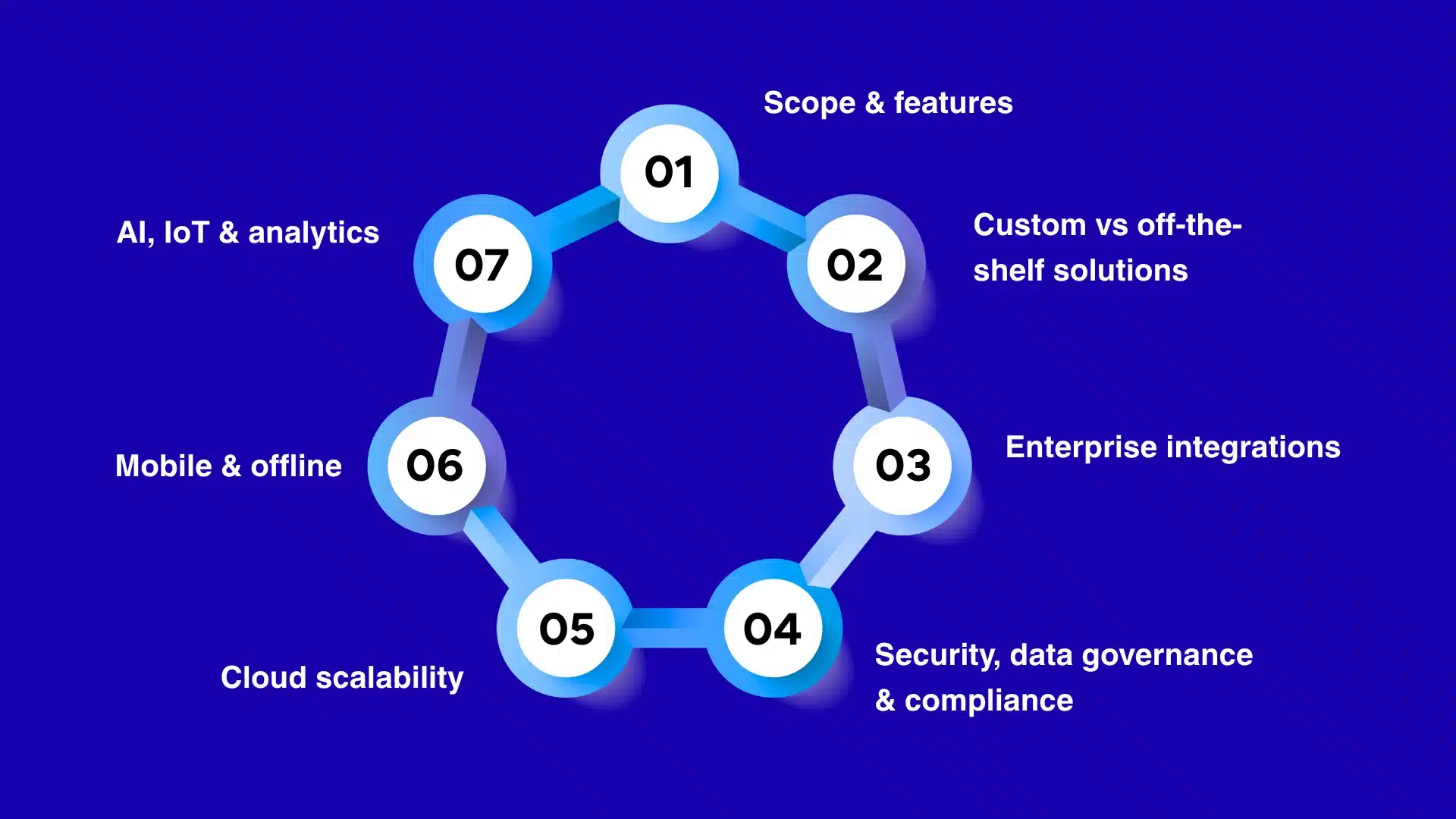
Scope & features
The cost of construction software changes substantially depending on whether you want to digitize just one workflow or build a system around the project’s end-to-end lifecycle. A field app that allows a superintendent to submit daily reports and upload progress photos will be relatively simple to develop and launch. The moment these records become part of project controls, budgets take a complete flip.
Consider a use case where a foreman records 600 labor hours and 1,200 square feet of drywall installed. Construction management software with advanced capabilities will help associate the numbers with relevant cost codes, budgeted labor hours, schedule activity, and crew so that you can compare planned versus actual productivity. When the project falls behind, it can feed that variance into the cost-to-complete forecast. Similarly, an approved change order may need to flow through the contract value, SOV, budget, commitment, billing, and forecast rather than simply appearing as a new line item.
Owing to the feature differences and the underlying engineering complexity involved, a construction platform development project budgeted initially at $75K-$100K can move into the $250K+ bracket.
| Development Level | Construction Management Capabilities | Estimated Cost |
| Field Operations | Daily logs, manpower, equipment, photos, inspections, and field issues | $40K–$70K |
| Project Administration | Field operations plus RFIs, submittals, drawings, punch lists, and document control | $70K–$120K |
| Project Management | Project administration plus scheduling, change orders, SOVs, and approvals | $120K–$200K |
| Project Controls | Project management plus job costing, commitments, forecasting, and financial reporting | $200K–$300K |
| Enterprise Platform | Multi-project controls, complex workflows, integrations, analytics, and organization-wide reporting | $300K–$500K+ |
Custom vs. off-the-shelf solutions
A standard off-the-shelf management tool will already help you with handling an RFI, maintaining drawing revisions, managing submittals, and recording daily reports. Although it will follow your business’s existing delivery model, challenges appear when your contractors have specific processes around preconstruction, subcontractor buyout, cost codes, change events, or pay applications. It is then a custom construction management tool that offers relevance by allowing you to build features around your business’s unique model.
This affects the development cost because even the slightest deviation from a standard tool behavior will require additional engineering effort and technical expertise. For example, consider a $100M commercial GC using an ERP for accounting but managing project changes through emails and spreadsheets. Building custom software that only digitizes daily reporting workflows will cost $60K-$80K. But if the requirement extends to connecting the estimate, buyout, change events, SOV, and actual job costs, the project would easily reach the bracket of $200K-$350K+. See our guide to how custom software development works if you’re still weighing the decision.
| Development Approach | When It Makes Sense in Construction | Estimated Cost |
| Off-the-Shelf | Standard workflows for RFIs, submittals, drawings, and field reporting are sufficient. | $20K–$50K |
| Configured Platform | Existing construction software meets most requirements but needs workflow and reporting configuration. | $40K–$80K |
| Customized Platform | Standard software needs custom modules, workflows, or construction-specific integrations. | $80K–$150K |
| Hybrid Solution | Standard project-management functions are combined with proprietary estimating, job-costing, or operational modules. | $100K–$200K |
| Fully Custom | Software must reproduce proprietary project-delivery, commercial, and operational processes. | $150K–$300K+ |
Enterprise integrations
As your construction company may have accumulated technology systems over several years, underestimating integration costs will lead to budget overruns. That’s why, while planning to develop construction management software, you need to consider the capital required to connect it with different applications your project team, estimating department, BIM team, financiers, and field teams use.
A simple API and third-party integration usually costs $10K-$20K. But when you look at a two-way ERP integration that has to synchronize financial transactions and handle errors, the cost will reach $30K-$75K+. Legacy systems with limited APIs may need a custom middleware solution, thereby pushing the integration costs further.
However, the real challenge comes in the form of visibility around job costing. Your estimate team might use one cost-code structure, the ERP another, and the project management platform a third. If the software fails to map these structures correctly, a $500K subcontractor commitment will appear correct in one system but fail to update the project’s financial variables somewhere else.
The same issue can occur with purchase orders, change orders, SOVs, pay applications, retainage, and actual job costs. That’s why you should budget for the integrations right from the beginning.
| Integration Level | Construction Systems Connected | Estimated Cost |
| Basic Integration | Identity, communication, notifications, or simple business applications | $8K–$15K |
| Operational Integration | Payroll, document management, procurement, or scheduling systems | $15K–$30K |
| Construction-System Integration | Estimating, project management, scheduling, or BIM platforms | $30K–$60K |
| Financial Integration | ERP, job costing, commitments, billing, and payment workflows | $50K–$100K |
| Enterprise Integration | ERP, estimating, BIM, procurement, payroll, and legacy construction systems | $100K–$200K+ |
Which system should own the data? Before integration work starts, decide explicitly which system is the source of truth for each data type. If your platform calculates project cost while the ERP remains the financial system of record, you need one-way or reconciled synchronization — not two systems independently “owning” the same number. Getting this decision wrong after launch means re-architecting the data model, not just adding a connector — see our notes on connecting new software to legacy systems for how this plays out in practice.
Security, data governance & compliance
All these three factors combined affect the overall construction management development costs. That’s because it needs to accommodate requirements surrounding project-specific contracts, state-level workforce, federal contracting rules, and sensitive employee and payment data. A private commercial GC will have a completely different compliance burden from a federal contractor handling Controlled Unclassified Information (CUI) under a contract subject to FAR/DFARS requirements.
Software handling payroll and employee information also needs stronger controls than a simple field reporting app. These differences move the development costs to $50K-$100K+, especially for products dealing with enterprise identity, audits, compliance controls, and regulated datasets. Consider a scenario where you may have to bid on US Federal construction work. It means that the project data will automatically fall within the regulations defined by the CUI standards. You cannot simply build a construction management tool that stores drawings, correspondence, subcontractor information, and project records in the same environment used for daily commercial jobs.
Instead, you will have to invest in an architecture with appropriate access restrictions, logging, encryption, identity controls, incident response processes, and controlled data environments. Supporting these features at the foundation level will add tens of thousands of dollars to the project’s budget. This pattern isn’t unique to construction; we’ve seen the same cost curve in other regulated builds, like the infrastructure and compliance costs behind mobile banking apps.
| Security & Governance Level | Construction Use Case | Estimated Cost |
| Basic Security | Internal field or project application with standard user access | $10K–$20K |
| Controlled Access | Department and project-level access with MFA and audit logging | $20K–$35K |
| Multi-Company Security | GC, owner, architect, and subcontractor access within shared projects | $35K–$50K |
| Commercial Data Governance | Contracts, pay applications, change orders, and financial records requiring detailed traceability | $50K–$75K |
| Regulated/Enterprise | Federal/CUI requirements, advanced identity controls, and extensive governance | $75K–$100K+ |
Cloud scalability
Depending on how the contractor’s project portfolio, field workforce, and construction data are expected to grow, hosting the tool on a cloud platform will add $20K-$75K+ to your budget. That’s because a single-GC platform with 20 active jobs needs less architecture than a system supporting 500 projects across multiple regions. Basic cloud-based construction tools run $20K–$50K; multi-tenant SaaS platforms built on solid cloud infrastructure and deployment designed for scale run $75K+. Drawing files and progress photos generate enough data volume that they typically need separate cloud storage and delivery pipelines rather than living in a standard database.
- Drawing revisions
- Progress photographs
- BIM files
- RFIs
- Submittals
- Inspection records
- Closeout documents
So, designing a simple cloud-based construction management tool that can handle a large data volume will cost you $20K-$50K. However, for a highly scalable multi-tenant SaaS platform, you may have to invest $75K+ in additional architecture and engineering. The costs become more apparent when portfolio-level construction controls are introduced.
For example, large drawing files and photographs often need a separate cloud storage and optimized delivery pipeline rather than being stored directly in a traditional repository. If you plan to introduce AI later for search specifications or project record analysis, you will have to invest in an advanced architecture that can support document indexing and processing.
| Architecture Level | Construction Workload | Estimated Cost |
| Small-Scale Cloud | Single contractor with a limited active-project portfolio | $10K–$20K |
| Growing Portfolio | Dozens of projects with increasing field users and documents | $20K–$35K |
| Multi-Project Platform | 75–200 projects with substantial drawings, photos, and project records | $30K–$50K |
| Enterprise Scale | Hundreds of projects requiring high availability and portfolio analytics | $50K–$75K |
| Construction SaaS | Multiple contractors, isolated tenants, and independently scaling workloads | $75K–$120K+ |
Mobile & offline
As construction teams hardly work in controlled office environments, building mobile and offline capabilities within the construction management tool will require an additional investment of $20K-$100K+. A mobile app meant to offer easy access to an online dashboard only will be relatively inexpensive. At the same time, software that allows the field teams to capture, edit, review, and synchronize project information without internet connectivity requires a much more sophisticated architecture, and hence becomes expensive.
That’s because building offline capabilities requires the app to maintain a localized copy of relevant datasets and determine what’s going to happen once the internet connection is reestablished. Consider a highway contractor whose crews work along a 30-mile infrastructure project. A foreman records quantities and inspection details throughout the day, usually outside reliable cellular coverage.
With an online-only app, the crew will have to retain the information on paper or in spreadsheets for the time being till they can enter those details into the app later. However, the offline capability will allow them to capture the details immediately and synchronize them with the core construction system once the network reconnects. That’s why the offline-first functionality alone can push the costs from $40K to $100K+. This is a materially harder engineering problem than a typical enterprise mobile app build.
| Mobile Capability | Construction Field Requirement | Estimated Cost |
| Basic Mobile | Daily reports, photographs, tasks, and field updates | $20K–$35K |
| Field Workflow Mobile | Inspections, punch lists, quantities, and field documentation | $30K–$50K |
| Offline Field App | Field records remain usable where cellular connectivity is unreliable. | $50K–$75K |
| Offline Drawing App | Drawings, markups, photographs, and inspections available offline | $75K–$100K |
| Offline-First Platform | Core field workflows continue offline with synchronization when connectivity returns. | $100K–$150K+ |
AI, IoT & analytics
AI development that reads plans, bid tabs, specifications, or daily reports requires data cleaning and normalization before a model can interpret it reliably — construction documents vary widely in format and terminology. Equipment telemetry adds another layer, typically handled through IoT development work that connects sensors to the platform. A basic cost/schedule dashboard costs $15K–$30K. A system ingesting estimates, subcontracts, change orders, and daily production to flag margin risk before it hits the monthly financial report costs $50K–$100K+.
Why AI needs structured data first: AI document intelligence and predictive risk models are only as good as the underlying project data. A platform without reliable cost codes, consistent RFI classification, and structured change-order records will produce AI outputs that are directionally interesting but not decision-grade. The practical sequencing is: build reliable data capture first, then layer AI on top — not the reverse. Our notes on sequencing enterprise AI implementation cover this same pattern outside construction.
The costs also depend on whether you use the management tool for descriptive reporting, predictive analysis, or automated decision support. Take a $100M commercial GC, for example. Let’s assume that it wants to identify margin risks before they can appear in the monthly financial report. A basic dashboard showing graphs and trends will need minimal capital of $20K-$30K only. However, an advanced system capable of ingesting the estimate, subcontract equipment, approved and pending change orders, or daily production records will cost more. Building these advanced capabilities will need $50K-$100K+.
| Capability Level | Construction Application | Estimated Cost |
| Construction Analytics | Project cost, schedule, productivity, and portfolio dashboards | $15K–$30K |
| Advanced Analytics | Variance analysis, productivity trends, and project forecasting | $30K–$50K |
| AI Document Intelligence | Specification, RFI, submittal, and contract-document analysis | $40K–$80K |
| Predictive Construction AI | Cost, schedule, productivity, or project-risk prediction | $70K–$120K |
| AI + IoT Platform | Equipment telemetry combined with project analytics and AI | $100K–$200K+ |
Not sure where your project lands on the $40K–$500K+ spectrum?
Talk to our team about your workflow priorities, integration complexity, and a realistic budget — before you write a single line of spec.
Hidden cost factors businesses should look for
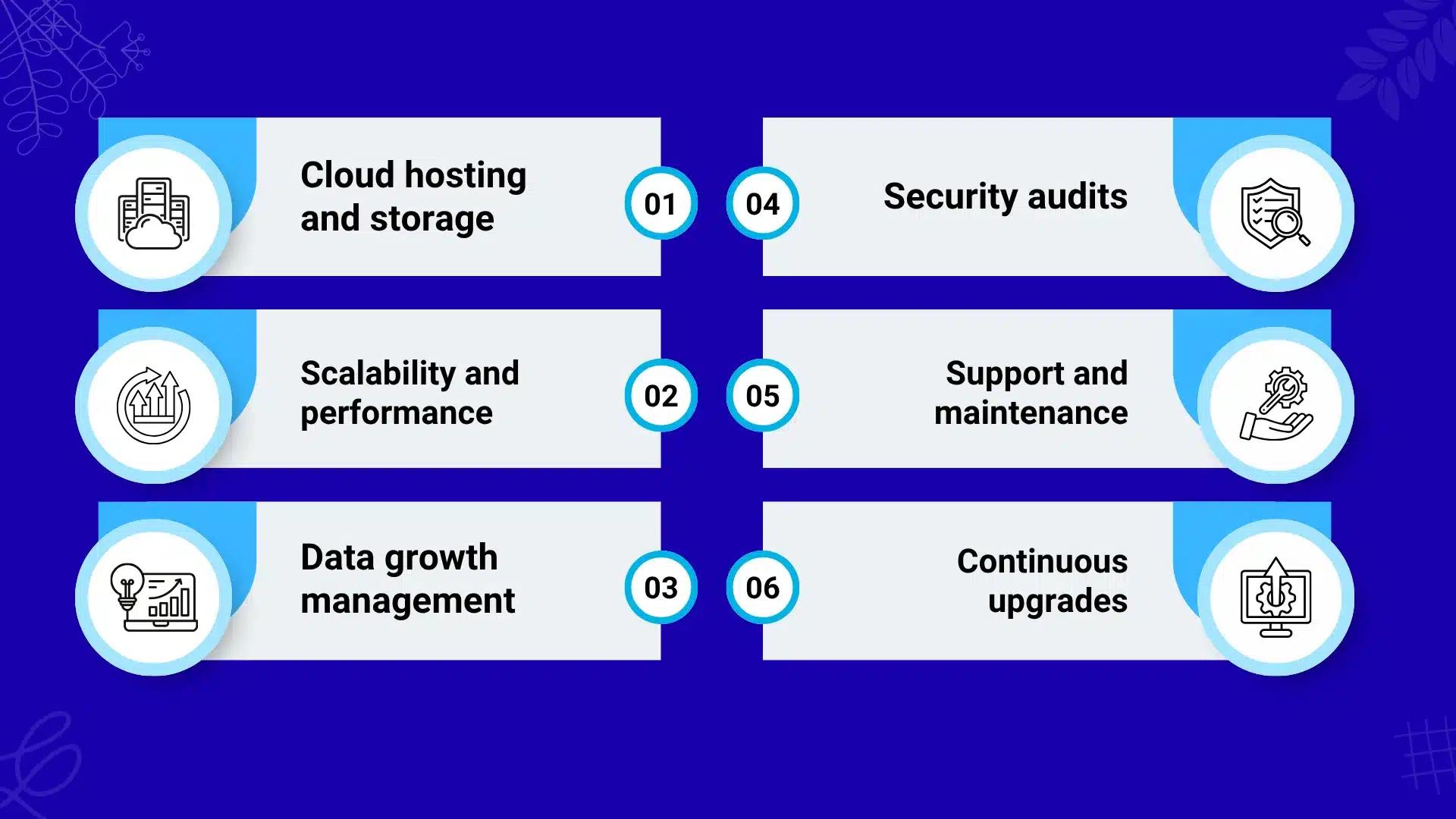
Cloud hosting and storage
A simple construction management platform will require $500-$3K per month on cloud infrastructure during the initial months. But when it comes to a document-heavy enterprise system, it can move to $5K per month due to growing project and file volumes. A single construction project in the US can generate years of drawing revisions, BIM files, inspection records, change orders, submittals, RFIs, and closeout documents.
So, the data storage requirements for managing 100 projects will be much more than someone handling 10 at a time. The more the storage and scalability needs, the more the recurring expenses for monthly cloud subscriptions and maintenance will be.
Scalability and performance
You should budget $15K-$40K+ annually for the engineering and infrastructure needed to keep a growing construction platform up and running. The hidden costs make their appearance when a system designed around individual projects is suddenly expected to answer portfolio-level questions. Suppose you initially invested in a simple dashboard for tracking one specific construction field job.
However, after a couple of months, your teams may need more advanced modules for comparing committed costs, actual costs, pending changes, forecast-at-completion, schedule status, and backlog across 200 projects. These workloads will automatically compete for database and computational resources. That’s why scaling data storage, caching frequently used information, moving heavy processing into background jobs, and separating document storage from transactional data will require significant investments.
Data growth management
Expect roughly $5K-$25K+ per year for managing long-term construction data once your platform accumulates several years of projects. This becomes important because completed projects do not simply disappear when the job gets closed. You will still need contracts, approved changes, as-builts, inspection records, payment documentation, warranties, and closeout information long after the final invoice.
Keeping every photograph, suspended drawing, duplicate upload, and obsolete workflow record in high-performance storage will become unnecessarily expensive. A smarter approach will be to move older project materials into archival storage while keeping commercially important records easily searchable.
Security audits
For construction management software, security assessments will cost $10K-$30K per engagement, while enterprise or federal requirements can push the expense to $50K+. The hidden cost is that security validation can become a part of winning and retaining work, rather than simply an internal IT exercise. If you work with large-scale property owners and enterprise clients, you may have to complete security questionnaires, penetration testing, vulnerability assessments, or evidence of remediation before handling their project information with your app.
In addition, you may also encounter NIST SP 800-171 assessment requirements while handling covered defense information. That’s why it’s important you budget for recurring analysis and remediation costs for highly sensitive projects rather than treating security as a one-time launch expense.
Support and maintenance
For a construction management platform, ongoing support and maintenance costs consume 15-25% of the original development budget every year. On a $250K platform, this amounts to $37.5K to $62.5K annually unless you add major changes to your tool. Every construction software has more moving parts than what was initially scoped in.
For example, an ERP can change its API midway, a cloud provider can change the service terms, or an authentication provider can alter its requirements. Incorporating all these changes into your app after launch may require reconfiguration, patching work, updates, and sometimes, new integrations. That’s why the annual budget should consider support and maintenance so that your app doesn’t become obsolete and stop assisting your field teams with routine tasks.
Continuous upgrades
Plan for roughly 10-20% of the original development investment every year for deploying planned upgrades. For $300K in construction management software, it would account for $30K-$60K annually. You may have initially built the software around ERP synchronization and document management only to realize later that your teams need AI-assisted estimating, specification search, predictive project risk analysis, equipment telemetry, BIM workflows, and portfolio forecasting.
This means that a platform architected for 2026 should also be designed to accommodate these advanced capabilities in the next two to three years. If that’s not the case, adding an AI bot or an analytics layer will require extensive restructuring of the underlying project-data model.
On a $250K platform, ongoing maintenance and support alone runs roughly $37.5K–$62.5K a year — budget for this from day one rather than treating it as a surprise renewal cost.
What are the key features of construction software?
Budgeting and cost control is usually the most expensive feature to get right, since it touches the same job-costing and invoicing logic behind custom billing software development — the construction-specific complexity is in the cost codes, not the billing math itself.
Project planning and scheduling
This helps connect the baseline schedule to actual field progress, procurement, labor availability, and project constraints without involving any manual interference. The objective here is not just to display a Gantt chart. Rather, it is to help your teams identify why an activity is slipping and what downstream work, subcontractor, or milestone can be affected. That’s why every construction scheduling module should have the following key capabilities:
- Baseline and critical path management feature to show whether current progress threatens contractual milestones
- Look-ahead planning to convert the master schedule into actionable two- or six-week field plans
- Constraint tracking to flag missing drawings, permits, materials, crews, or approvals before work gets scheduled
- Procurement-to-schedule linkage helps display when delayed long-lead materials are likely to affect installation activities
Budgeting and cost control
The financial core should connect the original estimate, budget, commitments, actual costs, change orders, and forecast-at-completion. This will help the management see margin erosion while there is still time to correct labor productivity, procurement, or change-order exposure.
For example, a cost-code management module will help you track spending against the project’s actual cost structure, while a cost-to-complete feature will recalculate expected final costs using current job performance. You should also build a change order forecasting module to know the financial impact of approved, pending, and potential changes in the project scope.
Resource and workforce management
Instead of functioning as a generic employee scheduler, this module must connect crews, people, equipment, work activities, and production quantities. Only then can you match available crews to scheduled work and the required skill set for a specific construction project. In addition, you can also compare actual hours against estimated time projections for several on-site activities or measure quantities installed at a site against labor consumed. In addition, workforce forecasting will help you identify upcoming labor shortages depending on the project’s pipeline and schedule.
Procurement and vendor management
Procurement must connect bids, awarded subcontractors, purchase orders, commitments, deliveries, and project cost. Given how material pricing has become volatile in 2026, procurement visibility is no longer just an administrative feature. Below are some of the key capabilities of this module that will help you make the best use of the construction management tool.
- Bid leveling can compare subcontractor proposals while accounting for exclusions, alternates, and scope differences
- Purchase order control connects material commitments directly to the project budgets
- The long-lead tracking feature helps you identify procurement items that could become schedule constraints
Document and drawing management
Document management functions as a controlled project information repository and not just cloud storage. Thus, your construction teams can easily know which drawing revision governs the work or how it’s related to submittals, RFIs, change orders, and field observations.
They can also connect technical decisions to affected drawings and specifications while creating traceable records of what information was issued and to whom. With an intelligent search engine, your teams can locate project information by specification, drawing number, RFI, subcontractor, or other types of metadata.
Site mobility and offline access
From daily reports to inspection details and photos, everything gets created at construction sites with limited to no cellular network. That’s why you must build offline accessibility into the mobile version of the construction management tool. This will allow the field teams to quickly update the details directly at the site. The app’s architecture can be designed in a way that it instantly synchronizes the data with the core connected systems once cellular connectivity is re-established.
Compliance, safety, and audit trails
For your US construction company, compliance functionality should create defensible project records and not just generate checklists. In other words, the platform should display what inspection took place, what deficiency was unraveled, who was responsible, when corrective action was completed, and whether the underlying record was subsequently changed. To ensure your product helps your compliance teams with end-to-end visibility, below are the key capabilities it should have.
- Safety inspection workflows
- Incident and near-miss reporting
- Credential tracking
- Approval history
- Immutable audit trails
| Main Feature | Expected Cost to Build | Major Cost Drivers |
| Project Planning & Scheduling | $25K–$60K | Gantt engine, critical-path logic, dependencies, progress tracking, schedule integrations such as Primavera P6 or MS Project |
| Budgeting & Cost Control | $30K–$75K | Job-cost architecture, cost codes, ERP integration, change-order workflows, forecasting, financial permissions |
| Resource & Workforce Management | $25K–$60K | Crew scheduling, time tracking, equipment allocation, production tracking, payroll integration |
| Procurement & Vendor Management | $25K–$65K | Bid leveling, subcontract workflows, purchase orders, vendor portals, compliance tracking, procurement integrations |
| Document & Drawing Management | $20K–$50K | Drawing version control, large-file storage, plan viewer, markups, search, document permissions |
| Site Mobility & Offline Access | $30K–$80K | Mobile development, local data storage, synchronization, conflict resolution, offline drawings, background uploads |
| Compliance, Safety & Audit Trails | $20K–$60K | Audit architecture, retention rules, approval workflows, certification tracking, security controls, regulatory requirements |
How to build construction software: Complete development process
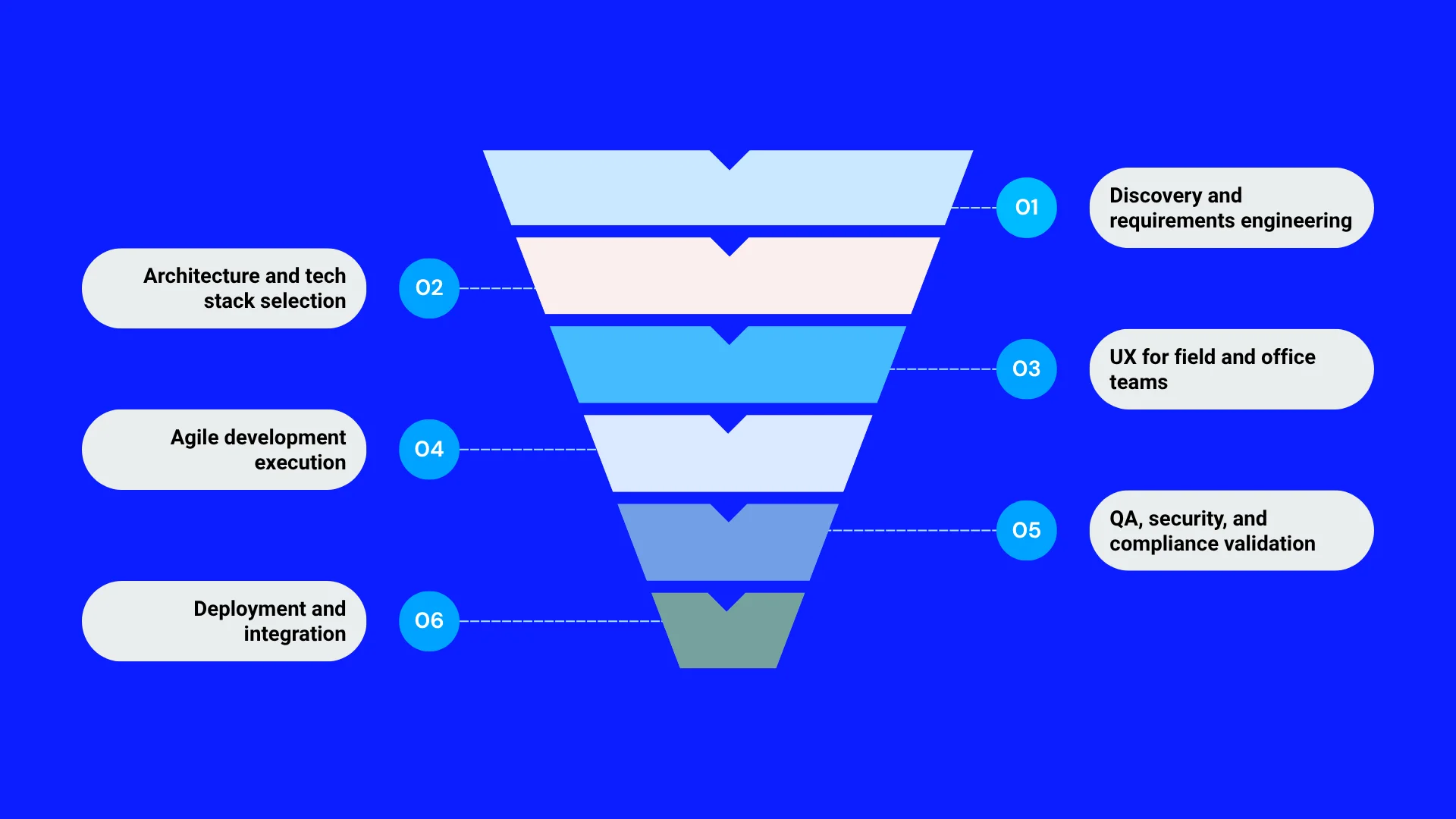
Step 1: Discovery and requirements engineering
Begin by determining what construction problem your product will own rather than producing a long feature list. Here, decide whether you are building primarily for a commercial GC, specialty contractor, homebuilder, or heavy-civil contractor because their workflows, margins, users, and technology environments vary significantly. Map one complete workflow end to end. Identify where information currently leaves the system and returns through spreadsheets, emails, or calls.
In addition, you should also identify the product’s system of record. If our software will own project costs, drawings, schedules, or field records, the decision will affect the database model, integrations, permissions, and migration strategy. Establish an MVP around one measurable business impact, like reducing the time required to produce a cost forecast or eliminating duplicate field reporting.
Step 2: Architecture and tech stack selection
Choose the architecture according to how construction data is likely to behave at scale. Your project management software will accumulate thousands of photographs, drawing revisions, submittals, RFIs, and other datasets. These information records shouldn’t be treated like ordinary transactional database records. That’s why identifying what object storage will be perfect for large documents is important. Adopt a separate approach for search and analytics to ensure your product doesn’t fail once data volume grows.
If you intend to sell to multiple contractors, decide early whether the product will remain multi-tenant. Project-level sharing, tenant isolation, and organization-specific configurations should be planned earlier to avoid future costly retrofits. In addition, you should also plan the architecture around:
- Offline mobile synchronization
- ERP integrations
- SSO
- Analytics
- AI document processing
Step 3: UX for field and office teams
Design the user interface around the fact that field users and office users experience the same project differently. A superintendent may be standing on a slab, using a phone with gloves on, trying to record manpower and photograph a concrete issue before moving to another location. On the other hand, a project accountant will be sitting at the desktop, reconciling commitments against the job-cost system. So, you cannot give the same interface to both users, as it will create unnecessary friction.
Step 4: Agile development execution
You should build the software around complete construction workflows rather than isolated features. If you are developing change management, for example, the first usable version should allow a user to create a change event, attach supporting evidence, route it up for review, capture the financial impact, and reflect the approved value in the relevant project records. A collection of disconnected screens for these activities will never generate the business value you are expecting.
This will also help you control scope. Release a narrow workflow to a small group of contractors, observe how they actually use it, and use the data to determine what advancements you can introduce next.
Step 5: QA, security, and compliance validation
Testing should be planned around real construction workflows so that you can know what happens when the approved value changes after a subcontractor amendment or when two users modify the same record. If your product deals with job costing or forecasting, financial accuracy will matter a lot. A small calculation error repeated across hundreds of projects will undermine user trust quickly. Security testing should similarly consider the collaborative nature of construction.
Step 6: Deployment and integration
Select one or a small group of projects with a clearly defined workflow, then prove that the software can work alongside the contractor’s existing system. As construction companies rarely work with one technology stack, your product will have to coexist with an ERP, accounting system, scheduling app, BIM platform, document repository, and payroll system.
Start with the workflow that’s costing you the most, not a feature wishlist.
Let’s map your highest-friction process — cost forecasting, change orders, field reporting — and scope an MVP that solves it first.
Key benefits of developing construction management software
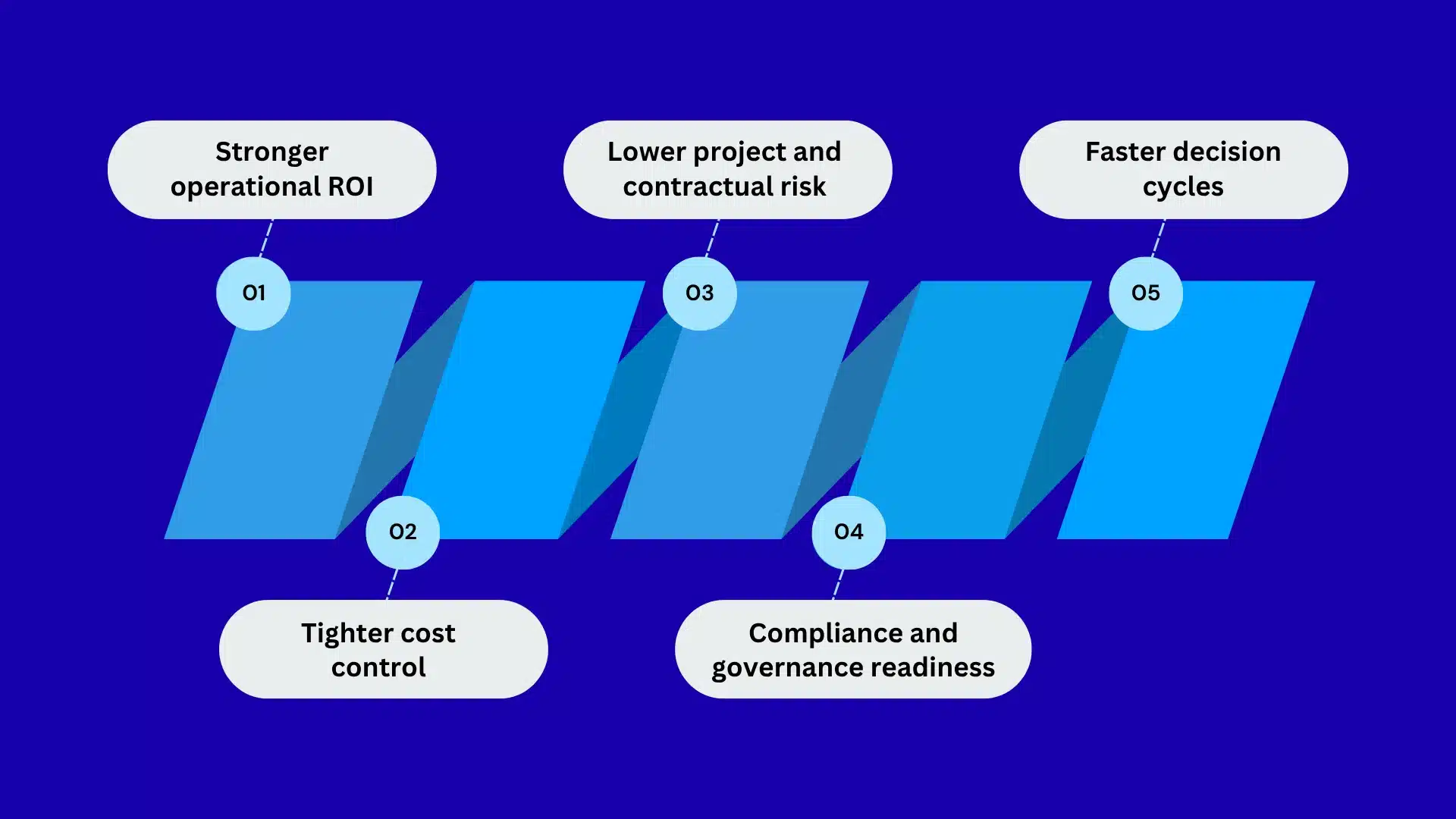
Stronger operational ROI
Construction management software can improve your business’s ROI by reducing the cost of managing each project, not simply digitizing workflows. When field data flows directly into project controls, you will have to spend less time reconciling spreadsheets and chasing updates. The bigger gain comes from acting early. A PM can spot low labor productivity, idle equipment, or procurement delays while there is still time to protect the revenue margin.
Lower project and contractual risk
The software will help reduce financial exposure when project records become evidence rather than scattered documentation. A delayed activity may involve a drawing revision, RFI response, subcontractor action, and change request. Linking these records creates a defensible timeline. Thus, you can strengthen your position during owner claims, subcontractor disputes, insurance reviews, or disagreements over responsibility for additional costs.
Faster decision cycles
Building the construction management software will minimize decision time by removing the information gaps between job sites, project management teams, and the finance department. Consider a pending change order, for instance. Instead of waiting for separate cost, schedule, and field updates, you can review them quickly within the same workflow. Faster decisions will help you release materials, approve changes, resolve RFIs, and address field issues before they become schedule or cost problems.
Tighter cost control
Construction software gives you tighter control over the margin drivers that determine whether a project is actually making money or not. By connecting the estimate, commitments, actual costs, pending changes, and cost-to-complete forecasts, it makes financial deterioration visible much faster. If a project is consuming labor hours faster than planned, you can then investigate the underlying cause immediately.
Compliance and governance readiness
Once you have the software developed, your contractors will have a consistent way to govern projects, financial approvals, subcontractors, safety records, and sensitive information. This becomes more important as you start taking on larger projects and more complex clients. Strong, immutable audit trails can demonstrate who approved a change or modified a record.
5 things businesses should look into while developing construction software
Start with a construction workflow, not a feature list.
Before you decide if the construction management software needs AI, BIM, dashboards, or mobile apps, identify one construction-specific workflow where money or time is consistently being lost. For example, if your target customers struggle with cost forecasting, map the process from original estimate to cost codes, subcontractor commitments, approved and pending change orders, actual costs, and the final forecast. This will tell you what data your product should capture and which integrations it will need.
Design around the systems contractors already use.
Your software is likely to operate in a connected ecosystem. That’s because any US contractor relies on an ERP for accounting, Procore or Autodesk Construction Cloud for project information, Primavera P6 for scheduling, and separate systems for payroll, estimating, or procurement. Your first architectural decision should therefore be determining which system owns each piece of information. If your platform calculates project costs while the ERP remains the financial system of record, you will need a reliable synchronization model. If that’s not the case, users will find different data across both systems.
Treat field conditions as a product requirement.
Do not design the product assuming that every construction user has a fast, stable internet connection and time to complete lengthy forms. A superintendent may need to document a concrete pour, upload photographs, record manpower, and flag a field issue while moving around a large commercial project site. Remote highway, utility, and infrastructure projects create even tougher connectivity conditions. That’s why your mobile architecture should be able to determine which information needs to remain available offline, how much data is stored locally, and how conflicts will be resolved when synchronization starts.
Build the commercial data model correctly from the beginning.
If your software touches project finances, the underlying data model will require significant attention. Construction never treats a dollar amount as an isolated transaction. It can relate to an estimate line, cost code, subcontract, commitment, SOV, change event, approved change order, invoice, or actual cost. That’s why your product should preserve these relationships. Otherwise, features like cost-to-complete forecasting and margin analysis will become difficult to build later.
Plan for multi-company collaboration and future scale.
If your product is intended for the US construction market, it’s likely that multiple organizations will eventually interact with the same project. A GC may invite an electrical subcontractor, structural engineer, owner representative, and supplier into one platform. Hence, they should never receive identical access. Rather, a subcontractor should be able to see its own contract, RFIs, submittals, and payment status while remaining completely isolated from another trade’s pricing or the GC’s internal margin data.
How does construction management software make money?
Construction management software can help you make money in different ways, like recurring SaaS subscriptions, per-user or per-project pricing, premium modules, implementation fees, and enterprise contracts. The right model will, however, depend on who pays for the platform and how the software is going to be used across the construction project.
The monetization techniques below can generate high revenue turnover, but only if chosen carefully.
- Per-user SaaS pricing works well when the product is primarily defined for an internal team. A contractor can pay based on the number of PMs, estimators, accountants, and field teams. The challenge is that construction companies often have large numbers of occasional users, subcontractors, and temporary participants. Thus, charging equally for every user may discourage adoption.
- Per-project pricing becomes more attractive for contractors that operate project-by-project. The company will then pay you according to the active project volume rather than headcount. This aligns the software expenses with revenue-generating work and will help you make pricing justifiable for smaller GCs and specialty contractors.
- Tiered subscriptions offer a scalable monetization model. A basic plan can cover field reporting and document management, while higher tiers add job costing, procurement, advanced reporting, API access, or AI capabilities. This allows your software to grow with the contractor instead of requiring every customer to purchase the full platform immediately.
- Implementation and integration fees will help generate significant upfront revenue. Sometimes, construction clients can ask for ERP integration, historical data migration, SSO, custom workflows, permissions, or onboarding. These services must be charged separately from the recurring subscription fee, as they create substantial one-time engineering work.
- Enterprise contracts become the strongest revenue channel once the product has established a strong market use case. Large contractors can then negotiate annual contracts covering multiple projects, business units, and thousands of users.
| Monetization Model | Benefit | When to Choose | Expected ROI |
| Per-user subscription | Generates predictable recurring revenue as more project managers, estimators, accountants, and field users adopt the platform. | Choose when usage is concentrated among identifiable employees and the software delivers recurring value to those users. | 150%–300% over 3 years |
| Per-project pricing | Ties software expenditure directly to the contractor’s active project portfolio, making the pricing easier to justify against project revenue. | Strong fit for GCs and specialty contractors whose project volume changes significantly from year to year. | 200%–400% over 3 years |
| Tiered SaaS plans | Creates expansion revenue as customers move from basic field workflows to cost control, analytics, integrations, and enterprise capabilities. | Best when serving contractors of different sizes and operational maturity. | 250%–500% over 3 years |
| Implementation & integration fees | Recovers the engineering effort involved in ERP integration, data migration, SSO, workflow configuration, and deployment. | Use for customers requiring substantial onboarding or integration work, particularly mid-market and enterprise accounts. | 30%–70% project-level margin |
| Premium modules | Increases revenue from higher-value capabilities such as forecasting, AI document analysis, procurement intelligence, and advanced analytics. | Introduce after customers are using the core platform and have demonstrated demand for advanced capabilities. | 300%–700% over 3 years |
The construction software market is projected to more than double by 2030.
If you’re still deciding between custom-built and off-the-shelf, let’s figure out which one actually protects your margins.
How will GMTA help you build secure construction software?
Construction software has quite a difficult job. It has to keep project costs, drawings, subcontractor data, field reports, schedules, and approvals connected while dozens of users access the system from different locations and devices. A security gap or unreliable integration can quickly become an operational problem, especially if the software becomes part of a contractor’s daily project workflow.
At GMTA Software Solutions, we architect role- and project-level access so subcontractors see only what’s relevant to their work, build secure APIs and third-party integrations for ERP, accounting, and scheduling systems with full audit trails, and engineer offline-first field workflows so daily reports and inspections don’t depend on jobsite connectivity. Our team also handles custom software development for teams whose workflows don’t fit an off-the-shelf tool.
Thinking through your own build? Talk to our team about your project scope — we’ll walk through workflow priorities, integration complexity, and a realistic budget range before you commit to a build.
FAQs
How much does it cost to develop construction management software in 2026?
The cost to build construction management software in 2026 ranges between $40K and $500K+. A focused field application with one workflow mapped end-to-end will require lower investments. On the other hand, an enterprise platform with job costing, scheduling, ERP integrations, offline mobile access, analytics, and AI will require more than $250K as upfront capital.
Is it better to build custom construction software or buy an existing platform?
Custom construction software makes more sense when your workflows, commercial model, or competitive advantage cannot be supported with an existing platform. Buying is more practical when standard functions like RFIs, submittals, document management, and scheduling meet your day-to-day business needs. A hybrid approach can work when you need customized capabilities alongside established construction systems and integrations.
How can construction companies measure the ROI of construction management software?
You can measure the ROI of construction management software against quantifiable operational improvements. Compare implementation costs with reductions in administrative hours, rework, equipment idle time, project delays, and cost overruns. Also, track faster change-order approvals, improved labor productivity, and forecast accuracy. Measuring these metrics before and after implementation will help you with a stronger financial use case.
How can AI improve construction management software?
AI can make the construction management software more valuable by turning large volumes of project information into actionable insights. It can extract information from drawings, specifications, RFIs, and contracts. In addition, the model can also help identify potential schedule or cost risks, summarize project activity, and improve forecasting accuracy.